DW Witness
DW Witness is made and published by Digital Watchdog. AppBrain is an independent app data site and isn't affiliated with Digital Watchdog. The app name, icon, screenshots and description belong to Digital Watchdog and are shown as published on the App Store.
AppBrain's verdict
Established- Rating on App Store
- 5.00
- 9 ratings
- Last updated
- June 7, 2023
It doesn't have enough ratings yet to judge what users think.
Rankings
App Store top chartsApp Store Rankings for DW Witness
Competitors
Similar apps and more from Digital WatchdogAlternatives to DW Witness
More from Digital Watchdog
Releases
Updates seen on the App Store- Version
- 1.10
- Launched
- September 2016
No changelog data
User feedback
Ratings and reviews on the App StoreComments on DW Witness for iOS
We don't have enough comments to show example comments. Please check back later.
Technology
Found in the app by AppBrain- Price
- Free
- App size
- 1.85 MB
- Content rating
- Everyone
Technologies used by DW Witness
About the app and developer
About DW Witness
DW Witness is a business app developed by Digital Watchdog.
User Ratings
DW Witness is rated 5.00 out of 5 stars. The rating is based on 9 ratings.
App Information
DW Witness is freely available from the App Store. The app size is 1.85 MB. The latest version available is 1.10. The last update was on June 7, 2023.
Technical Requirements
The app has a content rating of Everyone. The app has been available on the App Store since September 2016.
Developer information for Digital Watchdog
Address:
Frequently asked questions about DW Witness
Is DW Witness free?
Yes. DW Witness is free on the App Store.
Is DW Witness still available?
Yes. DW Witness is on the App Store, and the last update we saw was on June 7, 2023.
How large is DW Witness?
DW Witness is 1.85 MB.
Is DW Witness suitable for children?
App Store rates the content of DW Witness as suitable for everyone.
How do people rate DW Witness?
DW Witness scores 5.00 out of 5 stars, from 9 ratings on the App Store.
Who made DW Witness?
DW Witness was developed by Digital Watchdog. It is listed in the business category on the App Store.
What are the best alternatives to DW Witness?
People looking at DW Witness also look at these business apps: DMP Touchscreen for iPhone, SDCSecurity, AlarmNet 360, Neptune Mobile, USALink.
Store listing
By Digital Watchdog, from the App StoreDescription by Digital Watchdog Written by the developer, not by AppBrain. Click to read.
By Digital Watchdog®
Description
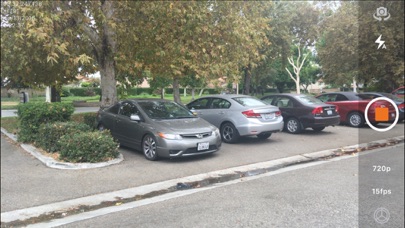
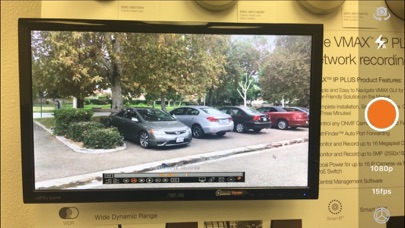
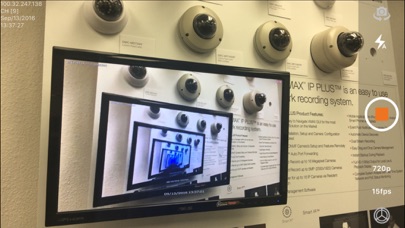
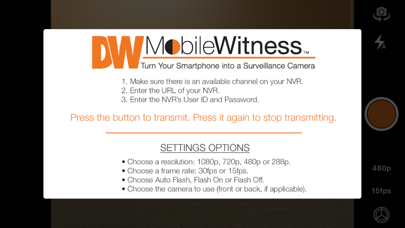
The DW Mobile Witness™ app turns the camera on a supported smartphone or tablet into a surveillance camera that can be viewed and recorded with a DW Spectrum IPVMS* or VMAX IP Plus™ PoE NVR (Network Video Recorder).
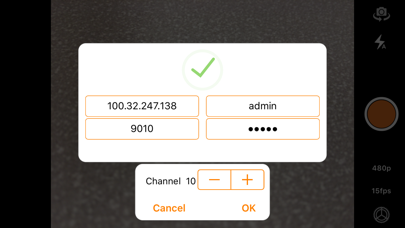
Simply download the app and type in your DW Spectrum’s IP address or NVR’s IP Address/URL, port, user name and password.
Now, when you press the button in the app to activate your camera and start transmitting to DW Spectrum IPVMS or VMAX IP Plus NVR.
APP FEATURES with DW Spectrum:
• You Control the Connection.
• Record setting must be set on the DW Spectrum (requires 1 Professional License)
• Supports Front and Rear Cameras.
• Video Resolution: 720p
• Frame Rate: 15fps
• Flash Control: On or Off.
NVR SUPPORTED
• Blackjack Bolt-LX, Blackjack Cube/Cube-LX/Cube-DL, Blackjack P-Rack/P-Rack-LX, Blackjack E-Rack/E-Rack-LX.
APP FEATURES with VMAX IP Plus:
• You Control the Connection and Recording* from the App.
• Supports Front and Rear Cameras.
• Video Resolution: 1080p, 720p, 480p or 288p.
• Frame Rate: 15fps or 5fps.
• Flash Control: On or Off.
• Transmits the iPhone/iPad's current location(Requires 1.1.9.2 firmware or higher).
• Audio Recording
NVR SUPPORTED
• Digital Watchdog® VMAX IP Plus™ PoE NVRs (Requires 1.1.7.5 firmware or higher).
iPhone and iPad SUPPORTED:
• iPhone and iPad with iOS 13.0 or Higher.
• Wi-Fi Connection or 3G/4G Data Service Required.
REQUIREMENT
• At Least One Available Channel in NVR. (VMAX IP Plus)
• One available recording license. (DW Spectrum)
• Stable Network Connectivity.
TECHNICAL HELP AND ASSISTANCE:
We are constantly working to improve any issues and update the app. If you experience any problems after installation or update, please contact our Technical Support Department at dw-tech@dwcc.tv. A quick email to our support team helps our developers to identify and resolve issues faster.
*There must be an available channel on your VMAX IP Plus™ PoE NVR. Enter into the app the URL of your NVR, the NVR’s User ID and Password. If the phone or tablet is connected to the Internet, your camera now appears on your NVR and is being recorded.