

ePRINTit Mobile
ePRINTit Mobile is made and published by ePRINTit.com Corp. AppBrain is an independent app data site and isn't affiliated with ePRINTit.com Corp. The app name, icon, screenshots and description belong to ePRINTit.com Corp and are shown as published on the App Store.
AppBrain's verdict
Established- Rating on App Store
- 2.00
- 8 ratings
- Last updated
- January 28, 2022
It doesn't have enough ratings yet to judge what users think.
Rankings
App Store top chartsApp Store Rankings for ePRINTit Mobile
Competitors
Similar apps and more from ePRINTit.com CorpAlternatives to ePRINTit Mobile








More from ePRINTit.com Corp

Releases
Updates seen on the App Store- Version
- 1.1.15
- Launched
- August 2018
No changelog data
User feedback
Ratings and reviews on the App StoreComments on ePRINTit Mobile for iOS
We don't have enough comments to show example comments. Please check back later.
Technology
Found in the app by AppBrain- Price
- Free
- App size
- 79.0 MB
- Content rating
- Everyone
Technologies used by ePRINTit Mobile
About the app and developer
About ePRINTit Mobile
ePRINTit Mobile is a productivity app developed by ePRINTit.com Corp.
What is the rating of ePRINTit Mobile?
ePRINTit Mobile is rated 2.00 out of 5 stars, based on 8 ratings.
Is ePRINTit Mobile free?
ePRINTit Mobile is free. The app size is 79.01 MB. The latest version available is 1.1.15. The last update was on January 28, 2022.
What are the requirements for ePRINTit Mobile?
The app has a content rating of Everyone. The app has been available on the App Store since August 2018.
Developer information for ePRINTit.com Corp
Address:
Frequently asked questions about ePRINTit Mobile
Is ePRINTit Mobile free?
Yes. ePRINTit Mobile is free on the App Store.
Is ePRINTit Mobile still available?
Yes. ePRINTit Mobile is on the App Store, and the last update we saw was on January 28, 2022.
How large is ePRINTit Mobile?
ePRINTit Mobile is 79.01 MB.
Is ePRINTit Mobile suitable for children?
App Store rates the content of ePRINTit Mobile as suitable for everyone.
How do people rate ePRINTit Mobile?
ePRINTit Mobile scores 2.00 out of 5 stars, from 8 ratings on the App Store.
Who made ePRINTit Mobile?
ePRINTit Mobile was developed by ePRINTit.com Corp. It is listed in the productivity category on the App Store.
What are the best alternatives to ePRINTit Mobile?
People looking at ePRINTit Mobile also look at these productivity apps: ePRINTit SaaS, MPrint Mobile, Pharos Print, ButterflyMX, Quick Print - Print & Scan PDF.
Store listing
By ePRINTit.com Corp, from the App Store



Description by ePRINTit.com Corp Written by the developer, not by AppBrain. Click to read.
ePRINTit™ Mobile is your one-stop mobile app for printing all your favorite content, via ePRINTit™’s secure cloud-based solution. Designed for users from across all industries, ranging from your common public user to students and staff at educational institutions, along with employees of corporate organizations, ePRINTit™ Mobile provides all mobile users the ability to securely and conveniently access and print all their documents.
Users can access their entire portfolio of content for printing, located in any of the major cloud storage accounts, such as Google Drive, Dropbox, Box, OneDrive and Office365! ePRINTit™ Mobile also allows in-app website browsing and printing content directly from the webpage, along with direct printing from integrated email addresses. ePRINTit™ Mobile is the only app that provides users with the all-in-one experience of being able to retrieve any of their content for printing, via any of the above options, from a single, streamlined platform!
ePRINTit™ Mobile users then choose their desired document pickup location, and subsequently proceed to the selected ePRINTit™ public print or partner location, with the print costs being automatically deducted from the user account. With tens of thousands of print locations situated across the globe, users are always presented with ultra-convenient print locations and can print from anywhere, to anywhere, via the ePRINTit™ secure cloud.
How it works:
1. Open the ePRINTit™ Mobile app and sign in using your credentials, or register if first time user. If signing in, enter your organization/campus credentials, For first time users, register by entering your organization, email, name, and creating your unique, secure username and password.
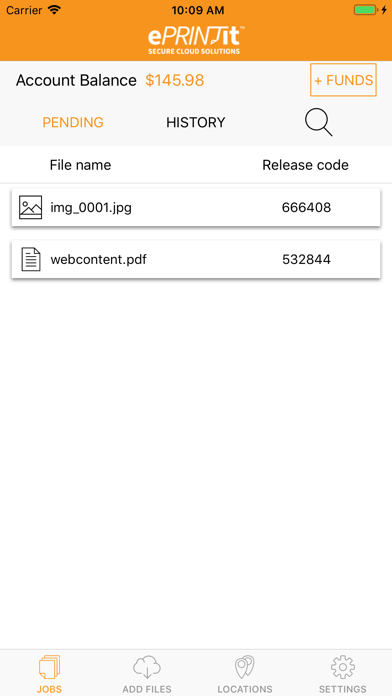
2. Once logged in, users will be able to see all pending print jobs that are awaiting to be released along with their unique release codes. Additionally, users will also be able to see all previously printed documents and their details under the history tab.
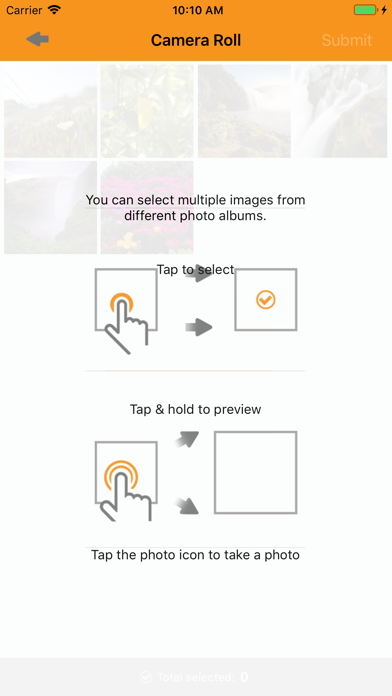
3. Next, users can add files for printing through the Add Content page. Using this interface, users can access, select, and submit content for printing directly from their email, specific webpages, device memory, and online storage accounts, all from a single platform.
4. The locations page will then show the available ePRINTit™ partner print locations kiosks nearby, enabling convenient, fast printing.
5. Go to your desired print location, login, preview your document and settings (copies, color, etc.) and print! Funds are automatically deducted from user accounts, though the option of paying at the ePRINTit™ partner print location is also available.
6. The settings page provides users with their user profile information, allows users to add and manage credit cards, add funds, view transaction history, and manage the addition and removal of their desired cloud storage accounts.
Download ePRINTit™ Mobile today and experience convenient, seamless, fast and secure printing like never before!