

eSign: Sign PDF Documents
eSign: Sign PDF Documents is made and published by Conteza LLC. AppBrain is an independent app data site and isn't affiliated with Conteza LLC. The app name, icon, screenshots and description belong to Conteza LLC and are shown as published on the App Store.
AppBrain's verdict
- Last updated
- October 12, 2026
- Size
- 29.2 MB
User feedback
Ratings and reviews on the App StoreComments on eSign: Sign PDF Documents for iOS
We don't have enough comments to show example comments. Please check back later.
Store listing
By Conteza LLC, from the App Store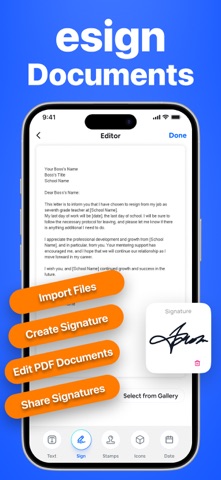



Description by Conteza LLC Written by the developer, not by AppBrain. Click to read.
Looking for a fast and reliable way to sign documents online? Our eSign App helps you create signatures, scan signatures, edit templates, scan documents, and manage files all in one place. Whether you need to sign contracts, agreements, forms, PDFs, or business documents, this app provides a simple and professional digital signing solution.
With advanced tools like an AI Signature Generator, Signature Scanner, Document Scanner, Editable Templates, and Smart File Manager, you can complete paperwork anytime and anywhere directly from your iPhone.
1. Create a Digital Signature
Use the built-in Signature Maker to create a unique digital signature in seconds. Draw your signature on screen and save it for future use.
You can easily add your signature to:
• Contracts
• Agreements
• Forms
• PDFs
• Business documents
Our Signature Creator makes digital signing simple, secure, and convenient.
2. AI Signature Generator
Create stylish and professional signatures with AI-powered signature generation.
Generate elegant signature styles for:
• Personal use
• Professional documents
• Online forms
• Digital contracts
3. Signature Scanner & Document Scanner
Turn your iPhone into a powerful Signature Scanner and Document Scanner.
Scan your handwritten signature and instantly save it for future use. Easily place scanned signatures on contracts, forms, agreements, and PDFs without printing.
You can also scan:
• Contracts
• Receipts
• Forms
• Business documents
• Paper records
Features include:
• Scan signatures instantly
• Extract signatures from paper
• Add scanned signatures to documents
• Convert paper documents into digital files
• Save and share files
4. Editable Document Templates
Save time with ready-to-use professional templates.
Choose from a variety of editable templates, including:
• Contracts
• Business Proposals
• Agreements
• Professional Documents
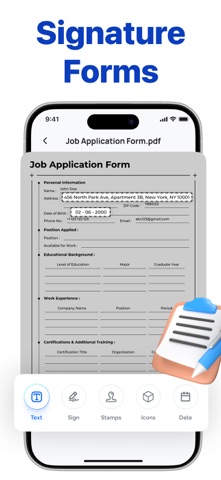
Simply open a template, customize the content, add your signature, and export or share your completed document.
5. Photo Editor for Documents
Improve scanned documents before signing.
Editing tools include:
• Crop images
• Adjust brightness and contrast
• Enhance document clarity
• Prepare files for signing
Make every document look clean, professional, and ready for official use.
6. Smart File Manager
Store, organize, and manage all your documents in one place.
You can:
• Manage signed documents
• Access files quickly
• Organize contracts and agreements
• Share documents instantly
Why Choose Our eSign App?
Our app combines everything you need to manage digital documents efficiently:
• Digital Signature Creator
• AI Signature Generator
• Signature Scanner
• Document Scanner
• Editable Templates
• Business Proposal Templates
• Contract Templates
• Built-in Photo Editor
Perfect For
• Business Professionals
• Freelancers
• Remote Workers
• Students & Teachers
• Office Work
• Contracts & Agreements
• Business Proposals
• Forms
If you frequently sign PDFs, scan signatures, edit contracts, or manage digital documents, our eSignature App is the perfect solution.
Privacy Policy:
https://conteza.com/privacy-policy.html
Terms of Use:
https://conteza.com/terms-and-conditions.html
Safety and technology
Found in the app by AppBrain- Price
- Free
- App size
- 29.2 MB
- Content rating
- Everyone
Technologies used by eSign: Sign PDF Documents
Releases
Updates seen on the App Store- Version
- 2.7
- Launched
- June 2025
No changelog data
Alternatives
Similar apps and more from Conteza LLCAlternatives to eSign: Sign PDF Documents


More from Conteza LLC


Rankings
App Store top chartsApp Store Rankings for eSign: Sign PDF Documents
About the app and developer
About eSign: Sign PDF Documents
eSign: Sign PDF Documents is a business app developed by Conteza LLC.
User Ratings
The app has no ratings yet.
App Information
eSign: Sign PDF Documents is freely available from the App Store. The app size is 29.19 MB. The latest version available is 2.7. The last update was on October 12, 2026.
Technical Requirements
The app has a content rating of Everyone. The app has been available on the App Store since June 2025.
Developer information for Conteza LLC
Address:
Frequently asked questions about eSign: Sign PDF Documents
Is eSign: Sign PDF Documents free?
Yes. eSign: Sign PDF Documents is free on the App Store.
Is eSign: Sign PDF Documents still available?
Yes. eSign: Sign PDF Documents is on the App Store, and the last update we saw was on October 12, 2026.
How large is eSign: Sign PDF Documents?
eSign: Sign PDF Documents is 29.19 MB.
Is eSign: Sign PDF Documents suitable for children?
App Store rates the content of eSign: Sign PDF Documents as suitable for everyone.
Who made eSign: Sign PDF Documents?
eSign: Sign PDF Documents was developed by Conteza LLC. It is listed in the business category on the App Store.
What are the best alternatives to eSign: Sign PDF Documents?
People looking at eSign: Sign PDF Documents also look at these business apps: Sign & Fill PDF Documents, Signature Maker: eSign PDF, AI Signature Maker: eSign Docs, O&G E-Stamp and Signature, Easy Sign: Digital Signature.