




AppBrain's verdict
- Last updated
- October 9, 2026
- Size
- 115.4 MB
User feedback
Ratings and reviews on the App StoreComments on EveryJot for iOS
We don't have enough comments to show example comments. Please check back later.
Store listing
By Roberto Bonfa, from the App StoreDescription by Roberto Bonfa Written by the developer, not by AppBrain. Click to read.
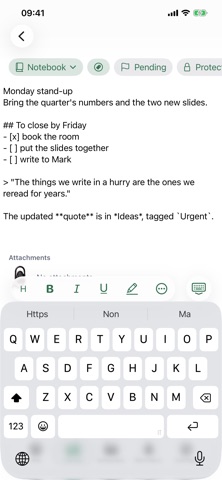
It opens ready to write, with the keyboard already open and the cursor in place. No forms to fill in, no title to invent: the first line becomes the title by itself.
MARKDOWN, WITH A BAR YOU CHOOSE
Headings, bold, italic, underline, highlight, strikethrough, quotes, lists, checklists, code blocks, links and alignment.
Five formats sit above the keyboard: you pick which five out of thirteen and you reorder them by dragging. The rest stay one tap away in the panel, so none of them is lost.
NOTEBOOKS AND TAGS, TO FIND THINGS AGAIN
Every note can belong to a notebook and carry as many tags as you like. Your library shows them all, sorts them the way you prefer, filters them by notebook and by tag and searches inside the text.
Notes with an unfinished checklist appear in "To finish" by themselves and leave it when you tick the last box. The trash keeps what you delete for thirty days.
PROTECTED NOTES, GENUINELY ENCRYPTED
A protected note is not a note hidden behind a screen: its content is encrypted with AES-GCM and the key is derived from a PIN you choose. Anyone opening the database or the iCloud container would find ciphertext, not your words.
They open with Face ID, Touch ID or your PIN, whichever you prefer. The key syncs with your account, so a protected note can be read on your second iPhone too.
RECORD A MEETING INSIDE THE NOTE
The microphone is right next to the text you are writing: tap it and recording begins, even with the screen locked. Up to one hour and forty-nine minutes per recording.
The clip is attached to the note, next to the notes you typed during the recording. When you need it, one tap shares or exports it, so you can listen elsewhere or have it transcribed.
ATTACHMENTS
Images, PDFs, documents, any file up to 25 MB: attach it to the note and open it again with the iOS preview, without leaving the app.
Attachments follow the note to iCloud and if the note is protected they are encrypted like the text. Recordings included: there is no separate path for audio.
REMINDERS, SHARING, EXPORT
Link a note to a system reminder and find it in Apple's Reminders app, with its notification and with the text of the note already inside. Change the note and the reminder realigns by itself.
Share a note as a PDF or as a Markdown file, or export it as an image or a Word document. From your library you can export several notes at once.
A .md file arriving from Mail or Files opens with EveryJot and becomes a note straight away.
SHORTCUTS
Touch and hold the icon on your Home Screen to write a new note, start a recording or search your notes, without going through the app. A new note also opens from Control Centre, from the Action button, with a double tap on the back of your iPhone, or by asking Siri.
There is an iMessage extension too: pick a note and send it without leaving the conversation.
FORTY-FIVE COMBINATIONS
Fifteen colour palettes and three visual styles that combine with each other: the classic card, translucent glass, two-colour print. The icon on your Home Screen follows the palette you pick.
YOUR DATA IS YOURS
No account to create, no sign-up, no ads, no tracking. Your notes stay on your iPhone and sync with your own iCloud: whoever wrote the app cannot see them and has no way to.
If you want, you can lock the whole app with Face ID, Touch ID or your phone passcode.
ALSO
- Italian and English
- Works offline and syncs when the connection returns
- Large tap targets and text that holds up at large sizes
Free, no in-app purchases.
Safety and technology
Found in the app by AppBrain- Price
- Free
- App size
- 115.4 MB
- Content rating
- Everyone
Technologies used by EveryJot
Releases
Updates seen on the App Store- Version
- 3.1.3
- Launched
- August 2026
No changelog data
Alternatives
Similar apps and more from Roberto BonfaAlternatives to EveryJot


Rankings
App Store top chartsApp Store Rankings for EveryJot
About the app and developer
About EveryJot
EveryJot is a productivity app developed by Roberto Bonfa.
What is the rating of EveryJot?
EveryJot has no ratings yet.
Is EveryJot free?
EveryJot is free. The app size is 115.44 MB. The latest version available is 3.1.3. The last update was on October 9, 2026.
What are the requirements for EveryJot?
The app has a content rating of Everyone. The app has been available on the App Store since August 2026.
EveryJot is made and published by Roberto Bonfa. AppBrain is an independent app data site and isn't affiliated with Roberto Bonfa. The app name, icon, screenshots and description belong to Roberto Bonfa and are shown as published on the App Store.
Developer information for Roberto Bonfa
Address:
Frequently asked questions about EveryJot
Is EveryJot free?
Yes. EveryJot is free on the App Store.
Is EveryJot still available?
Yes. EveryJot is on the App Store, and the last update we saw was on October 9, 2026.
How large is EveryJot?
EveryJot is 115.44 MB.
Is EveryJot suitable for children?
App Store rates the content of EveryJot as suitable for everyone.
Who made EveryJot?
EveryJot was developed by Roberto Bonfa. It is listed in the productivity category on the App Store.
What are the best alternatives to EveryJot?
People looking at EveryJot also look at these productivity apps: Muki: Walk to Scroll, N0te 7, PureKanban, NoteStream — Capture Your Mind, PromptSense - Smart AI Library.