

Faceless Video Maker: YumCut
Faceless Video Maker: YumCut is made and published by Ihar Shaduryn. AppBrain is an independent app data site and isn't affiliated with Ihar Shaduryn. The app name, icon, screenshots and description belong to Ihar Shaduryn and are shown as published on the App Store.
AppBrain's verdict
- Rating on App Store
- 1.00
- 1 ratings
- Last updated
- August 6, 2026
- Size
- 12.4 MB
It doesn't have enough ratings yet to judge what users think.
User feedback
Ratings and reviews on the App StoreComments on Faceless Video Maker: YumCut for iOS
We don't have enough comments to show example comments. Please check back later.
Store listing
By Ihar Shaduryn, from the App Store



Description by Ihar Shaduryn Written by the developer, not by AppBrain. Click to read.
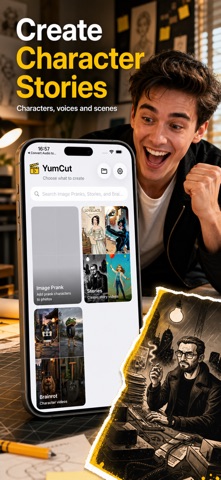
CHOOSE A CREATION MODE
Brainrot is built for character-led short videos. Stories turns an idea or script into a classic narrative clip. Image Prank adds a chosen character to one or more photos for a surprising edited result. Each mode keeps the steps focused on the content you are making.
MAKE CHARACTER VIDEOS
Choose a character from the catalog or upload your own PNG or JPG character. Start with a short idea when you want help shaping the concept, or provide the exact script when every word matters. Pick a voice, adjust tone or emotion, and review the selected settings before generation begins.
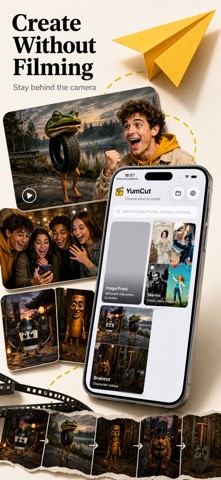
CREATE FACELESS STORY CLIPS
Build a story without recording yourself or working on a timeline. Choose a template, enter the idea or script, select the voice and language, then set a duration target. YumCut keeps the selected inputs together so it is easier to create another project with a consistent format.
TURN PHOTOS INTO IMAGE PRANKS
Choose photos from your library or use the camera, select a catalog character or custom reference, and write the scene you want to create. The composer supports one or more source images where the selected model allows it. A completed image can be saved to Photos.
CONTROL THE DETAILS
Depending on the selected mode, you can configure:
- Voice, language, tone, and emotion
- Templates and duration targets
- Captions and overlays
- Music defaults
- Watermark settings
- Call-to-action options
- Script and audio guidance
- Image model and reusable prompt choices
FOLLOW EVERY PROJECT
Open the project library to review submitted work, see whether generation is still running, and inspect a finished result. Clear project states show when an item is queued, processing, ready, saving, or complete. If generation or saving fails, YumCut presents a message so you can try again.
SAVE FINISHED RESULTS
Save generated videos and images to your photo library when they are ready. When a raw version is available for a project, YumCut can save that file too, allowing you to keep both the polished result and the available source output.
KNOW THE COST BEFORE YOU CREATE
A confirmation step shows the token cost and remaining balance before you submit a generation. This makes it easier to choose the right mode and settings before using tokens. Available plans and token allowances are always shown inside the app before purchase.
KEEP ACCESS CONNECTED
Use YumCut as a guest, sign in, or link an account later. Account linking helps protect purchase access and project availability. From Settings, you can view plan options, restore purchases, manage account access, choose the app language, and select supported image preferences.
BUILT FOR QUICK ITERATION
YumCut is designed for creators who want to test short-form ideas quickly: choose a format, add a prompt or script, select a character and voice, confirm the project, and return to the library while generation continues. Use it for brainrot character clips, faceless story videos, scripted scenes, AI image pranks, and repeatable creative formats from one mobile workflow.
SUBSCRIPTIONS:
- YumCut offers auto-renewing Weekly, Monthly Basic, and Monthly Pro plans.
- The price and included token allowance for each plan are shown in the app before purchase.
- Payment will be charged to your Apple ID at confirmation of purchase.
- Your subscription automatically renews unless you turn off auto-renewal at least 24 hours before the end of the current period.
- You can manage or turn off auto-renewal in your Apple ID subscription settings after purchase.
Terms of Use: https://www.apple.com/legal/internet-services/itunes/dev/stdeula/
Privacy: https://yumcut.com/mobile/privacy
Safety and technology
Found in the app by AppBrain- Price
- Free
- App size
- 12.4 MB
- Content rating
- Low
Technologies used by Faceless Video Maker: YumCut
Releases
Updates seen on the App Store- Version
- 1.8
- Launched
- December 2025
No changelog data
Alternatives
Similar apps and more from Ihar ShadurynAlternatives to Faceless Video Maker: YumCut


More from Ihar Shaduryn


Rankings
App Store top chartsApp Store Rankings for Faceless Video Maker: YumCut
About the app and developer
About Faceless Video Maker: YumCut
Faceless Video Maker: YumCut is a photo & video app developed by Ihar Shaduryn.
What is the rating of Faceless Video Maker: YumCut?
Faceless Video Maker: YumCut is rated 1.00 out of 5 stars, based on one rating ratings.
Is Faceless Video Maker: YumCut free?
Faceless Video Maker: YumCut is free. The app size is 12.44 MB. The latest version available is 1.8. The last update was on August 6, 2026.
What are the requirements for Faceless Video Maker: YumCut?
The app has a content rating of Low Maturity. The app has been available on the App Store since December 2025.
Developer information for Ihar Shaduryn
Address:
Frequently asked questions about Faceless Video Maker: YumCut
Is Faceless Video Maker: YumCut free?
Yes. Faceless Video Maker: YumCut is free on the App Store.
Is Faceless Video Maker: YumCut still available?
Yes. Faceless Video Maker: YumCut is on the App Store, and the last update we saw was on August 6, 2026.
How large is Faceless Video Maker: YumCut?
Faceless Video Maker: YumCut is 12.44 MB.
Is Faceless Video Maker: YumCut suitable for children?
App Store gives Faceless Video Maker: YumCut a low maturity rating, so it is meant for older children and up.
How do people rate Faceless Video Maker: YumCut?
Faceless Video Maker: YumCut has one rating of 1.00 stars on the App Store.
Who made Faceless Video Maker: YumCut?
Faceless Video Maker: YumCut was developed by Ihar Shaduryn. It is listed in the photo & video category on the App Store.
What are the best alternatives to Faceless Video Maker: YumCut?
People looking at Faceless Video Maker: YumCut also look at these photo & video apps: BOARD: AI Object Eraser, INGRAM: AI Viral Video Maker, Vydioo: AI Video Generator, Video Compressor : Reduce MB, Grayn: Analog Film Camera.