

Facilio WorkQ is made and published by Facilio Inc. AppBrain is an independent app data site and isn't affiliated with Facilio Inc. The app name, icon, screenshots and description belong to Facilio Inc. and are shown as published on the App Store.
AppBrain's verdict
- Last updated
- September 15, 2026
Rankings
App Store top chartsApp Store Rankings for Facilio WorkQ
Competitors
Similar apps and more from Facilio Inc.





Releases
Updates seen on the App Store- Version
- 6.13.1
- Launched
- November 2021
No changelog data
User feedback
Ratings and reviews on the App StoreComments on Facilio WorkQ for iOS
We don't have enough comments to show example comments. Please check back later.
Technology
Found in the app by AppBrain- Price
- Free
- App size
- 104.3 MB
- Content rating
- High
Technologies used by Facilio WorkQ
About the app and developer
About Facilio WorkQ
Facilio WorkQ is a business app developed by Facilio Inc.
User Ratings
The app has no ratings yet.
App Information
Facilio WorkQ is freely available from the App Store. The app size is 104.29 MB. The latest version available is 6.13.1. The last update was on September 15, 2026.
Technical Requirements
The app has a content rating of High Maturity. The app has been available on the App Store since November 2021.
Developer information for Facilio Inc.
Address:
Store listing
By Facilio Inc., from the App Store



Description by Facilio Inc. Written by the developer, not by AppBrain. Click to read.
Transform data into insights using a variety of visualization techniques such as cards, bar graphs, line graphs, and pie charts. Texts and images can also be added to customise the dashboard to meet specific needs, making it easier for the user to visualize multiple data sets in a single frame.
Scan a QR to get asset details
To obtain information, simply point your camera at the QR code on the asset. Understand and control the entire equipment lifecycle, including information about your asset operations, including a detailed summary and asset history details.
State customization according to business requirements
A state represents the condition or circumstance in a workflow at an instant of time. Stateflows are majorly needed to introduce an execution process for any business requirement. Every stateflow has multiple states associated with it.
Create work orders without any hassle in just a tap and manage them easily in a single view.
Work orders are used to schedule various types of work, such as installations, repairs, or preventive and corrective maintenance. WorkQ allows you to prioritize workorders based on their importance, and you can also include images. The work order can also be assigned to technicians and sent for approval on need basis.
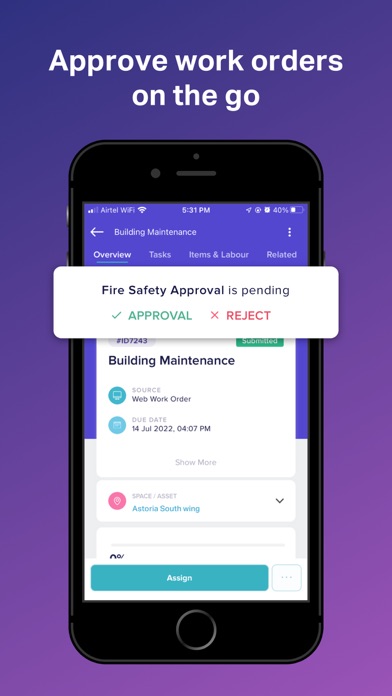
Approve work orders seamlessly
Approval feature allows users or groups to approve or reject a task. When records are submitted for approval, they are approved by the organization's users, known as approvers. An administrator must configure approval for specific tasks in selected modules to prevent unauthorized users from accessing or modifying critical information, thereby promoting data security and integrity.
Make inspections more effective for your field staff and analyze collected data afterward
Inspections are digital forms that technicians use to quickly and easily answer a series of questions as part of a work order. They can also be associated with assets, allowing users to see a history of all inspections for a specific piece of equipment. A detailed summary of each inspection, as well as its history, can be viewed.
Who is workQ for?
Facilio Workq is a scalable and adaptable solution for unifying siloed building systems, automating your unique processes, and achieving the best cost and productivity results. The Facilio Workq app is primarily designed for technicians and supervisors to manage their building level maintenance tasks such as managing work orders, gaining insight into asset details for asset history, and so on.