

Fieldvox - Punch List Reports
Fieldvox - Punch List Reports is made and published by Thang Tran Duc. AppBrain is an independent app data site and isn't affiliated with Thang Tran Duc. The app name, icon, screenshots and description belong to Thang Tran Duc and are shown as published on the App Store.
AppBrain's verdict
- Last updated
- September 5, 2026
- Size
- 122.6 MB
User feedback
Ratings and reviews on the App StoreComments on Fieldvox - Punch List Reports for iOS
We don't have enough comments to show example comments. Please check back later.
Store listing
By Thang Tran Duc, from the App Store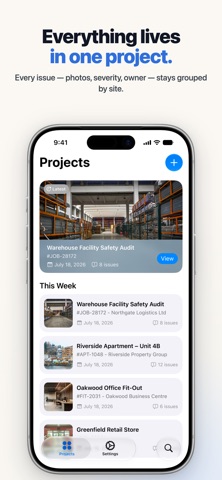



Description by Thang Tran Duc Written by the developer, not by AppBrain. Click to read.
Fieldvox turns site photos and spoken notes into a client-ready punch list PDF — no re-typing at the desk, no half-finished notes in a notebook.
SPEAK INSTEAD OF TYPING
Smart Voice Assistance listens to a spoken description and fills in the fields for you — title, comments, assignee, due date. Describe an item in ten seconds instead of thumb-typing it for two minutes. Works one-handed, with gloves on.
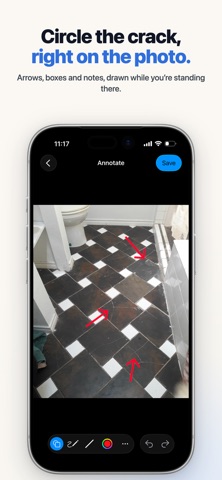
MARK UP THE PHOTO
Circle the crack. Arrow the leak. Box the missing bracket. Freehand drawing, straight lines, arrows and shapes let you point at exactly what you mean, right on the photo.
SEE THE REAL PDF BEFORE YOU SEND
Preview the actual document — not an approximation — so you know exactly what lands in your client's inbox. Preview and customisation are open to everyone.
MAKE THE REPORT LOOK LIKE YOURS
Ten report themes. Three paper sizes (A4, Letter, Legal). Your company logo and your signature. Adjust photo size and image quality to keep the file small enough to email.
BUILT FOR FIELD WORK
- Organise by project, then by issue, with unlimited photos per issue
- Everything stays on your device. No account, no sign-up, works with no signal
- English, French, German, Spanish and Portuguese — in the app and on the PDF
- A sample project is included, so you can see a finished report before you build one
WHO IT'S FOR
Site inspectors, building surveyors, snagging inspectors, property managers, contractors, safety officers and auditors — anyone who has to prove what they found with a photo and a paragraph.
FREE AND PRO
Fieldvox is free to download. The free version includes photo annotation, all ten report themes, unlimited photos per issue, and PDF export for one project of your own — plus the sample project, which you can always export.
Fieldvox Pro unlocks:
- Unlimited PDF exports
- No watermark on your reports
- Smart Voice Assistance
Choose a monthly or annual subscription, or buy Lifetime once and never think about it again.
Subscriptions renew automatically unless cancelled at least 24 hours before the end of the current period. Payment is charged to your Apple Account when you confirm the purchase. Manage or cancel your subscription in your Apple Account settings.
Privacy Policy: https://fieldvox.app/privacy.html
Terms of Use: https://fieldvox.app/terms.html
Support: customer-support@wavento.com
Safety and technology
Found in the app by AppBrain- Price
- Free
- App size
- 122.6 MB
- Content rating
- Everyone
Technologies used by Fieldvox - Punch List Reports
Releases
Updates seen on the App Store- Version
- 1.0.2
- Launched
- August 2026
No changelog data
Alternatives
Similar apps and more from Thang Tran DucAlternatives to Fieldvox - Punch List Reports


Rankings
App Store top chartsApp Store Rankings for Fieldvox - Punch List Reports
About the app and developer
About Fieldvox - Punch List Reports
Fieldvox - Punch List Reports is a business app developed by Thang Tran Duc.
User Ratings
The app has no ratings yet.
App Information
Fieldvox - Punch List Reports is freely available from the App Store. The app size is 122.64 MB. The latest version available is 1.0.2. The last update was on September 5, 2026.
Technical Requirements
The app has a content rating of Everyone. The app has been available on the App Store since August 2026.
Developer information for Thang Tran Duc
Address: