

GEMBA Note Viewer 6
GEMBA Note Viewer 6 is made and published by MetaMoJi Corporation. AppBrain is an independent app data site and isn't affiliated with MetaMoJi Corporation. The app name, icon, screenshots and description belong to MetaMoJi Corporation and are shown as published on the App Store.


AppBrain's verdict
- Last updated
- April 20, 2026
- Size
- 268.5 MB
User feedback
Ratings and reviews on the App StoreComments on GEMBA Note Viewer 6 for iOS
We don't have enough comments to show example comments. Please check back later.
Store listing
By MetaMoJi Corporation, from the App StoreDescription by MetaMoJi Corporation Written by the developer, not by AppBrain. Click to read.
◆Dramatically improve the productivity of your team or organization
● Work that could only be done back in the office can now be done in the field.
● Speedy documentation; instant reporting from the field and completion of approvals
◆Improving the quality of work and reducing errors on site.
● Quickly and reliably record handwriting, voice recordings, photos and videos
● Intuitive TODO management helps you manage your tasks
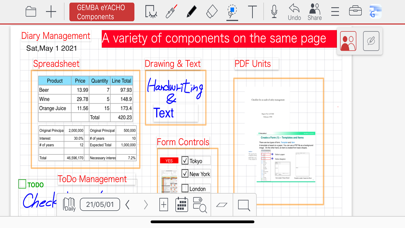
● Diary management allows you to keep track of your schedule and tasks
◆An easy-to-use system that meets the needs of a wide variety of sites
● Create a toolbox of the specific functions you need for your job and share it with your team
● Data linkage with a wide range of equipment and devices
◆Easy and reliable communication in real-time, even at a distance
● Create shared documents where authorized users can collaborate in real-time or on-demand.
◆Helps to identify problems early and avoid risks
● A "management console" can be built to consolidate information on site from the manager's point of view.
● Instantly consolidate reports from the field and issue instructions in real time
Feature Overview:
● Manage approvals using stamps and signatures with management of requests to specific authorizers.
● Add photos of the area or object to be inspected and attach to pins on an imported drawing from PDF or image.
● Maintain a diary with pages automatically timestamped, allowing you to organize and view your records in a calendar view
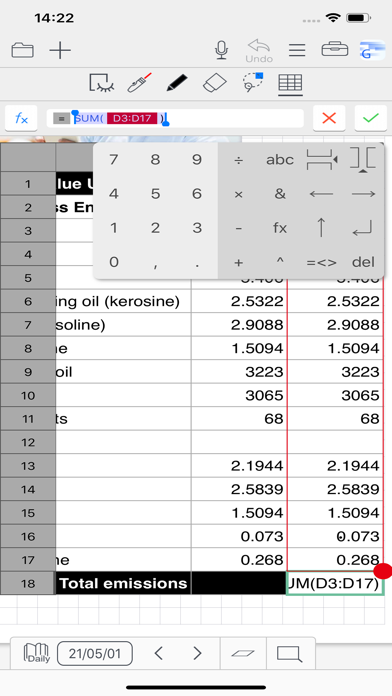
● Using the spreadsheet component enter data, automatically calculate results, and perform analysis
● Capture video and audio quickly. Easily play within your note pages
● Jump to notes taken on a specific day using the calendar view
● Search for target templates or content using tags, enabling to-do lists and much more
● Customize search and filter conditions
● Write, sketch, and draw notes with a variety of pens, paper layouts, and graphics. Includes calligraphy pens and special inks from a vast color palette
● Take photographs using the camera or import existing images straight into your documents
● A vector graphics system (as used in CAD applications) means you can fine tune and edit anything you add
● Move, scale, and rotate anything on your page without losing quality
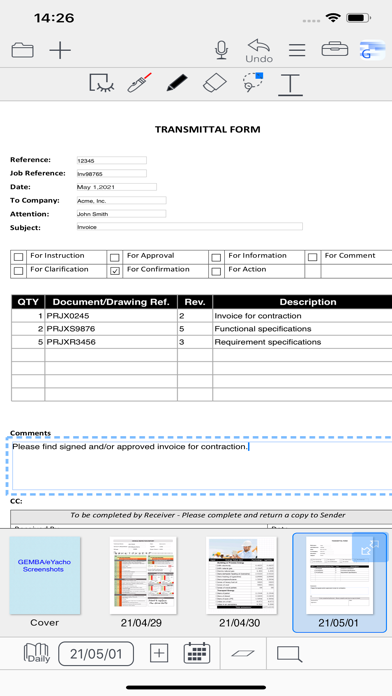
● Import PDF documents as pages in a note, annotate and then save as a new PDF file
● Import multiple PDF documents on the same page for side-by-side information analysis
● Include web page links and visualizations within a note
● Smart cropping tool for photo editing
● Quickly access frequently used tools and commands, customized for different business scenarios
● Layers are stackable sheets of paper placed on top of each other
● Data integration with other systems is possible via interfacing with their REST APIs
Share Features:
● Push notifications to request approval of reports and other documents
● Create teams and share templates, items, and toolboxes between members
● Convert to a Share Note to allow multiple users to visually interact with the documents and add text, handwriting, photos, new pages, graphics, spreadsheets, and any other content types
●Tools for managing meetings:
- Control a meeting by a presenter. The presenter can turn pages of the current Share Note and zoom in and out on the current editor screen
- Easily view planned and ad-hoc future and past meetings
Development Enterprise Edition Features (Option):
● Create a package including contents such as tag schemas, filters, items, and papers
● Deploy packages to users
● Customize user interface
Safety and technology
Found in the app by AppBrain- Price
- Free
- App size
- 268.5 MB
- Content rating
- High
Technologies used by GEMBA Note Viewer 6
Releases
Updates seen on the App Store- Version
- 6.12.9
- Launched
- July 2021
No changelog data
Alternatives
Similar apps and more from MetaMoJi CorporationAlternatives to GEMBA Note Viewer 6


More from MetaMoJi Corporation






Rankings
App Store top chartsApp Store Rankings for GEMBA Note Viewer 6
About the app and developer
About GEMBA Note Viewer 6
GEMBA Note Viewer 6 is a business app developed by MetaMoJi Corporation.
User Ratings
The app has no ratings yet.
App Information
GEMBA Note Viewer 6 is freely available from the App Store. The app size is 268.53 MB. The latest version available is 6.12.9. The last update was on April 20, 2026.
Technical Requirements
The app has a content rating of High Maturity. The app has been available on the App Store since July 2021.
Developer information for MetaMoJi Corporation
Address:
Frequently asked questions about GEMBA Note Viewer 6
Is GEMBA Note Viewer 6 free?
Yes. GEMBA Note Viewer 6 is free on the App Store.
Is GEMBA Note Viewer 6 still available?
Yes. GEMBA Note Viewer 6 is on the App Store, and the last update we saw was on April 20, 2026.
How large is GEMBA Note Viewer 6?
GEMBA Note Viewer 6 is 268.53 MB.
Is GEMBA Note Viewer 6 suitable for children?
App Store gives GEMBA Note Viewer 6 a high maturity rating. It is meant for adults.
Who made GEMBA Note Viewer 6?
GEMBA Note Viewer 6 was developed by MetaMoJi Corporation. It is listed in the business category on the App Store.
What are the best alternatives to GEMBA Note Viewer 6?
People looking at GEMBA Note Viewer 6 also look at these business apps: Online ProMISe, 5W1H Note, Inseries: Smart Calculator, Protect-My-Files, MKX NOTES.