

GenVid: AI Video Generator
GenVid: AI Video Generator is made and published by Kajal Darji. AppBrain is an independent app data site and isn't affiliated with Kajal Darji. The app name, icon, screenshots and description belong to Kajal Darji and are shown as published on the App Store.
AppBrain's verdict
- Last updated
- October 19, 2026
Rankings
App Store top chartsApp Store Rankings for GenVid: AI Video Generator
Competitors
Similar apps and more from Kajal DarjiAlternatives to GenVid: AI Video Generator


More from Kajal Darji


Releases
Updates seen on the App Store- Version
- 1.1
- Launched
- September 2026
No changelog data
User feedback
Ratings and reviews on the App StoreComments on GenVid: AI Video Generator for iOS
We don't have enough comments to show example comments. Please check back later.
Technology
Found in the app by AppBrain- Price
- Free
- App size
- 44.8 MB
- Content rating
- Medium
Technologies used by GenVid: AI Video Generator
About the app and developer
About GenVid: AI Video Generator
GenVid: AI Video Generator is a photo & video app developed by Kajal Darji.
What is the rating of GenVid: AI Video Generator?
GenVid: AI Video Generator has no ratings yet.
Is GenVid: AI Video Generator free?
GenVid: AI Video Generator is free. The app size is 44.78 MB. The latest version available is 1.1. The last update was on October 19, 2026.
What are the requirements for GenVid: AI Video Generator?
The app has a content rating of Medium Maturity. The app has been available on the App Store since September 2026.
Developer information for Kajal Darji
Address:
Frequently asked questions about GenVid: AI Video Generator
Is GenVid: AI Video Generator free?
Yes. GenVid: AI Video Generator is free on the App Store.
Is GenVid: AI Video Generator still available?
Yes. GenVid: AI Video Generator is on the App Store, and the last update we saw was on October 19, 2026.
How large is GenVid: AI Video Generator?
GenVid: AI Video Generator is 44.78 MB.
Is GenVid: AI Video Generator suitable for children?
App Store gives GenVid: AI Video Generator a medium maturity rating, so it is not meant for young children.
Who made GenVid: AI Video Generator?
GenVid: AI Video Generator was developed by Kajal Darji. It is listed in the photo & video category on the App Store.
What are the best alternatives to GenVid: AI Video Generator?
People looking at GenVid: AI Video Generator also look at these photo & video apps: GenVid AI, Editora: Face & Photo AI, Capto: AI photo stories for IG, AI Photo Generator Editor -bai, Video Ai Generator.
Store listing
By Kajal Darji, from the App Store




Description by Kajal Darji Written by the developer, not by AppBrain. Click to read.
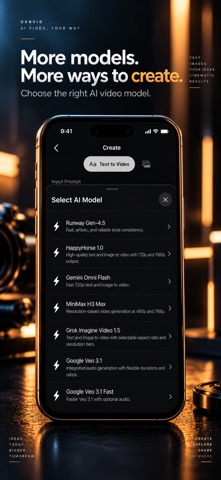
Create cinematic video concepts from your imagination or bring a still image to life with AI animation. Choose from multiple AI video models, customise available generation settings, and save or share your results.
**CREATE AI VIDEOS**
**Text to Video**
- Turn natural-language prompts into AI-generated videos.
- Describe a scene, subject, action, or visual style.
- Choose from available AI models and supported generation settings.
**Image to Video**
- Upload a photo and crop it before generation.
- Animate a still image into a moving video.
- Explore creative motion and cinematic scene ideas.
**TOOLS FOR YOUR CREATIVE WORKFLOW**
- Enhance prompts with the optional prompt-enhancement tool.
- Explore Inspire suggestions and ready-made Stories prompt templates.
- Adjust video duration and output resolution where supported by the selected model.
- Track Running, Completed, and Failed generations in History.
- Retry failed generations and copy prompts.
- Save generated videos to Photos or share them directly.
- Receive optional push notifications when generations finish.
- Choose Light, Dark, or System appearance.
- Sign in with Apple, Google, or continue as a Guest.
**SIMPLE, TRANSPARENT CREDITS**
GenVid Studio uses one-time, consumable credit packs—no subscriptions or recurring charges.
- Review the credit cost before starting a generation.
- Credit usage depends on the selected model and settings.
- Failed generations do not deduct credits.
- Purchase additional credit packs whenever you need them.
- Track your balance and purchases in Wallet and Payment History.
**YOUR ACCOUNT, YOUR GENERATIONS**
- Explore the app as a Guest or sign in with Apple or Google.
- Your generations are private to your account; there is no public gallery or social feed.
- Prompts and uploaded images are processed on our servers to generate videos.
- Delete your account from the Profile screen.
- Access the Privacy Policy and Terms of Use inside the app.
**BEFORE YOU START**
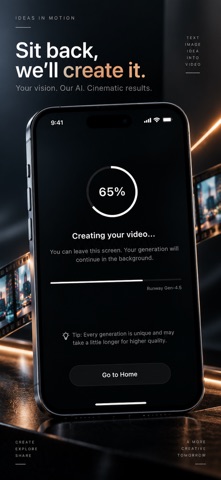
An internet connection is required. AI video generation runs on remote servers and may take several minutes, depending on the selected model and settings. You can leave the generation screen while processing continues.
Please follow our Content Guidelines. Prohibited content includes adult content, extreme violence, hate speech, copyright infringement, and unauthorised use of real people's likenesses.