Go Live: RTMP Stream Camera is an overall app developed by 国辉 满.
How many times has Go Live: RTMP Stream Camera been downloaded?
What is the rating of Go Live: RTMP Stream Camera?
Go Live: RTMP Stream Camera is rated 4.47 out of 5 stars, based on 640 ratings.
Is Go Live: RTMP Stream Camera free?
Go Live: RTMP Stream Camera is free to download. The APK download size is 43.03 MB. The latest version available is 4.8. The last update was on June 25, 2026.
What are the requirements for Go Live: RTMP Stream Camera?
The app has a content rating of Everyone. The app has been available on Google Play July 2020.
Description
Go Live Video Broadcasting is a powerful live streaming app for creators, gamers, educators, businesses, and anyone who wants to broadcast high-quality video from iPhone or iPad.
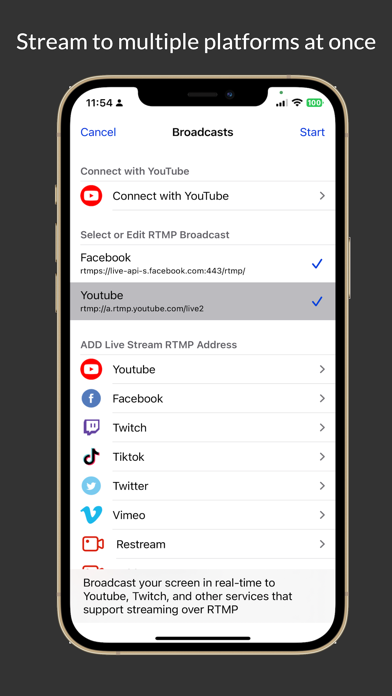
Stream live video to your favorite platforms with RTMP or RTMPS, including YouTube, Facebook Live, Twitch, Vimeo, Restream, and custom streaming servers. You can also stream to multiple platforms at the same time.
Go Live makes mobile live streaming simple, fast, and flexible.
Key Features
• Broadcast live video in HD, Full HD, and up to 4K quality • Stream to YouTube, Facebook Live, Twitch, Vimeo, Restream, and custom RTMP/RTMPS servers • Stream to multiple platforms at the same time • Support for RTMP and RTMPS streaming addresses • Live camera broadcasting from your iPhone or iPad • Screen broadcasting for tutorials, gameplay, presentations, and demos • File streaming for broadcasting saved videos • Adjustable video resolution, frame rate, bitrate, GOP, and audio bitrate • Support for microphone audio and app audio • Landscape live streaming support • Add images, logos, text, and visual elements to your live video • Network quality monitoring with helpful live streaming status prompts • Easy setup for custom streaming URLs and stream keys
Go Live is designed for reliable mobile broadcasting. Video quality depends on your selected settings and the available upload bandwidth of your network connection. For unstable networks, you can switch to a smoother quality preset for a more stable live stream.
How It Works
1. Choose a streaming platform or add your own RTMP/RTMPS server. 2. Enter your stream URL and stream key. 3. Select your video quality and audio settings. 4. Tap Go Live and start broadcasting.
Go Live Premium
Upgrade to Go Live Premium to unlock all paid features and enjoy a more complete live streaming experience.
Go Live Premium is billed monthly according to the selected plan.
Payment will be charged to your Apple ID account at confirmation of purchase. Subscriptions automatically renew unless auto-renew is turned off at least 24 hours before the end of the current period. Your account will be charged for renewal within 24 hours before the end of the current period. You can manage or cancel your subscription anytime in your Apple ID account settings.
Each subscription will automatically renew 3 days before the expiration date for
the same time period. Subscriptions can be cancelled at any time before the renewal.