

Grid Cuts - Photo Splitter
Grid Cuts - Photo Splitter is made and published by Taiki Miyamoto. AppBrain is an independent app data site and isn't affiliated with Taiki Miyamoto. The app name, icon, screenshots and description belong to Taiki Miyamoto and are shown as published on the App Store.
AppBrain's verdict
- Last updated
- February 3, 2026
- Size
- 31.4 MB
User feedback
Ratings and reviews on the App StoreComments on Grid Cuts - Photo Splitter for iOS
We don't have enough comments to show example comments. Please check back later.
Store listing
By Taiki Miyamoto, from the App Store

Description by Taiki Miyamoto Written by the developer, not by AppBrain. Click to read.
【Trending Now: Create Vertical Posts for X】
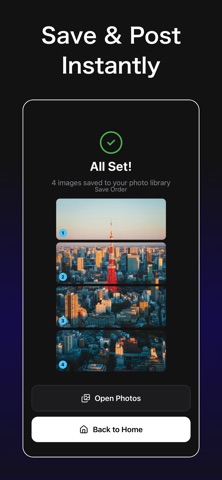
Create the trending vertical posts on X (formerly Twitter) where 4 images connect vertically. With our "1×4" preset, anyone can easily make these eye-catching vertical posts. Stand out in the timeline with impactful posts that drive engagement.
【Make Your Instagram Profile Stylish】
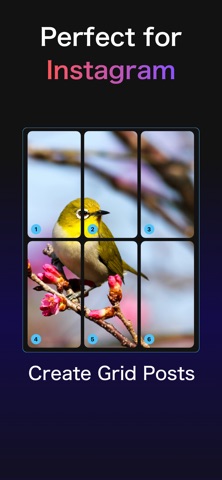
Fully supports 3×2 and 3×3 grid splits. Split and post a single large photo to transform your profile into a poster-like display.
【Key Features】
・Quick Presets: One-tap setup for popular formats like "1×4 (for X)" and "3×3 (for Instagram)"
・Free Customization: Freely adjust rows and columns (e.g., 2×2, 4×1, 5×2, etc.)
・High-Quality Export: Maintains image quality even after splitting
・Intuitive Controls: Simply pinch to zoom and adjust cropping position
・Visual Post Order: Numbered tiles show you the correct posting sequence
【Perfect For】
・Creating attention-grabbing posts on X
・Adding cohesive style to your Instagram profile
・Showcasing your favorite photos in a big way
・Splitting images for blogs or websites
Safety and technology
Found in the app by AppBrain- Price
- Free
- App size
- 31.4 MB
- Content rating
- Everyone
Technologies used by Grid Cuts - Photo Splitter
Releases
Updates seen on the App Store- Version
- 1.0.1
- Launched
- January 2026
No changelog data
Alternatives
Similar apps and more from Taiki MiyamotoAlternatives to Grid Cuts - Photo Splitter


Rankings
App Store top chartsApp Store Rankings for Grid Cuts - Photo Splitter
About the app and developer
About Grid Cuts - Photo Splitter
Grid Cuts - Photo Splitter is a photo & video app developed by Taiki Miyamoto.
User Ratings
The app has no ratings yet.
App Information
Grid Cuts - Photo Splitter is freely available from the App Store. The app size is 31.43 MB. The latest version available is 1.0.1. The last update was on February 3, 2026.
Technical Requirements
The app has a content rating of Everyone. The app has been available on the App Store since January 2026.
Developer information for Taiki Miyamoto
Address:
Frequently asked questions about Grid Cuts - Photo Splitter
Is Grid Cuts - Photo Splitter free?
Yes. Grid Cuts - Photo Splitter is free on the App Store.
Is Grid Cuts - Photo Splitter still available?
Yes. Grid Cuts - Photo Splitter is on the App Store, and the last update we saw was on February 3, 2026.
How large is Grid Cuts - Photo Splitter?
Grid Cuts - Photo Splitter is 31.43 MB.
Is Grid Cuts - Photo Splitter suitable for children?
App Store rates the content of Grid Cuts - Photo Splitter as suitable for everyone.
Who made Grid Cuts - Photo Splitter?
Grid Cuts - Photo Splitter was developed by Taiki Miyamoto. It is listed in the photo & video category on the App Store.
What are the best alternatives to Grid Cuts - Photo Splitter?
People looking at Grid Cuts - Photo Splitter also look at these photo & video apps: AI Timestamp Camera, CompareSnap, Auto Captions AI – Subtitles, Easy EXIF – Date & GPS Editor, Portrait | Photo Frame.