

Grocery/ShoppingList
Grocery/ShoppingList is made and published by Greg Anderson. AppBrain is an independent app data site and isn't affiliated with Greg Anderson. The app name, icon, screenshots and description belong to Greg Anderson and are shown as published on the App Store.
AppBrain's verdict
- Last updated
- October 22, 2026
Rankings
App Store top chartsApp Store Rankings for Grocery/ShoppingList
Competitors
Similar apps and more from Greg AndersonMore from Greg Anderson


Releases
Updates seen on the App Store- Version
- 1.2.6
- Launched
- March 2026
No changelog data
User feedback
Ratings and reviews on the App StoreComments on Grocery/ShoppingList for iOS
We don't have enough comments to show example comments. Please check back later.
Technology
Found in the app by AppBrain- Price
- $0.99
- App size
- 2.34 MB
- Content rating
- Everyone
Technologies used by Grocery/ShoppingList
About the app and developer
About Grocery/ShoppingList
Grocery/ShoppingList is a shopping app developed by Greg Anderson.
User Ratings
The app has no ratings yet.
App Information
Grocery/ShoppingList costs $0.99. The app size is 2.34 MB. The latest version available is 1.2.6. The last update was on October 22, 2026.
Technical Requirements
The app has a content rating of Everyone. The app has been available on the App Store since March 2026.
Developer information for Greg Anderson
Address:
Store listing
By Greg Anderson, from the App Store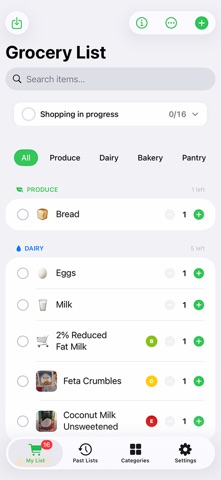



Description by Greg Anderson Written by the developer, not by AppBrain. Click to read.
Photograph a printed recipe or choose a recipe image, review the ingredients, and add them to MyGroceryList. Import more recipes one at a time to build a combined list with cumulative ingredient totals.
START WITH SIRI
Say "Hey Siri, scan a recipe in MyGroceryList" to open the recipe scanner. Take a photo, check the recognized text, and add the ingredients to your list. You can also start from the app or Apple's Shortcuts app.
ONE INGREDIENT, ONE TOTAL
Matching recipe ingredients share a single row. Common equivalents, such as flour and all-purpose flour, are combined. Fractions are preserved, and compatible measurements are added together. Different varieties, such as almond flour and regular flour, stay separate. Weight and volume remain visible as separate amounts when they cannot be combined.
COUNTS AND PACKAGE SIZES THAT MAKE SENSE
See the actual number of eggs or cans you need. A recipe calling for two 15-ounce cans keeps both the two-can count and the size of each can. Measured ingredients show totals such as 5 1/2 cups directly in the list.
ORGANIZE AS YOU ADD
Recipe ingredients use matching existing categories and previous ingredient assignments. Supported custom categories, such as Baking, Vegetables, Spices, and Seafood, are used when available. Unmatched ingredients go to Other. Review category assignments before adding.
KEEP EVERYDAY SHOPPING SIMPLE
- Add groceries by typing, voice, or quick suggestions.
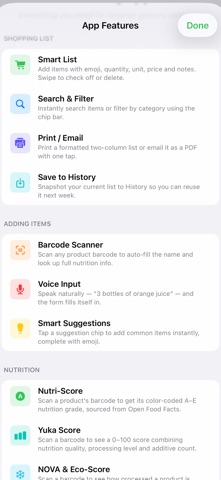
- Scan product barcodes to look up available nutrition information from Open Food Facts.
- Create and arrange your own categories.
- Check off groceries, search your list, and filter by category.
- Save lists to history and reuse them later.
- Print your grocery list or send it by email.
- Sync lists through iCloud across devices signed in to the same Apple ID.
Recipe text recognition happens on your device. For best results, photograph the ingredients section of a printed English recipe and review the text before adding.
Available for iPhone and iPad running iOS 17 or later.