




AppBrain's verdict
- Last updated
- November 16, 2026
- Size
- 10.2 MB
User feedback
Ratings and reviews on the App StoreComments on Harubi: Receipt Budget Tracker for iOS
We don't have enough comments to show example comments. Please check back later.
Store listing
By MJ KONG, from the App StoreDescription by MJ KONG Written by the developer, not by AppBrain. Click to read.
Receipts, payment text alerts, the transaction list inside your banking app — photograph or screenshot them, and Harubi reads the date, amount and merchant and fills the entry in for you. No ads, no account, no bank login.
■ Why photos instead of a bank connection?
Harubi never asks for your bank credentials.
· Cash never shows up in a bank feed. A photo of the receipt catches it.
· You never hand your bank login to a third party — there is nobody to hand it to.
· Nothing to sign up for. Open the app and start.
■ Three kinds of images, sorted out automatically
· Paper receipts — merchant, total and date, read straight off the slip.
· Payment and card alert messages — screenshot the alert and it becomes one transaction.
· Bank and card statement lists — screenshot the transaction list in your banking app and every row is read at once.
Whatever you send, a review screen comes first. Correct a misread figure, untick a row you don't want, then save.
■ Several screenshots, stitched into one list
A statement never fits on one screen. Scroll, take as many screenshots as you need, and hand them over together.
· Overlapping stretches are matched up by running balance, so nothing is imported twice.
· If a date header was cut off at the top of a shot, the date is carried across from the neighboring shots.
· Transactions you have already saved come back pre-unticked.
■ Share now, sort it out later
Send images to Harubi from Photos or Messages with the share sheet. iOS won't let an app launch itself, so nothing happens at that moment — but the next time you open Harubi, everything you shared is waiting and gets sorted in one go.
■ Private by construction
· Text recognition runs on your device, through Apple's Vision framework. Photos are not uploaded for processing.
· Your transaction records stay on this device.
· No account, no login, no bank connection.
· No ads, no tracking. The App Store privacy label reads "Data Not Collected".
· Not a single analytics or advertising SDK, and no third-party libraries at all.
■ The budgeting part
· Income, expense and transfer entries with a large number keypad
· Daily, calendar, weekly, monthly, summary and memo views
· Transaction search — by details, category or asset, narrowed to a period, with your recent searches kept
· Category statistics (pie chart) with period and account filters
· Per-category budgets with remaining amount and spending pace
· Event budgets — keep a trip, a holiday or a move on its own named budget, apart from your monthly one
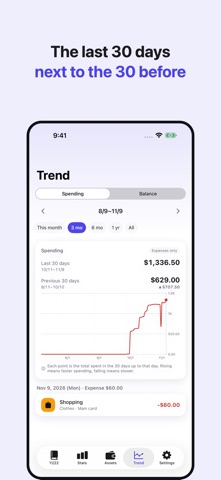
· Trend tab — your daily balance, and the transactions behind any day
· Balance trend graph per account
· Double-entry asset tracking — cash, bank and card balances kept in step
· Recurring expenses — rent, subscriptions, anything that leaves on the same day each month
· Automatic insights — budgets nearly spent, too much in Other, month-over-month jumps
· Backup and restore to a JSON file (photos and videos attached to memos, and recurring-expense rules, are not included in the backup)
· On-device AI — a summary of your month and category suggestions for Other (iOS 26 on Apple Intelligence devices)
· Light / dark mode and theme colors
■ Receipts we read
Korea, Japan, the United States, Germany and the Philippines.
Budgeting is all about consistency. Start light — just today's spending.
For iPhone and iPad. Requires iOS 17 or later.
Safety and technology
Found in the app by AppBrain- Price
- Free
- App size
- 10.2 MB
- Content rating
- Everyone
Technologies used by Harubi: Receipt Budget Tracker
Releases
Updates seen on the App Store- Version
- 1.4.4
- Launched
- July 2026
No changelog data
Alternatives
Similar apps and more from MJ KONGAlternatives to Harubi: Receipt Budget Tracker


Rankings
App Store top chartsApp Store Rankings for Harubi: Receipt Budget Tracker
About the app and developer
About Harubi: Receipt Budget Tracker
Harubi: Receipt Budget Tracker is a finance app developed by MJ KONG.
What is the rating of Harubi: Receipt Budget Tracker?
Harubi: Receipt Budget Tracker has no ratings yet.
Is Harubi: Receipt Budget Tracker free?
Harubi: Receipt Budget Tracker is free. The app size is 10.21 MB. The latest version available is 1.4.4. The last update was on November 16, 2026.
What are the requirements for Harubi: Receipt Budget Tracker?
The app has a content rating of Everyone. The app has been available on the App Store since July 2026.
Harubi: Receipt Budget Tracker is made and published by MJ KONG. AppBrain is an independent app data site and isn't affiliated with MJ KONG. The app name, icon, screenshots and description belong to MJ KONG and are shown as published on the App Store.
Developer information for MJ KONG
Address:
Frequently asked questions about Harubi: Receipt Budget Tracker
Is Harubi: Receipt Budget Tracker free?
Yes. Harubi: Receipt Budget Tracker is free on the App Store.
Is Harubi: Receipt Budget Tracker still available?
Yes. Harubi: Receipt Budget Tracker is on the App Store, and the last update we saw was on November 16, 2026.
How large is Harubi: Receipt Budget Tracker?
Harubi: Receipt Budget Tracker is 10.21 MB.
Is Harubi: Receipt Budget Tracker suitable for children?
App Store rates the content of Harubi: Receipt Budget Tracker as suitable for everyone.
Who made Harubi: Receipt Budget Tracker?
Harubi: Receipt Budget Tracker was developed by MJ KONG. It is listed in the finance category on the App Store.
What are the best alternatives to Harubi: Receipt Budget Tracker?
People looking at Harubi: Receipt Budget Tracker also look at these finance apps: 프로요 영수증, Receipto: Receipt Scanner, Hoard: Budget & Save, BillSnap AI, Walletnavigator.