

Home Manager is made and published by Yi Fang. AppBrain is an independent app data site and isn't affiliated with Yi Fang. The app name, icon, screenshots and description belong to Yi Fang and are shown as published on the App Store.
AppBrain's verdict
- Last updated
- September 15, 2026
Rankings
App Store top chartsApp Store Rankings for Home Manager
Competitors
Similar apps and more from Yi FangMore from Yi Fang


Releases
Updates seen on the App Store- Version
- 1.1.0
- Launched
- June 2026
No changelog data
User feedback
Ratings and reviews on the App StoreComments on Home Manager for iOS
We don't have enough comments to show example comments. Please check back later.
Technology
Found in the app by AppBrain- Price
- $3.99
- App size
- 3.52 MB
- Content rating
- Everyone
Technologies used by Home Manager
About the app and developer
About Home Manager
Home Manager is a lifestyle app developed by Yi Fang.
What is the rating of Home Manager?
Home Manager has no ratings yet.
Is Home Manager free?
Home Manager costs $3.99. The app size is 3.52 MB. The latest version available is 1.1.0. The last update was on September 15, 2026.
What are the requirements for Home Manager?
The app has a content rating of Everyone. The app has been available on the App Store since June 2026.
Developer information for Yi Fang
Address:
Frequently asked questions about Home Manager
Is Home Manager free?
No. Home Manager costs $3.99 on the App Store.
Is Home Manager still available?
Yes. Home Manager is on the App Store, and the last update we saw was on September 15, 2026.
How large is Home Manager?
Home Manager is 3.52 MB.
Is Home Manager suitable for children?
App Store rates the content of Home Manager as suitable for everyone.
Who made Home Manager?
Home Manager was developed by Yi Fang. It is listed in the lifestyle category on the App Store.
Store listing
By Yi Fang, from the App Store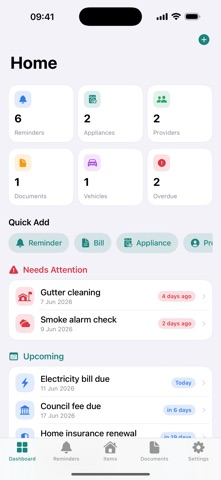

Description by Yi Fang Written by the developer, not by AppBrain. Click to read.
SCAN DETAILS, SAVE TYPING
• Vehicle registration: take a photo, choose an image or import a PDF. Review VIN/chassis number, year, make, model, plate number, tare weight, usage, insurer name and code, and registration expiry before saving.
• Appliances: read product labels, receipts and warranties to fill in brand, model, serial number, purchase details and warranty dates.
• You choose which details to use. Existing values are preserved unless you select them for replacement, and every field stays editable.
ORGANISE EACH PROPERTY
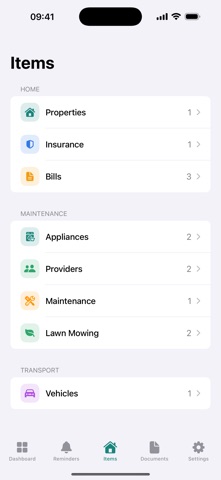
Keep records for your home and other properties, then switch between them to see the relevant reminders, items and documents.
• Bills: track electricity, water, gas, internet and council bills, mark them paid and see what's due.
• Insurance: store policies, premiums and renewal dates.
• Appliances and devices: keep purchase and warranty details, photos and manuals together.
• Maintenance: log repairs, costs, providers and follow-ups, plus lawn mowing history.
• Providers: keep trusted plumbers, electricians and tradies handy, with quick access to their contact details.
• Vehicles: track registration, insurance and service dates alongside vehicle and insurer details.
• Documents: import and preview PDFs and images of manuals, receipts, policies and bills.
GET HELP FROM APPLE INTELLIGENCE
• Ask Your Home: ask questions about your saved household records and follow links to the records behind the answer.
• Property Briefing: see overdue tasks and upcoming bills, reminders and warranties for a property.
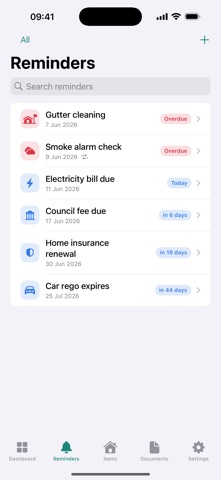
• Smart Quick Add: turn a sentence into a reminder draft you can review and edit.
• Manual Assistant: ask questions about a PDF or image document, follow references to its pages and turn supported care tasks into reminder drafts.
STAY AHEAD OF DUE DATES
Use local notifications for bills, insurance renewals, warranties, car rego and household tasks. Capture reminders and bills with Siri and Shortcuts, or ask Siri what's due. Connect shortcuts to the Action Button, Home Screen and Spotlight.
YOUR RECORDS, ACROSS YOUR DEVICES
Sync through your private iCloud across iPhone and iPad. There's no app account to create, no ads and no third-party tracking. Core record keeping, reminders and text scanning work offline; iCloud sync resumes when you're online.
Home Manager supports iOS 18 and later, including iOS 27. On-device AI features require iOS 26 or later, a compatible device and Apple Intelligence enabled. Optional document analysis with Apple's Private Cloud Compute requires iOS 27, internet access and service availability. When you enable it, selected document images and text are sent to Apple for analysis. If AI is unavailable, text scanning and manual entry remain available. Always review suggested details before saving.