

HTTPocket - WiFi File Transfer
HTTPocket - WiFi File Transfer is made and published by Md Imran Ansari. AppBrain is an independent app data site and isn't affiliated with Md Imran Ansari. The app name, icon, screenshots and description belong to Md Imran Ansari and are shown as published on the App Store.
AppBrain's verdict
- Rating on App Store
- 5.00
- 6 ratings
- Last updated
- July 31, 2026
It doesn't have enough ratings yet to judge what users think.
Rankings
App Store top chartsApp Store Rankings for HTTPocket - WiFi File Transfer
Competitors
Similar apps and more from Md Imran AnsariAlternatives to HTTPocket - WiFi File Transfer


More from Md Imran Ansari


Releases
Updates seen on the App Store- Version
- 1.0.4
- Launched
- June 2026
No changelog data
User feedback
Ratings and reviews on the App StoreComments on HTTPocket - WiFi File Transfer for iOS
We don't have enough comments to show example comments. Please check back later.
Technology
Found in the app by AppBrain- Price
- Free
- App size
- 52.0 MB
- Content rating
- Everyone
Technologies used by HTTPocket - WiFi File Transfer
About the app and developer
About HTTPocket - WiFi File Transfer
HTTPocket - WiFi File Transfer is an utilities app developed by Md Imran Ansari.
What is the rating of HTTPocket - WiFi File Transfer?
HTTPocket - WiFi File Transfer is rated 5.00 out of 5 stars, based on 6 ratings.
Is HTTPocket - WiFi File Transfer free?
HTTPocket - WiFi File Transfer is free. The app size is 52.02 MB. The latest version available is 1.0.4. The last update was on July 31, 2026.
What are the requirements for HTTPocket - WiFi File Transfer?
The app has a content rating of Everyone. The app has been available on the App Store since June 2026.
Developer information for Md Imran Ansari
Address:
Store listing
By Md Imran Ansari, from the App Store


Description by Md Imran Ansari Written by the developer, not by AppBrain. Click to read.
Send and receive files wirelessly between your devices, or share photos, videos, PDFs, and documents with anyone on the same Wi-Fi: laptop, phone, tablet, even a smart TV. Pick a folder, tap Start Server, and share instantly. Includes a Built-In Photo Converter & PDF Toolkit, so you can convert files right where they are.
TWO WAYS TO CONNECT
1. From Any Browser
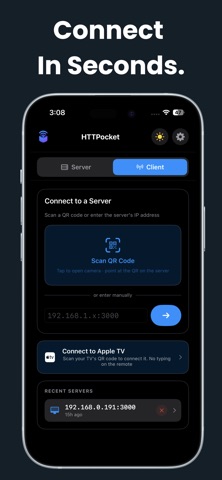
Open the server address in any browser. No app needed on the other device. Scan a QR code to connect in seconds. Works on PC, Mac, phone, tablet, or smart TV.
2. HTTPocket App (iPhone, iPad, Mac)
Connect to another HTTPocket server using Client Mode for a smoother, native experience. Browse, view, and download right inside the app.
3. HTTPocket for Apple TV
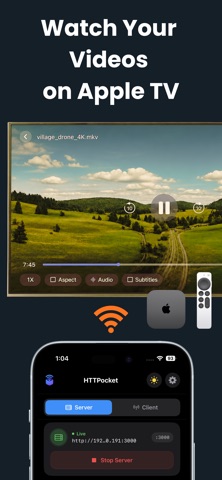
Install the free Apple TV app to browse your server and play videos on the big screen, controlled with your Apple TV remote.
SEND & RECEIVE FILES (FREE)
- Wireless File Sharing: share any folder over Wi-Fi, no cables or internet needed
- Upload From Any Device: others can send you files from their browser, including drag-and-drop
- Browser Access: anyone connects from any browser, no app required
- QR Code Connect: scan to connect instantly, no typing IP addresses
- Live Transfer Progress: see speed and time remaining for every file
- In-App Chat: message connected devices right from the app
- Custom Port: set your own port to fit your network
- See Who's Connected: know how many devices are connected
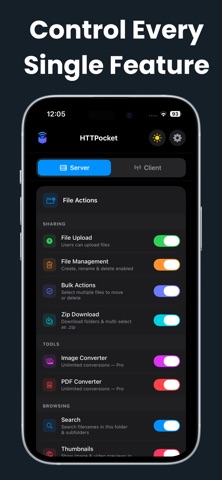
- Search & Thumbnails: find files fast, with instant previews
- Slideshow: flip through a folder's photos without downloading them
- Custom Video Player: play videos in the browser, no downloading needed
- Download as Zip: grab a folder or several files as one .zip
BROWSE ANOTHER DEVICE (FREE, CLIENT MODE)
Skip the browser and connect to another HTTPocket server for a true native app experience, built right in.
- Connect in one tap or QR scan
- Fast native file browser, no tabs, no page loads
- Native video player: switch audio and subtitles, change speed, resume where you left off
- View photos with zoom, pan, and fit-to-screen
- Read PDFs in a full-screen native viewer
- Open text and HTML files without saving them
- Save logins for password-protected servers
- Remembers recent servers for quick reconnecting
- Full Dark Mode support
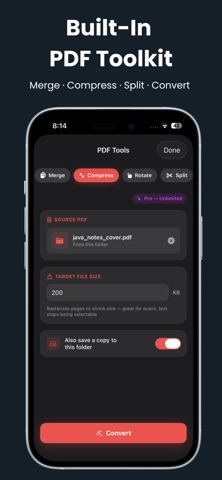
BUILT-IN PHOTO CONVERTER & PDF TOOLKIT
No separate app, nothing uploaded. Everything happens on your device.
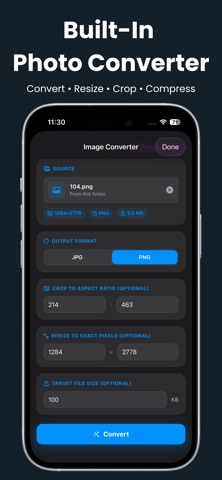
- Photo Converter: JPG, PNG, HEIC, WebP, plus resize, crop, and compress
- PDF Toolkit: combine images to PDF, merge, compress, rotate, split pages, or convert to and from Word, Excel, PowerPoint
Try each tool free, 3 conversions each, then upgrade to Pro for unlimited use.
HTTPOCKET PRO
- File Management: create, rename, and delete files from the browser
- Bulk Actions: select multiple files to move or delete
- Password Protection: lock your server with a username and password
- Multi-User Logins: separate logins for different people
- Unlimited Conversions: no cap on Photo and PDF tools
Available as Monthly, Yearly, or one-time Lifetime purchase. Subscriptions auto-renew unless cancelled 24 hours before the period ends.
YOUR FILES STAY YOURS
- Everything happens on your local Wi-Fi, nothing sent to an outside server
- No account or sign-up needed, no internet connection required
- Conversions happen entirely on your device, never uploaded anywhere
- Built with Apple's own frameworks, no third-party dependencies
By subscribing, you agree to Apple's standard Terms of Use:
https://www.apple.com/legal/internet-services/itunes/dev/stdeula/
Privacy Policy: https://httpocket.pntapps.com/privacy-policy
Terms of Use: https://httpocket.pntapps.com/terms-and-conditions