

Infinite Painter
Infinite Painter is made and published by Sean Brakefield. AppBrain is an independent app data site and isn't affiliated with Sean Brakefield. The app name, icon, screenshots and description belong to Sean Brakefield and are shown as published on the App Store.
AppBrain's verdict
EstablishedWell rated- Rating on App Store
- 4.15
- 10,193 ratings
- Last updated
- October 22, 2026
- Size
- 108.2 MB
Users rate it well: 4.1 stars from 10,193 ratings.
User feedback
Ratings and reviews on the App StoreComments on Infinite Painter for iOS
We don't have enough comments to show example comments. Please check back later.
Store listing
By Sean Brakefield, from the App Store


Description by Sean Brakefield Written by the developer, not by AppBrain. Click to read.
HIGHLIGHTS
- Best-in-class pencils
- Minimal and intuitive interface
- Easily group layers
- Share Time-lapse recordings with your social networks
- Convert any stroke into an editable shape
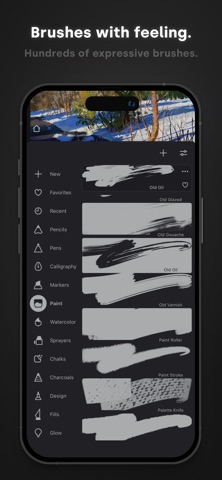
REIMAGINING BRUSHES
- Hundreds of built-in brushes: Airbrushes, Calligraphy, Chalk, Charcoal, Glow, Lasso Fills, Pencils, Markers, Oil Paint, Paint Splatter, Spray Paint, Screentones, and Watercolor
- Realistic brush to canvas interaction
- Over 100 customizable settings for every brush
- Organize and share your favorite brushes and brush sets
- Designed for the Apple Pencil with full pressure and tilt support
- Apply real-time color adjustments and live filters to any brush
- Sample lower layers when blending
- Import and export custom brushes and sets
GETTING THE MOST OUT OF YOUR SPACE
- More canvas, less clutter with a clean, customizable interface
- Assign finger functions separate from the Apple Pencil
- Expand and collapse layers with a flick
- Dock brushes and brush settings for quick, easy editing
- Quick access eyedropper
- Rotate and flip canvas
- Group layers with a pinch
MAKING ART LESS WORK
- Pin tools and actions to the main interface
- Pull the color wheel right on the canvas with two fingers
- Add multiple reference images
- Lighting-fast saving and loading
- Step back in time with Project History
DIVERSIFYING TOOLS
- Simple or complex symmetry with Radial or Kaleidoscope
- Draw with precision using Guides or Shapes
- Smart shape detection by pausing when drawing
- Innovative Hatching guide
NEVER LOSING PERSPECTIVE
- Design 3D cityscapes with five different perspective guides or a standard 2D grid
- Drag Rectangle and Circle shapes in perspective
PIXEL-PERFECT EDITING
- Seamless pattern projects
- Selection tools: Lasso, Rectangle, Circle, Poly, Path, Wand, Brush, and Color Range
- Industry-leading Transformations
- Transform multiple layers at once
- Gradient and Pattern Fill tools
- Target separate layers or all layers with Fill tools
- Drag with Fill tool or Magic Wand for live tolerance adjustment
- Bring your painting to life with Time-lapse
- Canvas Navigator with flip and grayscale support (for proportions and value checking)
- Clone tool with offset
- Tools for pattern creation
EVERYTHING YOU NEED TO CREATE
- 64-bit color when painting
- Layer support with 30 blend modes
- Masks for layers, adjustments, and groups
- Clipping masks
- Gradient map, Color Curves, and Filter layers
- Industry-leading color correction
- Over 40 live Filters
- Focus and Tilt-shift masking
- Liquify
- Crop and Resize tool
- Pattern and Array tools
- Powerful selection workspace
- Photoshop®-like smart layers for multiple transformations without loss of quality
- Solo & Trace modes
- Print presets & CMYK color modes
ACCELERATE YOUR WORKFLOW
- Import from Photos, Camera, Clipboard, or Image Search
- Search over 1 million free for commercial-use images
- Export images as JPG, PNG, ZIP, layered PSD files, or Painter projects
- Share artwork to Infinite Painter's ever-growing community and see what others are creating, #InfinitePainter
WHAT’S FREE?
- 7 days to try out everything
- 5 layers at the device resolution
- Solid Fill, Lasso selection, Basic Transform and Symmetry
- Seamless pattern projects
- All the built-in brushes and brush editing
- Smart shape detection
WHAT’S PRO?
- HD canvas sizes and tons of layers*
- Adjustments and live Filter layers
- Layer groups
- Layer masks
- Over 40 powerful, professional tools
* Maximum number of layers depends on the canvas size and your device
TAKE INFINITE PAINTER WITH YOU
See what you can do.
Safety and technology
Found in the app by AppBrain- Price
- Free
- App size
- 108.2 MB
- Content rating
- Low
Technologies used by Infinite Painter
Releases
Updates seen on the App Store- Version
- 7.2.7
- Launched
- August 2016
No changelog data
Alternatives
Similar apps and more from Sean BrakefieldAlternatives to Infinite Painter


Rankings
App Store top chartsApp Store Rankings for Infinite Painter
About the app and developer
About Infinite Painter
Infinite Painter is a graphics & design app developed by Sean Brakefield.
What is the rating of Infinite Painter?
Infinite Painter is rated 4.15 out of 5 stars, based on 10 thousand ratings.
Is Infinite Painter free?
Infinite Painter is free. The app size is 108.19 MB. The latest version available is 7.2.7. The last update was on October 22, 2026.
What are the requirements for Infinite Painter?
The app has a content rating of Low Maturity. The app has been available on the App Store since August 2016.
Developer information for Sean Brakefield
Address:
Frequently asked questions about Infinite Painter
Is Infinite Painter free?
Yes. Infinite Painter is free on the App Store.
Is Infinite Painter still available?
Yes. Infinite Painter is on the App Store, and the last update we saw was on October 22, 2026.
How large is Infinite Painter?
Infinite Painter is 108.19 MB.
Is Infinite Painter suitable for children?
App Store gives Infinite Painter a low maturity rating, so it is meant for older children and up.
How do people rate Infinite Painter?
Infinite Painter scores 4.15 out of 5 stars, from 10,193 ratings on the App Store.
Who made Infinite Painter?
Infinite Painter was developed by Sean Brakefield. It is listed in the graphics & design category on the App Store.
What are the best alternatives to Infinite Painter?
People looking at Infinite Painter also look at these graphics & design apps: MediBang Paint for iPhone, Drawing Desk:Learn To Draw Art, iArtbook, Clip Studio Paint for iPhone, Tayasui Sketches.