

Tayasui Sketches
Tayasui Sketches is made and published by SKETCHES SRL. AppBrain is an independent app data site and isn't affiliated with SKETCHES SRL. The app name, icon, screenshots and description belong to SKETCHES SRL and are shown as published on the App Store.
AppBrain's verdict
EstablishedLoved by users- Rating on App Store
- 4.54
- 54,352 ratings
- Last updated
- October 9, 2026
- Size
- 474.6 MB
Users love it: 4.5 stars from 54,352 ratings.
User feedback
Ratings and reviews on the App StoreComments on Tayasui Sketches for iOS
We don't have enough comments to show example comments. Please check back later.
Store listing
By SKETCHES SRL, from the App Store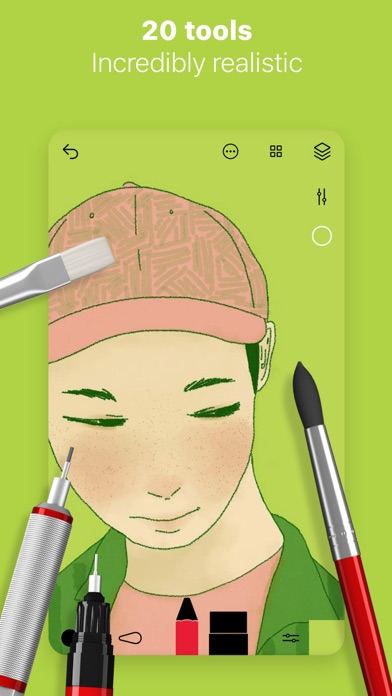




Description by SKETCHES SRL Written by the developer, not by AppBrain. Click to read.
Sketches is the most realistic, versatile and user-friendly sketching app designed for a mobile device. This exhaustive artist's toolbox helps users create dazzling sketches, cheerful paintings and smashing illustrations on the go.
Sketches includes a Pro Bundle IAP that make it exactly the same as the Paid Sketches Pro App.
• Features
- Import photos
- Over 20 ultra realistic tools
- Incredibly realistic watercolor wet brushes
- Brush Editor
- Color Eyedropper
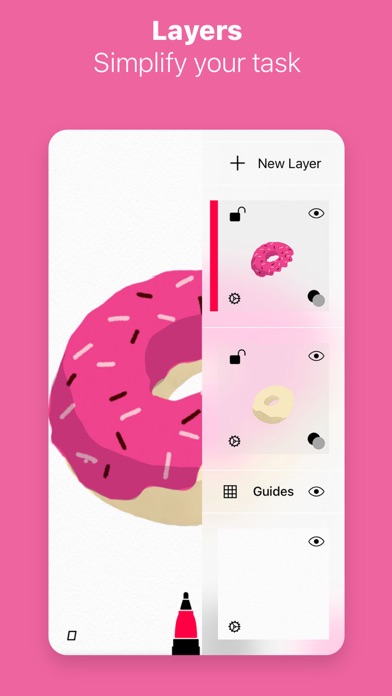
• Layers
- Use layers to simplify your task
- Export them as separate PNG with transparency
- import and export PSD layered files
• Cloud Sync
- Backup your drawings to the Cloud
- Synchronize your drawings between all your devices
- Manage sync options folder by folder
• Patterns
- Import, draw and customise your own patterns.
• Folders
Easily organize your drawings to personalize folders.
• Pressure Stylus support
Discover even more realistic brushes while Styluses.
Full support for Apple Pencil.
• A Unique feeling: Each stroke behaves vividly and truly like a brush on paper, adapting the pressure, angle, and width to your movements. It's an effect you have to see to believe.
• A unique UI with a touch of Zen : Tools are hidden away as you create and the bare minimum buttons are shown to make for a very clean canvas.
• List of tools
- Pen
- Rotring
- Felt Pen
- Pen Brush
- Oil Pastel
- Watercolor Dry and Wet brushes
- Acrylic brush
- Airbrush
- Area and Filling tool
- Patterns
- Text
- Shapes (iPad only)
- Eraser
- Cutter
- Smudge tool
- Ruler
Subscribe to access to premium app features; subscription details are the following:
• Length: weekly, yearly
• Your payment will be charged to your iTunes Account as soon as you confirm your purchase
• You can manage your subscriptions and turn off auto-renewal from your Account Settings after the purchase
• Your subscription will renew automatically, unless you turn off auto-renew at least 24 hours before the end of the current period
• The cost of renewal will be charged to your account in the 24 hours prior to the end of the current period
• When canceling a subscription, your subscription will stay active until the end of the period. Auto-renewal will be disabled, but the current subscription will not be refunded
• Any unused portion of a free trial period, if offered, will be forfeited when purchasing a subscription
Terms of Use: https://www.apple.com/legal/internet-services/itunes/dev/stdeula/
Safety and technology
Found in the app by AppBrain- Price
- Free
- App size
- 474.6 MB
- Content rating
- Everyone
Technologies used by Tayasui Sketches
Releases
Updates seen on the App Store- Version
- 36.9
- Launched
- June 2013
No changelog data
Alternatives
Similar apps and more from SKETCHES SRL


Rankings
App Store top chartsApp Store Rankings for Tayasui Sketches
About the app and developer
About Tayasui Sketches
Tayasui Sketches is a graphics & design app developed by SKETCHES SRL.
User Ratings
Tayasui Sketches is rated 4.54 out of 5 stars. The rating is based on 54 thousand ratings.
App Information
Tayasui Sketches is freely available from the App Store. The app size is 474.63 MB. The latest version available is 36.9. The last update was on October 9, 2026.
Technical Requirements
The app has a content rating of Everyone. The app has been available on the App Store since June 2013.
Developer information for SKETCHES SRL
Address: