

Label Printer: Address Labels
Label Printer: Address Labels is made and published by Phuc Pham. AppBrain is an independent app data site and isn't affiliated with Phuc Pham. The app name, icon, screenshots and description belong to Phuc Pham and are shown as published on the App Store.
AppBrain's verdict
- Last updated
- August 19, 2026
- Size
- 5.60 MB
User feedback
Ratings and reviews on the App StoreComments on Label Printer: Address Labels for iOS
We don't have enough comments to show example comments. Please check back later.
Store listing
By Phuc Pham, from the App Store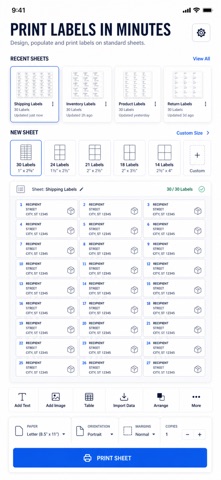




Description by Phuc Pham Written by the developer, not by AppBrain. Click to read.
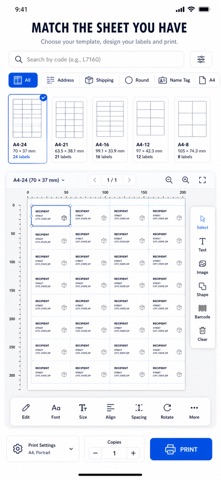
Most label apps guess at spacing. Label Printer uses the real grid geometry for each sheet code (30-per-sheet address, shipping, return, name badge, round, file folder and more), so what you see on screen is what prints on the page. Import from Contacts, paste a whole list to auto-fill the grid, drop in a QR or barcode, then send it to any AirPrint printer or export a print-ready PDF.
WHAT YOU GET
- Address labels that line up dead-center on the real grid for your sheet code
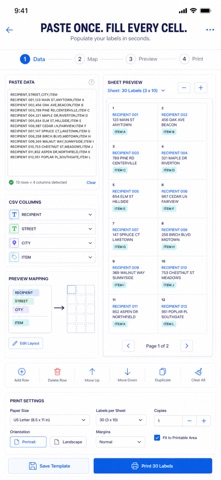
- Paste a CSV or list and auto-fill every cell at once, one address per label
- Pull names and mailing addresses straight from your Contacts
- Add QR, Code 128, EAN-13, PDF417 or Aztec codes to any label
- Print over AirPrint or export a sharp, print-ready PDF to share or archive
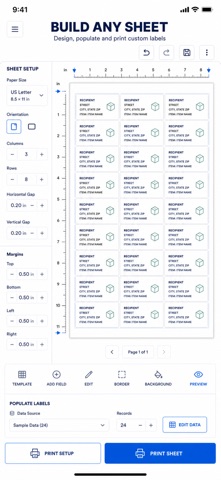
- Style each cell with fonts, color, alignment, bold, italic and auto-fit sizing
PERFECT FOR
- Small shops printing return and shipping labels for every order
- Anyone mailing invitations, holiday cards or newsletters in bulk
- Event hosts printing name badges and place tags fast
- Organizers labeling folders, jars, bins and inventory
WHY NOT JUST USE A WORD PROCESSOR TEMPLATE
Desktop templates drift by a few millimeters and ruin the whole sheet. Label Printer maps each design to the exact cell coordinates of your sheet code, so column one never bleeds into column two — and you do it all from your phone.
PRIVACY
Your labels, contacts and lists stay on your device. Nothing is uploaded to a server.
FULL ACCESS
Label Printer is free to try with 3 full outputs. Unlock unlimited printing and PDF exports plus batch auto-fill (paste a whole list and populate every cell at once) with a single subscription or one-time purchase:
- Weekly
- Yearly
- Lifetime (one-time, unlocks everything forever)
Payment is charged to your Apple ID. Subscriptions auto-renew unless canceled at least 24 hours before the period ends; manage or cancel anytime in Settings. Lifetime is a one-time purchase.
Pick your sheet code and print your first sheet in under a minute.
Terms of Use (EULA): https://web-levi.web.app/terms
Privacy Policy: https://web-levi.web.app/privacy-policy
Questions? tphuc.work@gmail.com
Safety and technology
Found in the app by AppBrain- Price
- Free
- App size
- 5.60 MB
- Content rating
- Everyone
Technologies used by Label Printer: Address Labels
Releases
Updates seen on the App Store- Version
- 1.0.1
- Launched
- July 2026
No changelog data
Alternatives
Similar apps and more from Phuc PhamAlternatives to Label Printer: Address Labels


More from Phuc Pham


Rankings
App Store top chartsApp Store Rankings for Label Printer: Address Labels
About the app and developer
About Label Printer: Address Labels
Label Printer: Address Labels is a productivity app developed by Phuc Pham.
User Ratings
The app has no ratings yet.
App Information
Label Printer: Address Labels is freely available from the App Store. The app size is 5.60 MB. The latest version available is 1.0.1. The last update was on August 19, 2026.
Technical Requirements
The app has a content rating of Everyone. The app has been available on the App Store since July 2026.
Developer information for Phuc Pham
Address:
Frequently asked questions about Label Printer: Address Labels
Is Label Printer: Address Labels free?
Yes. Label Printer: Address Labels is free on the App Store.
Is Label Printer: Address Labels still available?
Yes. Label Printer: Address Labels is on the App Store, and the last update we saw was on August 19, 2026.
How large is Label Printer: Address Labels?
Label Printer: Address Labels is 5.60 MB.
Is Label Printer: Address Labels suitable for children?
App Store rates the content of Label Printer: Address Labels as suitable for everyone.
Who made Label Printer: Address Labels?
Label Printer: Address Labels was developed by Phuc Pham. It is listed in the productivity category on the App Store.
What are the best alternatives to Label Printer: Address Labels?
People looking at Label Printer: Address Labels also look at these productivity apps: Label Printer Address Stickers, Envelope Printer & Templates, PosPos, DPS Order App, Badgely: Name Badge Maker.