

Labely: Address Labels
Labely: Address Labels is made and published by Jhomar Maravillas. AppBrain is an independent app data site and isn't affiliated with Jhomar Maravillas. The app name, icon, screenshots and description belong to Jhomar Maravillas and are shown as published on the App Store.
AppBrain's verdict
- Last updated
- September 26, 2026
- Size
- 693.0 KB
User feedback
Ratings and reviews on the App StoreComments on Labely: Address Labels for iOS
We don't have enough comments to show example comments. Please check back later.
Store listing
By Jhomar Maravillas, from the App Store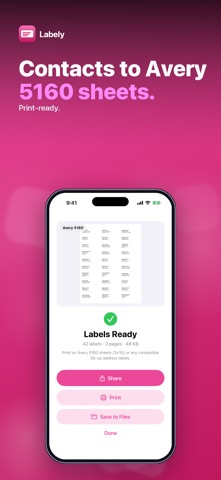


Description by Jhomar Maravillas Written by the developer, not by AppBrain. Click to read.
Choose your contacts, pick the label sheet, and Labely lays out one address per label. Then print, share or save the PDF.
• TWO LABEL SHEET LAYOUTS — Avery 5160 (US Letter, 3 × 10, 30 labels per page) and Avery Zweckform L7160 / 3652 (A4, 3 × 7, 21 per page), or any compatible 30-up or 21-up address labels.
• MULTI-SELECT FROM CONTACTS — only contacts with a postal address are listed. Search by name or address, Select All, or add more with the system contact picker.
• CLEAN ADDRESS BLOCKS — name first, company on the next line, multi-line streets kept intact. Long lines wrap inside the label instead of running off the edge, and “United States” is left off domestic labels.
• EVERY ADDRESS COUNTS — a contact with two addresses gets two labels. A live count shows how many labels and pages you are about to make.
• PRINT, SHARE OR SAVE — send the PDF straight to your printer, share it, or save it to Files.
Honest scope: Labely prints name and address text only (no logos, images or return-address layouts), and it uses the addresses exactly as they are saved in Contacts. With limited Contacts access on iOS 18, only the contacts you allowed are shown.
Labely reads your contacts only to build the labels. The PDF is made on your iPhone — nothing is uploaded and no account is needed.
Try it free — 3 label sheets. A one-time $4.99 purchase unlocks unlimited sheets. No subscription, no ads.
Questions: overlapmarr@gmail.com
Safety and technology
Found in the app by AppBrain- Price
- Free
- App size
- 693.0 KB
- Content rating
- Everyone
Technologies used by Labely: Address Labels
Releases
Updates seen on the App Store- Version
- 1.0.5
- Launched
- July 2026
No changelog data
Alternatives
Similar apps and more from Jhomar MaravillasAlternatives to Labely: Address Labels





More from Jhomar Maravillas


Rankings
App Store top chartsApp Store Rankings for Labely: Address Labels
About the app and developer
About Labely: Address Labels
Labely: Address Labels is a productivity app developed by Jhomar Maravillas.
User Ratings
The app has no ratings yet.
App Information
Labely: Address Labels is freely available from the App Store. The app size is 693.00 kB. The latest version available is 1.0.5. The last update was on September 26, 2026.
Technical Requirements
The app has a content rating of Everyone. The app has been available on the App Store since July 2026.
Developer information for Jhomar Maravillas
Address: