

Locker - Password Manager
Locker - Password Manager is made and published by 晖 姚. AppBrain is an independent app data site and isn't affiliated with 晖 姚. The app name, icon, screenshots and description belong to 晖 姚 and are shown as published on the App Store.
AppBrain's verdict
- Rating on App Store
- 5.00
- 6 ratings
- Last updated
- October 14, 2026
- Size
- 9.84 MB
It doesn't have enough ratings yet to judge what users think.
User feedback
Ratings and reviews on the App StoreComments on Locker - Password Manager for iOS
We don't have enough comments to show example comments. Please check back later.
Store listing
By 晖 姚, from the App Store


Description by 晖 姚 Written by the developer, not by AppBrain. Click to read.
Store passwords safely and effortlessly. Supports text, hand-drawn notes and photos.
— FEATURES —
- Supports import & export for easy password management.
- Gesture and fingerprint login for faster access.
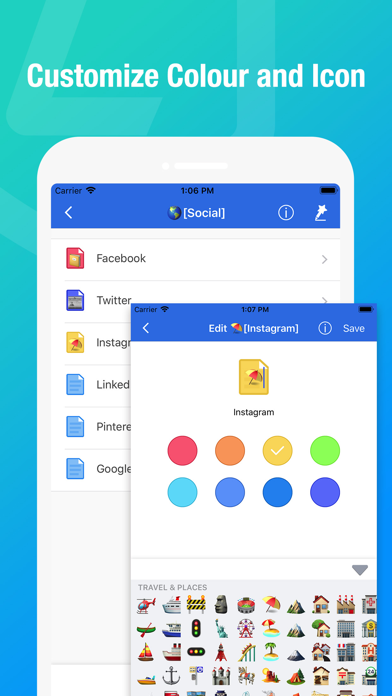
- Customize colors and icons for each record.
- High-strength encryption keeps your data secure.
- Supports text, hand-drawn notes and photos.
- Random password generator.
- Clone records.
- Powerful association features to quickly fill in data.
- iCloud backup & restore supported. Quickly recover data when switching phones or if your device is lost.
- Data wipe feature: data will be destroyed after exceeding your set number of wrong password attempts.
— SECURITY —
Leveraging Apple’s security mechanisms and iOS security system, all private data is encrypted and stored only on your device or iCloud. No one, including the developers, can access your private data or master password. Your encrypted private data is protected against hacking.
— LOCKER —
Everyone needs accounts and passwords to access websites. Reusing the same username and password is risky. Once credentials are stolen, your accounts on other sites face data leakage risks. However, unique complex passwords are hard to memorize. That’s why YOU NEED LOCKER!
Locker is a safe and convenient password manager.
Simple to use, with fast import and entry.
Manage text, hand-drawn images.
High security: not even developers can access your data.
For questions or feedback, please email us. We value your feedback, which drives our continuous improvement.
support@mxcode.com
* Privacy Policy: https://api.mxcode.com/html/locker/privacy/en.html
* Terms of Use: https://api.mxcode.com/html/locker/terms/en.html
Safety and technology
Found in the app by AppBrain- Price
- Free
- App size
- 9.84 MB
- Content rating
- Everyone
Technologies used by Locker - Password Manager
Releases
Updates seen on the App Store- Version
- 2.1
- Launched
- August 2022
No changelog data
Alternatives
Similar apps and more from 晖 姚Alternatives to Locker - Password Manager


More from 晖 姚



Rankings
App Store top chartsApp Store Rankings for Locker - Password Manager
About the app and developer
About Locker - Password Manager
Locker - Password Manager is an utilities app developed by 晖 姚.
What is the rating of Locker - Password Manager?
Locker - Password Manager is rated 5.00 out of 5 stars, based on 6 ratings.
Is Locker - Password Manager free?
Locker - Password Manager is free. The app size is 9.84 MB. The latest version available is 2.1. The last update was on October 14, 2026.
What are the requirements for Locker - Password Manager?
The app has a content rating of Everyone. The app has been available on the App Store since August 2022.
Developer information for 晖 姚
Address: