

Lockit Secure Password Manager
Lockit Secure Password Manager is made and published by Lockit Solutions Inc. AppBrain is an independent app data site and isn't affiliated with Lockit Solutions Inc. The app name, icon, screenshots and description belong to Lockit Solutions Inc. and are shown as published on the App Store.
AppBrain's verdict
EstablishedLoved by users- Rating on App Store
- 4.72
- 758 ratings
- Last updated
- October 5, 2026
Users love it: 4.7 stars from 758 ratings.
Rankings
App Store top chartsApp Store Rankings for Lockit Secure Password Manager
Competitors
Similar apps and more from Lockit Solutions Inc.Alternatives to Lockit Secure Password Manager




 App Lock - Lock Apps & Photos

Releases
Updates seen on the App Store- Version
- 4.5.1
- Launched
- August 2015
No changelog data
User feedback
Ratings and reviews on the App StoreComments on Lockit Secure Password Manager for iOS
We don't have enough comments to show example comments. Please check back later.
Technology
Found in the app by AppBrain- Price
- Free
- App size
- 62.4 MB
- Content rating
- Everyone
Technologies used by Lockit Secure Password Manager
About the app and developer
About Lockit Secure Password Manager
Lockit Secure Password Manager is a productivity app developed by Lockit Solutions Inc.
User Ratings
Lockit Secure Password Manager is rated 4.72 out of 5 stars. The rating is based on 760 ratings.
App Information
Lockit Secure Password Manager is freely available from the App Store. The app size is 62.43 MB. The latest version available is 4.5.1. The last update was on October 5, 2026.
Technical Requirements
The app has a content rating of Everyone. The app has been available on the App Store since August 2015.
Developer information for Lockit Solutions Inc.
Address:
Store listing
By Lockit Solutions Inc., from the App Store




Description by Lockit Solutions Inc. Written by the developer, not by AppBrain. Click to read.
Lockit keeps your passwords, website logins, credit cards, contact information, and PIN codes safe and one tap away, so you don't have to.
PASSWORD MANAGER & DIGITAL SAFE
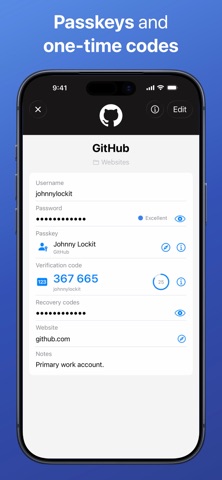
- Create and sign in with passwords and passkeys using AutoFill in Safari and other apps
- Store and AutoFill one-time verification codes (2FA), and import them from Google Authenticator and other authenticator apps
- Security Center catches weak, reused, and compromised passwords, plus duplicates and expiring credit cards or IDs
- Import from Apple Passwords, 1Password, LastPass, and other password managers
- Generate strong passwords with the built-in password generator
- Use Face ID, Touch ID, or a PIN code to unlock instantly
- Customizable categories: secure passwords, credit cards, private notes, IDs, memberships, rewards programs, and more
- Choose how to store your data: locally on one device, or backed up to the Lockit Secure Cloud
- Copy any field with a single tap
- Automatic icon matching for thousands of brands, plus your own custom icons
- Native iPhone, iPad, and Mac apps, designed for iOS 26 and macOS 26
- Full dark mode support
- Available in 13 languages, including English, Spanish, French, German, Japanese, Hindi, Arabic, and Chinese
SECURE FILE STORAGE & DATA BACKUP (PRO)
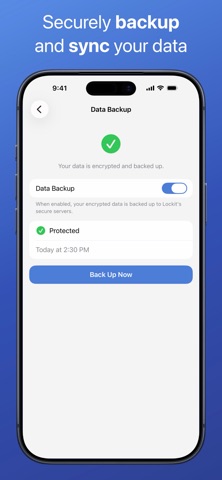
- Automatic, encrypted backup of your information to the Lockit Secure Cloud
- Recover everything in seconds if your device is lost or stolen
- Sync across all your devices
- Store unlimited records and custom categories
- Attach documents, photos, videos, and audio to any record
- Remotely wipe a lost or stolen device
- Unlimited password breach scans, with automatic checks every time you save or update a login
OUR SECURITY
- AES-256 encryption, the same standard used to protect classified data
- Your master password and encryption key are never sent to our servers. Only you can decrypt your vault
- PBKDF2 key derivation guards against brute-force attacks
- Two-factor authentication on every new device sign-in
- Self-destruct option wipes local data after repeated failed unlock attempts
CUSTOMER SUPPORT
- Dedicated support team
- Fast-response email support
Available for iPhone, iPad, and Mac.
We'd love to hear from you at feedback@lockitsolutions.com