

Luma View
Luma View is made and published by Wirepath Home Systems, LLC. AppBrain is an independent app data site and isn't affiliated with Wirepath Home Systems, LLC. The app name, icon, screenshots and description belong to Wirepath Home Systems, LLC and are shown as published on the App Store.
AppBrain's verdict
- Rating on App Store
- 2.14
- 7 ratings
- Last updated
- September 1, 2026
It doesn't have enough ratings yet to judge what users think.
Rankings
App Store top chartsApp Store Rankings for Luma View
Competitors
Similar apps and more from Wirepath Home Systems, LLC







Releases
Updates seen on the App Store- Version
- 1.10.77
- Launched
- December 2022
No changelog data
User feedback
Ratings and reviews on the App StoreComments on Luma View for iOS
We don't have enough comments to show example comments. Please check back later.
Technology
Found in the app by AppBrain- Price
- Free
- App size
- 104.2 MB
- Content rating
- Everyone
Technologies used by Luma View
About the app and developer
About Luma View
Luma View is a lifestyle app developed by Wirepath Home Systems, LLC.
What is the rating of Luma View?
Luma View is rated 2.14 out of 5 stars, based on 7 ratings.
Is Luma View free?
Luma View is free. The app size is 104.22 MB. The latest version available is 1.10.77. The last update was on September 1, 2026.
What are the requirements for Luma View?
The app has a content rating of Everyone. The app has been available on the App Store since December 2022.
Developer information for Wirepath Home Systems, LLC
Address:
Store listing
By Wirepath Home Systems, LLC, from the App Store

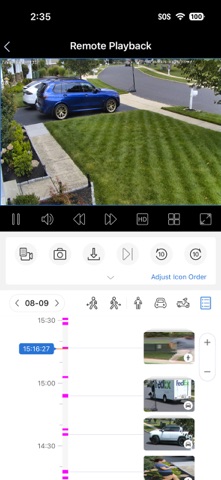


Description by Wirepath Home Systems, LLC Written by the developer, not by AppBrain. Click to read.
• Enjoy HD live viewing of a single or split screen (4, 9, or 16 channels simultaneously) in both portrait and landscape modes with convenient pinch to zoom
• Synchronize playback up to 16 channels
• User-friendly Smart Event Search with human and vehicle filtering
• Push message offer quick overview of latest events
• Auto switch between high or standard resolution depending on your remote connection
• Customize your grid views for multi-device management – Drag and drop cameras where you’d like them, even across multiple DVRs/NVRs
• Easily scan timeline and playback to find recordings and events
• Instantly capture snapshots or record videos with a tap of your finger
• Add snapshots and video to your photo library for safe keeping or to share with family, friends, or colleagues
• Listen or speak to whoever is on the other end (Audio support varies by camera model)
• Remotely control pan/tilt/zoom (PTZ) cameras