

Lumo: Creator Agent
Lumo: Creator Agent is made and published by Shanghai TacticSpace Technology Co., Ltd. AppBrain is an independent app data site and isn't affiliated with Shanghai TacticSpace Technology Co., Ltd. The app name, icon, screenshots and description belong to Shanghai TacticSpace Technology Co., Ltd. and are shown as published on the App Store.
AppBrain's verdict
- Last updated
- November 1, 2026
- Size
- 10.8 MB
User feedback
Ratings and reviews on the App StoreComments on Lumo: Creator Agent for iOS
We don't have enough comments to show example comments. Please check back later.
Store listing
By Shanghai TacticSpace Technology Co., Ltd., from the App Store

Description by Shanghai TacticSpace Technology Co., Ltd. Written by the developer, not by AppBrain. Click to read.
DEVELOP IDEAS INTO CONTENT
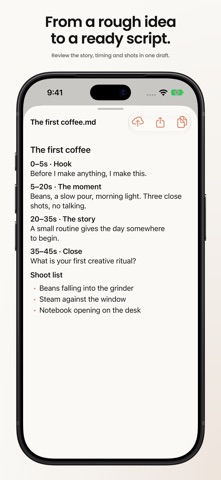
Start with a brief, a photo, or a dictated instruction. Tell your AI agent about the audience, goal, and format, then work on topics, hooks, outlines, scripts, titles, and captions. Develop shot lists, clip plans, and product copy. Continue the conversation to refine the tone or adapt existing work for another format.
ORGANIZE YOUR CONTENT SCHEDULE
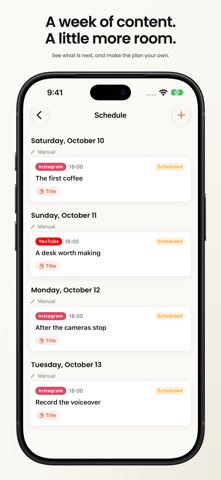
Create, edit, and remove schedule entries, and see what you have planned across projects. Preview an agent-generated content calendar before choosing Add to Schedule. When connected to your Mac, both devices work with the same schedule, so you can plan on your computer and make adjustments on your phone. Scheduling organizes your work; it does not automatically publish posts to social platforms.
STAY INVOLVED AS THE AGENT WORKS
Follow progress and tool activity as a task runs. Answer follow-up questions and respond to action requests according to your selected permission mode. Add instructions or stop a task when you need to change direction. Return to previous conversations to continue work, and search message history to find earlier requirements and decisions.
REVIEW AND USE THE RESULTS
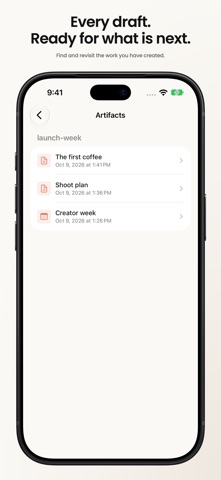
Open documents, images, content calendars, tables, diagrams, CSV data, and subtitle files directly in the app. Dedicated previews make writing, clip plans, and product information easier to inspect, with image comparisons available alongside other saved work. Browse artifacts across conversations, copy useful text, and share files through the system share sheet. Use available Skills to start tasks with structured inputs.
CONTINUE ON MOBILE, MAC, OR CLOUD
Use Lumo Cloud without connecting a Mac, or connect to Lumo for Mac to work with projects on your computer. While your Mac is online and mobile access is enabled, connect over the local network or a remote relay. Send a selected artifact to Lumo Cloud to continue working with it in a new cloud conversation.
Add photos or dictate instructions while you are away from your desk. Check results, answer a question, or approve the next step from your phone. Lumo supports English, Simplified Chinese, Japanese, Korean, Spanish, and Brazilian Portuguese, with a language choice in Settings or automatic selection based on your system language.
ACCOUNT AND PRIVACY
Lumo Cloud requires a Lumo account, and available features depend on your service plan. Connecting to a Mac requires Lumo to be running on that computer. The app explains when messages and attachments are processed by AI services, and provides AI data-sharing and privacy controls in Settings.
Support: https://getlumo.io/support
Privacy: https://getlumo.io/privacy
Contact: hi@getlumo.io
Safety and technology
Found in the app by AppBrain- Price
- Free
- App size
- 10.8 MB
- Content rating
- Everyone
Technologies used by Lumo: Creator Agent
Releases
Updates seen on the App Store- Version
- 1.4.0
- Launched
- July 2026
No changelog data
Alternatives
Similar apps and more from Shanghai TacticSpace Technology Co., Ltd.Alternatives to Lumo: Creator Agent


Rankings
App Store top chartsApp Store Rankings for Lumo: Creator Agent
About the app and developer
About Lumo: Creator Agent
Lumo: Creator Agent is a productivity app developed by Shanghai TacticSpace Technology Co., Ltd.
What is the rating of Lumo: Creator Agent?
Lumo: Creator Agent has no ratings yet.
Is Lumo: Creator Agent free?
Lumo: Creator Agent is free. The app size is 10.79 MB. The latest version available is 1.4.0. The last update was on November 1, 2026.
What are the requirements for Lumo: Creator Agent?
The app has a content rating of Everyone. The app has been available on the App Store since July 2026.
Developer information for Shanghai TacticSpace Technology Co., Ltd.
Frequently asked questions about Lumo: Creator Agent
Is Lumo: Creator Agent free?
Yes. Lumo: Creator Agent is free on the App Store.
Is Lumo: Creator Agent still available?
Yes. Lumo: Creator Agent is on the App Store, and the last update we saw was on November 1, 2026.
How large is Lumo: Creator Agent?
Lumo: Creator Agent is 10.79 MB.
Is Lumo: Creator Agent suitable for children?
App Store rates the content of Lumo: Creator Agent as suitable for everyone.
Who made Lumo: Creator Agent?
Lumo: Creator Agent was developed by Shanghai TacticSpace Technology Co., Ltd. It is listed in the productivity category on the App Store.
What are the best alternatives to Lumo: Creator Agent?
People looking at Lumo: Creator Agent also look at these productivity apps: Gika, FocusFour - Eisenhower Matrix, 吉真倪师-中医经络穴位方剂查询-倪海厦人纪天纪与紫微斗数排盘, 啃豆小仓, Trust Guardian: AI VPN Protect.