

Magnifier Reader: Big Text
Magnifier Reader: Big Text is made and published by 家宝 戴. AppBrain is an independent app data site and isn't affiliated with 家宝 戴. The app name, icon, screenshots and description belong to 家宝 戴 and are shown as published on the App Store.
AppBrain's verdict
- Rating on App Store
- 5.00
- 2 ratings
- Last updated
- October 13, 2026
- Size
- 1.35 MB
It doesn't have enough ratings yet to judge what users think.
User feedback
Ratings and reviews on the App StoreComments on Magnifier Reader: Big Text for iOS
We don't have enough comments to show example comments. Please check back later.
Store listing
By 家宝 戴, from the App Store



Description by 家宝 戴 Written by the developer, not by AppBrain. Click to read.
The app is built around five clear promises: Offline, No Login, Privacy First, On Device, No Cloud Upload. EasyLook does not require an account before you can use it. It does not ask you to sign in just to read small text. Its core reading, magnifier, settings, and reminder workflows are designed to stay on your iPhone, with no online account, cloud profile, or remote document library to manage.
What EasyLook helps with:
* Magnifier for small print
Use the camera as a clear, full-screen magnifier. Move the zoom slider from 1x to 5x, turn on the flashlight in a dim room, and look more comfortably at labels, instructions, menus, receipts, packaging, pill bottles, appliance panels, forms, and everyday fine print. The controls are large, direct, and easy to tap.
* Big-text reader
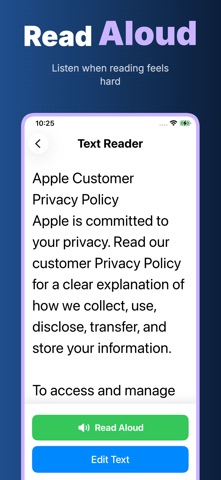
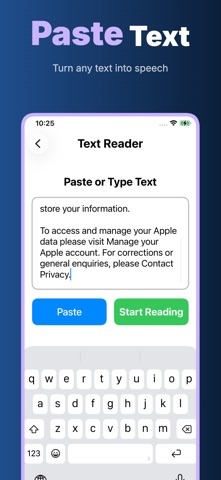
Paste or type text into the reader and view it in a calm layout with large type and generous line spacing. This is useful for long messages, copied instructions, policy text, appointment notes, addresses, phone numbers, or anything that feels cramped on a normal screen. When reading with your eyes is tiring, use Read Aloud, Pause, Resume, and Stop controls to listen instead.
* Helpful reminders
Create simple reminders for medicine, rest, phone calls, and other daily routines. Choose a time, add a note such as before meal, after meal, or dosage, and keep important reminders visible. EasyLook is not a medical diagnosis or treatment tool; it is a practical timer and reminder helper for everyday care routines.
* Comfortable settings
Choose a text size that feels right: Standard, Large, or Extra Large. Select a contrast mode for different lighting and vision needs: black on white, white on black, or yellow on black. Settings are safe and reversible, so the app can be adjusted without fear of breaking anything.
* Simple home screen
EasyLook keeps the main actions easy to find: Magnifier, Reader, Reminders, Help, and Settings. The interface uses large buttons, clear labels, and a quiet layout so a parent, grandparent, caregiver, or first-time iPhone user can understand where to go without searching through many tabs.
Why privacy matters here
Reading and reminder data can be personal. A medicine name, a pasted message, a document excerpt, a reminder note, or a photo of a label may reveal private daily details. EasyLook is designed to avoid unnecessary accounts and unnecessary cloud upload. You should be able to use a reading helper without turning small private moments into online data.
Offline: core features are made for everyday use without depending on a web account.
No Login: open the app and start using the magnifier, reader, settings, and reminders without registration.
Privacy First: the product is designed around clarity and user control, not data collection.
On Device: reading text, reminder storage, display settings, and camera magnification happen on your device.
No Cloud Upload: EasyLook does not upload your reading text, reminder list, or magnifier use to its own cloud.
EasyLook helps at home, in stores, while traveling, or when supporting an older family member: make text bigger, read comfortably, hear text aloud, remember important times, and keep the experience private.
Privacy Policy
https://5gotogo.github.io/EasyLook-privacy/privacy-policy.html
Terms of Use
https://www.apple.com/legal/internet-services/itunes/dev/stdeula/
Safety and technology
Found in the app by AppBrain- Price
- Free
- App size
- 1.35 MB
- Content rating
- Everyone
Technologies used by Magnifier Reader: Big Text
Releases
Updates seen on the App Store- Version
- 1.0.3
- Launched
- January 2026
No changelog data
Alternatives
Similar apps and more from 家宝 戴Alternatives to Magnifier Reader: Big Text


 Calorie Counter:CalorieTracker

More from 家宝 戴


Rankings
App Store top chartsApp Store Rankings for Magnifier Reader: Big Text
About the app and developer
About Magnifier Reader: Big Text
Magnifier Reader: Big Text is a health & fitness app developed by 家宝 戴.
What is the rating of Magnifier Reader: Big Text?
Magnifier Reader: Big Text is rated 5.00 out of 5 stars, based on 2 ratings.
Is Magnifier Reader: Big Text free?
Magnifier Reader: Big Text is free. The app size is 1.35 MB. The latest version available is 1.0.3. The last update was on October 13, 2026.
What are the requirements for Magnifier Reader: Big Text?
The app has a content rating of Everyone. The app has been available on the App Store since January 2026.
Developer information for 家宝 戴
Address:
Frequently asked questions about Magnifier Reader: Big Text
Is Magnifier Reader: Big Text free?
Yes. Magnifier Reader: Big Text is free on the App Store.
Is Magnifier Reader: Big Text still available?
Yes. Magnifier Reader: Big Text is on the App Store, and the last update we saw was on October 13, 2026.
How large is Magnifier Reader: Big Text?
Magnifier Reader: Big Text is 1.35 MB.
Is Magnifier Reader: Big Text suitable for children?
App Store rates the content of Magnifier Reader: Big Text as suitable for everyone.
How do people rate Magnifier Reader: Big Text?
Magnifier Reader: Big Text scores 5.00 out of 5 stars, from 2 ratings on the App Store.
Who made Magnifier Reader: Big Text?
Magnifier Reader: Big Text was developed by 家宝 戴. It is listed in the health & fitness category on the App Store.
What are the best alternatives to Magnifier Reader: Big Text?
People looking at Magnifier Reader: Big Text also look at these health & fitness apps: Moodvale: Mood Tracker & Diary, StackOverload, PTHP Health+Wellness, I'MPOWER Fitness Center, Menopause Symptoms Tracker.