Download Android Apps and Games
AppBrain
  • Apps
  • Apps being viewed right now Trending apps today Most popular apps All-time most downloaded apps Top rated apps iPhone and iPad apps
  • Intelligence ▾
    Intelligence overview → Track any Android app or your whole market
    Track & analyze
    Keyword Tracker & OptimizerTrack & improve Play rankings App Performance ReportOne-off PDF for any app StatisticsFree Android & Play market stats
    Promote your app
    Featured Apps App Links
  • Intelligence
  • Pricing
  • Dashboard
  • Sign up
  • Log in
Last updated on: 2026-09-21
App Store Apps > Productivity > MarkUp — Text & Math Editor
MarkUp — Text & Math Editor icon

MarkUp — Text & Math Editor

1.5.1
Valentin Donchev
5.00
2 reviews
Free

MarkUp — Text & Math Editor Screenshot 1 of 7
MarkUp — Text & Math Editor Screenshot 2 of 7
MarkUp — Text & Math Editor Screenshot 3 of 7
MarkUp — Text & Math Editor Screenshot 4 of 7
MarkUp — Text & Math Editor Screenshot 5 of 7
MarkUp — Text & Math Editor Screenshot 6 of 7
MarkUp — Text & Math Editor Screenshot 7 of 7
5.00 · 2 reviews
Download from the App Store

About MarkUp — Text & Math Editor

MarkUp — Text & Math Editor is a productivity app developed by Valentin Donchev.

User Ratings

MarkUp — Text & Math Editor is rated 5.00 out of 5 stars. The rating is based on 2 ratings.

App Information

MarkUp — Text & Math Editor is FREE to download. The download size is 65.34 MB. The latest version available is 1.5.1. The last update was on September 18, 2026.

Technical Requirements

The app has a content rating of Everyone. The app has been available on App Store April 2026.

Description
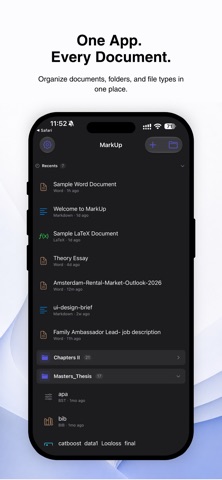
MarkUp is a writing app for notes, research, and long-form work. Edit Word documents with a true page layout, write in Markdown with live preview, or typeset a full LaTeX thesis with a real XeTeX engine that runs entirely on your device. For students, researchers, and technical writers — with the same features on iPhone, iPad, and Mac, in one universal purchase.

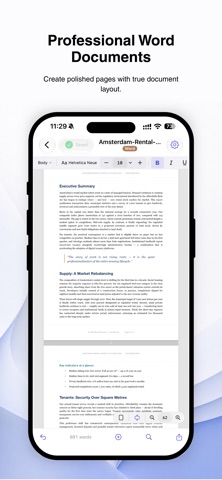
Word (.docx) documents
• Create and edit fully formatted Word documents with a real page layout
• Tables you can type straight into — fonts, colors, shading, and bullets inside cells, with full undo
• Charts with editable data, plus shapes and text boxes — drag anything anywhere and resize from any corner
• Photos with text wrap: in line with text, in columns, behind text, or in front of text
• Table of contents, captions and cross-references, citations with a works-cited list
• Footnotes and endnotes, comments with replies, and tracked changes
• Custom styles, multilevel and clause numbering, and newspaper columns
• Page size, margins, line spacing, and headers & footers — saved per document
• Calibri and Cambria render with matching character widths, so line breaks and page counts stay where Word put them
• LaTeX math inside Word documents (Pro)

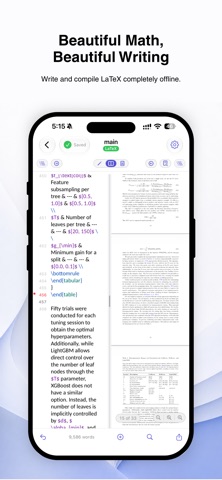
LaTeX, offline (Pro)
• A real XeTeX engine on your device — no internet, no account, nothing uploaded
• Download the typesetting files once, then compile on a plane
• Tap the rendered page to jump to the line that made it, and back again (SyncTeX)
• Autocomplete for commands, citations, references, environments, and file paths
• Errors and warnings marked in the margin, with plain-English explanations
• Code check that catches common LaTeX mistakes before you compile
• Search the typeset PDF, follow its outline, fold sections, step through pages
• Math symbol palette, visual table builder, live preview of the equation at your cursor
• Multi-file projects, BibTeX bibliographies, and ready-made templates

Write in Markdown
• Live rendered preview as you type
• LaTeX math equation rendering (KaTeX)
• Split view — write and preview side by side
• Table editor with a visual grid
• Find & replace with match highlighting
• Word count and character count

One app, all your devices
• The same features on iPhone, iPad, and Mac — not a cut-down mobile version
• One universal purchase: buy Pro once, use it everywhere
• Documents, templates, and settings sync through iCloud

Templates
• Start from a ready-made article, paper, thesis, problem set, presentation, or CV
• Save any document as a reusable template, for any file type (Pro)

Version history
• Automatically keeps earlier drafts as you edit
• Compare any version against the current file with side-by-side rendered differences
• Restore any earlier version in a tap (Pro)

Files & workflow
• Works with txt, md, tex, rmd, fountain, yaml, yml, json, csv, html, rtf, and docx files
• Export to PDF, HTML, RTF, Markdown, LaTeX, Word, and plain text
• Open and sync any folder from iCloud or your device, including subfolders
• Find & replace across an entire folder
• Customizable toolbar — show only what you need
• Spell check that understands LaTeX, in the language you write in
• Autosave, dark mode, and full keyboard shortcut support

MarkUp is free to use. MarkUp Pro unlocks offline LaTeX typesetting, LaTeX math in Word documents, version history, your own templates, and unlimited file exports — as a one-time purchase or a yearly subscription, across all your devices.

Privacy Policy: https://appsvaldonchevdeveloper.com/privacy/markup
Terms of Use: https://www.apple.com/legal/internet-services/itunes/dev/stdeula/
Show more Show less

More data about MarkUp — Text & Math Editor

Price Free to download
Rating 5.00 based on 2 ratings
Ranking Not ranked
Version 1.5.1
App download size 65.3 MB
Suitable for Everyone

Alternative downloads for the MarkUp — Text & Math Editor app

MathNote: for Research icon MathNote: for Research
Kihun Nam
5.0
Free
1 ratings
Dawn - Markdown icon Dawn - Markdown
Hallidai Inc.
5.0
Free
1 ratings
MathDown - Markdown LaTeX Docs icon MathDown - Markdown LaTeX Docs
Milestone Made, LLC
0.0
$9.99
Markdown Viewer: Copy for AI icon Markdown Viewer: Copy for AI
Yusuke Yamamoto
0.0
Free
Scout: Zettelkasten Notes icon Scout: Zettelkasten Notes
CHIYODA NAME PLATE SEISAKUSHO, K.K.
1.0
Free
1 ratings
Calendar Paste 3 icon Calendar Paste 3
Christian Tietze
4.0
$1.99
9 ratings
Kryven Vault - ID & Doc Wallet icon Kryven Vault - ID & Doc Wallet
Kryven Technologies LLC
5.0
Free
3 ratings
Quick Search File icon Quick Search File
CHAO CHIN TING
4.0
Free
1 ratings

More from Valentin Donchev

Tolk - Offline Translator icon Tolk - Offline Translator
Valentin Donchev
5.0
Free
2 ratings

Changelog of MarkUp — Text & Math Editor

No changelog data

Developer information for Valentin Donchev

Valentin Donchev

Address:

Share MarkUp — Text & Math Editor

Comments on MarkUp — Text & Math Editor for iOS

We don't have enough comments to show example comments. Please check back later.

App Store Rankings for MarkUp — Text & Math Editor

This app is not ranked

Technologies used by MarkUp — Text & Math Editor

Top new apps Apps on sale Apps other people are watching Today's trending apps Popular Productivity Apps
MathNote: for Research icon MathNote: for Research
Dawn - Markdown icon Dawn - Markdown
MathDown - Markdown LaTeX Docs icon MathDown - Markdown LaTeX Docs
Markdown Viewer: Copy for AI icon Markdown Viewer: Copy for AI
Scout: Zettelkasten Notes icon Scout: Zettelkasten Notes
Calendar Paste 3 icon Calendar Paste 3
Kryven Vault - ID & Doc Wallet icon Kryven Vault - ID & Doc Wallet
Quick Search File icon Quick Search File

Back to top
AppBrain Intelligence premium content

Subscribe now to get full and unlimited access to AppBrain Intelligence. You'll have access to:

  • App Intelligence dashboard (performance timeline, competitor comparison, country rankings, insight cards)
  • Detailed ranking data per app
  • Full timeline per developer
  • Device market shares data per country
  • Unlimited keyword tracking
1 Month

$75/mo
(billed every month)

SAVE 0%
Subscribe
3 Months

$65/mo
($195 billed every 3 months)

SAVE 13%
Subscribe
1 Year

$57.50/mo
($690 billed every year)

SAVE 23%
Subscribe
Each subscription will automatically renew 3 days before the expiration date for the same time period. Subscriptions can be cancelled at any time before the renewal.

AppBrain is a directory focused on discovering great apps and games. We give statistics, rankings and search options that Google Play and the App Store don't have. All trademarks are owned by their respective owners. AppBrain doesn't offer APKs or binaries, and always lets users install the official version from Google Play or the App Store.

More apps

  • Top Android apps being viewed
  • OPA: Get Brand Collabs
  • Notepad - Notes, Notebook
  • View Tiri Solitaire TriPeaks

App statistics

  • Android statistics
  • Google Play Developer stats
  • Trending Android Apps
  • Trending iOS apps
  • Top popular Apps
  • Buy the best Android phone

About AppBrain

  • Contact
  • Privacy
  • Documentation
  • DMCA takedowns
  • Articles
  • Blog
  • Tips to improve your Android promotional campaign
© 2010-2026 - AppBrain