Download Android Apps and Games
AppBrain
  • Apps
  • Apps being viewed right now Trending apps today Most popular apps All-time most downloaded apps Top rated apps
  • Intelligence ▾
    Intelligence overview → Track any Android app or your whole market
    Track & analyze
    Keyword Tracker & OptimizerTrack & improve Play rankings App Performance ReportOne-off PDF for any app StatisticsFree Android & Play market stats
    Promote your app
    Featured Apps App Links
  • Intelligence
  • Pricing
  • Dashboard
  • Sign up
  • Log in
Last updated on: 2026-06-24
App Store Apps > Productivity > Menu Minder - To Do Reminders
Menu Minder - To Do Reminders icon

Menu Minder - To Do Reminders

2.1.4
Limit Point Software
4.00
1 reviews
Free

Menu Minder - To Do Reminders Screenshot 1 of 10
Menu Minder - To Do Reminders Screenshot 2 of 10
Menu Minder - To Do Reminders Screenshot 3 of 10
Menu Minder - To Do Reminders Screenshot 4 of 10
Menu Minder - To Do Reminders Screenshot 5 of 10
Menu Minder - To Do Reminders Screenshot 6 of 10
Menu Minder - To Do Reminders Screenshot 7 of 10
Menu Minder - To Do Reminders Screenshot 8 of 10
Menu Minder - To Do Reminders Screenshot 9 of 10
Menu Minder - To Do Reminders Screenshot 10 of 10
Download from the App Store

About Menu Minder - To Do Reminders

Menu Minder - To Do Reminders is an overall app developed by Limit Point Software.

Download Statistics

User Ratings

Menu Minder - To Do Reminders is rated 4.00 out of 5 stars. The rating is based on one rating ratings.

App Information

Menu Minder - To Do Reminders is FREE to download. The APK download size is 6.51 MB. The latest version available is 2.1.4. The last update was on May 16, 2023.

Technical Requirements

The app has a content rating of Everyone. The app has been available on Google Play September 2015.

Description
Never forget anything ever again. Menu Minder is an app for organizing reminders.

Keep your plans in order and make sure you are reminded of the tasks and plans you have set for yourself.

Reminders are color coded when they repeat.

Menu Minder uses notifications and internal alerts. You can have reminders repeat hourly, daily, weekly, etc.

Reminders can be saved into reminder sets that are Menu Minder documents. These documents can be saved and shared. You can email them, or save them in Files.

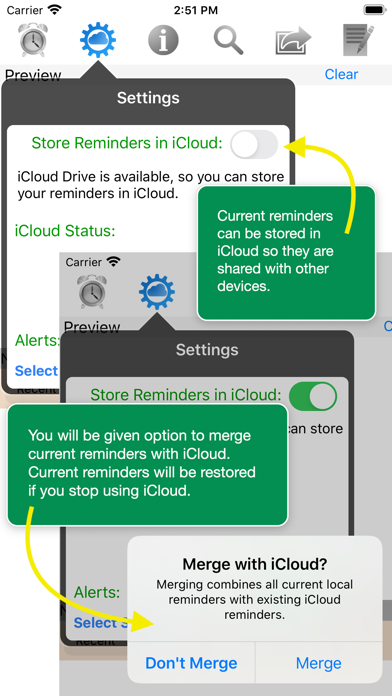
If you use iCloud you can view and edit the same reminders on your desktop and mobile devices.

Documentation of all features is provided conveniently in the app itself.

Here is a broad overview of major features of Menu Minder:

• Create, manage and access your reminders from all of your iOS devices and macOS computers

• Store reminders in iCloud, locally on the device, or both

• Set a "fire" date and time to be reminded by Menu Minder with in-app alerts, local device notifications and a list of recently fired reminders

• Recent reminders, i.,e. reminders that have fired, are displayed in a separate list in the main view called “Recents”. You can clear them all at once.

• Clear items from recents when they are completed

• Organize, save and backup reminders into "Reminder Sets" that can be shared on other iOS or macOS devices

• Switch between Reminder Sets for different projects and contexts

• Email Reminder Sets as attachments

• Open attached Reminder Sets in Menu Minder from the Mail app by simply tapping on them in the message (in iOS and macOS)

• On the Mac you can use device file sharing in the Finder to add Reminder Sets to Menu Minder, or copy them from your iPhone or iPad to the Mac with drag and drop to the Finder

• Reminders can be sorted by their creation, modification, fire and fired date or by text

• Reminders with styled text and photos are all conveniently displayed, sorted and accessed in a menu list format

• Tap reminder items in the menu to edit them

• Export reminders or recents as text, mail, messages, PDFs, or Menu Minder's own document format via the standard iOS Share mechanism

• Choose from a variety of in-app alert and notification sounds to accompany a reminder to get your attention when they fire

• Reminders are colored according to the number of times they fired: green, yellow and orange for 1st, 2nd and 3rd times respectively, and red thereafter

• Repetition intervals: minute, hour, day, week or month

• Search reminders by content to easily find what you are looking for

• Supports local device notifications when a reminder fires if the app is in the background or the device is in lock screen mode

• The display can be tailored by options such as whether or not to number reminders or truncate them when displayed in the menu, or display as styled text with graphics or simply plain text

• Editor supports all fonts, various sizes and colors, internal copy and pasting of styles, and insertion or pasting of images from the photo library or camera

• Contains a special editor style named “Crazy Text” - use it to apply a style that consists of randomly selected fonts, colors and sizes to any text selection!

• Create and view reminders with Siri. Some things you can ask Siri to do with Menu Minder:

Remind me with Menu Minder
Create a reminder with Menu Minder

Show reminders witeh Menu Minder
Show today's reminders with Menu Minder
Show tomorrow's reminders with Menu Minder
Show next weeks reminders with Menu Minder
Show more Show less

More data about Menu Minder - To Do Reminders

Price Free to download
Rating 4.00 based on a single rating
Ranking Not ranked
Version 2.1.4
App download size 6.51 MB
Suitable for Everyone

Alternative downloads for the Menu Minder - To Do Reminders app

Colorize Remember That icon Colorize Remember That
Colorize
0.0
Free
Projects & Tasks icon Projects & Tasks
Tom Tegelhoff
0.0
Free
Higher rated
TaskAngel To-Do List icon TaskAngel To-Do List
Andrew Boswell
4.6
$4.99
10 ratings
TimeLimits icon TimeLimits
naoki okamura
0.0
Free
TaskFocus: To-Do list, planner icon TaskFocus: To-Do list, planner
Artem Denisov
0.0
Free
Higher rated
AI-dea: AI Idea Concretization icon AI-dea: AI Idea Concretization
yu nakamura
5.0
Free
5 ratings
Higher rated
Present Anything icon Present Anything
Quirin Parstorfer
4.3
Free
3 ratings
Reminder Butler - Chat with AI icon Reminder Butler - Chat with AI
Yoshinori Tsuchiya
3.0
Free
1 ratings

More from Limit Point Software

Grapes - Scales & Chords icon Grapes - Scales & Chords
Limit Point Software
4.6
Free
40 ratings
Patterns - Personal Analytics icon Patterns - Personal Analytics
Limit Point Software
4.5
Free
34 ratings
Spectra - Video & Audio to Art icon Spectra - Video & Audio to Art
Limit Point Software
3.4
Free
8 ratings
Justified Photo Collage icon Justified Photo Collage
Limit Point Software
3.4
Free
8 ratings
Photo Cube - Animated Art icon Photo Cube - Animated Art
Limit Point Software
3.3
Free
7 ratings
AddMovie icon AddMovie
Limit Point Software
4.0
Free
4 ratings
Photo Reflect - Video too! icon Photo Reflect - Video too!
Limit Point Software
4.0
Free
4 ratings
URL to Photo icon URL to Photo
Limit Point Software
3.5
Free
4 ratings

Changelog of Menu Minder - To Do Reminders

No changelog data

Developer information for Limit Point Software

Limit Point Software

Address:

Share Menu Minder - To Do Reminders

Comments on Menu Minder - To Do Reminders for iOS

We don't have enough comments to show example comments. Please check back later.

App Store Rankings for Menu Minder - To Do Reminders

This app is not ranked

Technologies used by Menu Minder - To Do Reminders

Apps on sale Apps other people are watching Today's trending apps Popular Overall Top new apps
Colorize Remember That icon Colorize Remember That
Projects & Tasks icon Projects & Tasks
TaskAngel To-Do List icon TaskAngel To-Do List
TimeLimits icon TimeLimits
TaskFocus: To-Do list, planner icon TaskFocus: To-Do list, planner
AI-dea: AI Idea Concretization icon AI-dea: AI Idea Concretization
Present Anything icon Present Anything
Reminder Butler - Chat with AI icon Reminder Butler - Chat with AI

Back to top
AppBrain Intelligence premium content

Subscribe now to get full and unlimited access to AppBrain Intelligence. You'll have access to:

  • App Intelligence dashboard (performance timeline, competitor comparison, country rankings, insight cards)
  • Detailed ranking data per app
  • Full timeline per developer
  • Device market shares data per country
1 Month

$75/mo
(billed every month)

SAVE 0%
Subscribe
3 Months

$65/mo
($195 billed every 3 months)

SAVE 13%
Subscribe
1 Year

$57.50/mo
($690 billed every year)

SAVE 23%
Subscribe
Each subscription will automatically renew 3 days before the expiration date for the same time period. Subscriptions can be cancelled at any time before the renewal.

AppBrain is a directory focused on discovering great apps and games. We give statistics, rankings and search options that Google Play and the App Store don't have. All trademarks are owned by their respective owners. AppBrain doesn't offer APKs or binaries, and always lets users install the official version from Google Play or the App Store.

More apps

  • Top Android apps being viewed
  • IRBpro Companion Application
  • 7DS CC Calculator for Android
  • Get Daily Diamond

Android Statistics

  • Android statistics
  • Google Play Developer stats
  • Trending Android Apps
  • Top popular Apps
  • Buy the best Android phone

About AppBrain

  • Contact
  • Privacy
  • Documentation
  • DMCA takedowns
  • Articles
  • Blog
  • Android app Install tracking and attribution options for the AppBrain ad network
© 2010-2026 - AppBrain