AppBrain
AppBrain
  • Apps
  • Apps being viewed right now Trending apps today Most popular apps All-time most installed apps Top rated apps iPhone and iPad apps
  • Intelligence ▾
    Intelligence overview → Track any Android app or your whole market
    Track & analyze
    Keyword Tracker & OptimizerTrack & improve Play rankings App Performance ReportOne-off PDF for any app StatisticsFree Android & Play market stats
    Promote your app
    Featured Apps App Links
  • Intelligence
  • Pricing
  • Dashboard
  • Sign up
  • Log in
App Store Apps > Productivity > Microsoft OneDrive
App profile & analytics · Productivity · Data updated 2026-10-17
Microsoft OneDrive icon

Microsoft OneDrive

by Microsoft Corporation · Free · Version 18.12.3
Availability On the App Store since December 2011 ↗
Rating on App Store
4.70/5
487,843 ratings
Rating
4.70
487,843 reviews
Best rank
#6
Top Grossing, Productivity, Finland
Last updated
October 16, 2026
18.12.3
AppBrain's verdict EstablishedLoved by usersTop 10

Users love it: 4.7 stars from 487,843 ratings. Its best ranking is #6 in Top Grossing, Productivity in Finland.

Microsoft OneDrive is made and published by Microsoft Corporation. AppBrain is an independent app data site and isn't affiliated with Microsoft Corporation. The app name, icon, screenshots and description belong to Microsoft Corporation and are shown as published on the App Store.

About Microsoft OneDrive

Microsoft OneDrive is a productivity app developed by Microsoft Corporation.

What is the rating of Microsoft OneDrive?

Microsoft OneDrive is rated 4.70 out of 5 stars, based on 490 thousand ratings.

Is Microsoft OneDrive free?

Microsoft OneDrive is free. The app size is 359.07 MB. The latest version available is 18.12.3. The last update was on October 16, 2026.

What are the requirements for Microsoft OneDrive?

The app has a content rating of Everyone. The app has been available on the App Store since December 2011.

Description by Microsoft Corporation (from the App Store)
Microsoft OneDrive keeps your photos, videos, and files backed up, protected, synced, and accessible on all your devices. The OneDrive app lets you view and share OneDrive files, photos, and videos with friends and family. You can use the app to automatically back up your phone's photos and videos. Start with 5 GB of free cloud storage or upgrade to a Microsoft 365 subscription to get up to 1 TB.

Microsoft OneDrive Features:

Back up photos and videos
• Automatic photo and video backup when you turn on Camera Upload
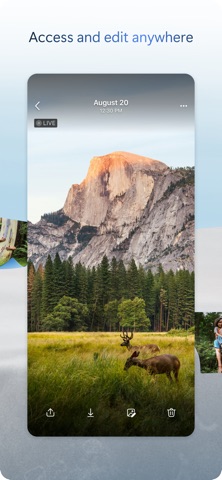
• View photos and videos on your phone, computer, and web browser

File sharing and management
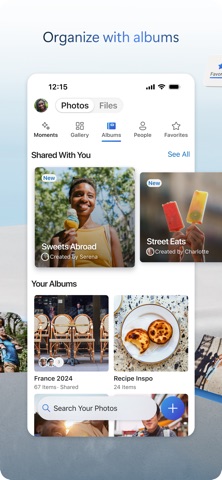
• Share files, photos, videos, and albums with friends and family
• Get notifications when a shared document is edited
• Set password-protected or expiring sharing links*
• Access entire folders on the app even when there is no internet connection*

Scan
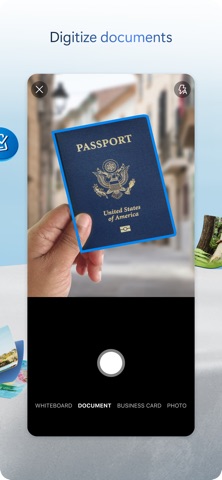
• Scan and save documents, business cards, receipts, whiteboards, and more
• Mark up, sign, and send docs right from the OneDrive mobile app

Search
• Search docs by name or content

Security
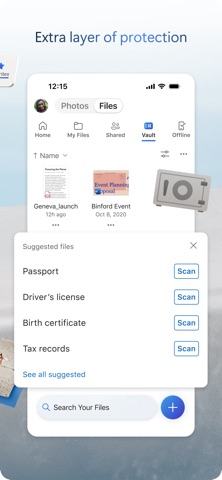
• Personal Vault lets you protect your important files with identity verification
• Restore documents with version history on all files
• Ransomware detection and recovery*

Works with Microsoft Word, Excel, PowerPoint, OneNote, Outlook
• Back up, view, and save your Office documents.
• Use Microsoft Office apps to edit and collaborate in real time on Word, Excel, PowerPoint, and OneNote files stored in OneDrive.
• Edit documents offline and save them once you are back online

Upgrade to a Microsoft 365 Personal or Family subscription:
• 1TB of storage (1TB of storage per person for up to 6 people with the Family subscription)
• Access OneDrive premium features
• Get access to Word, Excel, PowerPoint, Outlook, and OneNote on iPad, iPhone, and iPod touch
• Install Word, Excel, PowerPoint, and Outlook on PCs or Macs.
• Bigger personal vault
• Keep your shared files, folders and photos more secure by giving others access for a limited period of time
• Ransomware detection and recovery
• Offline Folders: Stay productive and access entire folders even when there is no internet connection
• Increase your sharing limit and share 10x content per day with friends and family

You can also purchase additional cloud storage only, with a Microsoft 365 Basic subscription. This is enough cloud storage for 32,000 photos (9 MP JPEG photos) or 132,000 documents (.7 MB Office files).

To make an in-app purchase of a Microsoft 365 Basic, Microsoft 365 Personal, Microsoft 365 Family subscription: open the app, tap the Me tab, then tap Get More Storage or the Go Premium diamond icon.

Subscriptions begin at $1.99 a month in the US, and can vary by region. Microsoft 365 subscriptions purchased from the app will be charged to your Apple ID and will automatically renew within 24 hours prior to the end of the current subscription period, unless auto-renewal is disabled beforehand.

To manage your subscriptions or to disable auto-renewal, after purchase, go to your Apple ID account settings. A subscription cannot be cancelled or refunded during the active subscription period.

Using this OneDrive app for work or school
For you to sign into your work or school account on OneDrive, your organization needs to have a qualifying OneDrive, SharePoint Online or Microsoft 365 business subscription plan.

Privacy
This app is provided by Microsoft. Data provided through the use of this store and this app may be accessible to Microsoft and transferred to, stored, and processed in the United States or any other country where Microsoft or its affiliates maintain facilities.

Privacy Policy: https://go.microsoft.com/fwlink/?LinkID=507539.
Terms of Use: https://go.microsoft.com/fwlink/p/?LinkID=246338.
Consumer Health Data Privacy Policy: https://go.microsoft.com/fwlink/?linkid=2259814.

*Requires Microsoft 365 Personal or Family subscription
Show more Show less

Screenshots

Microsoft OneDrive Screenshot 1 of 8
Microsoft OneDrive Screenshot 2 of 8
Microsoft OneDrive Screenshot 3 of 8
Microsoft OneDrive Screenshot 4 of 8
Microsoft OneDrive Screenshot 5 of 8
Microsoft OneDrive Screenshot 6 of 8
Microsoft OneDrive Screenshot 7 of 8
Microsoft OneDrive Screenshot 8 of 8
Screenshots by Microsoft Corporation, from the the App Store listing
Official page on the App Store Also on Google Play

Also available on Google Play

Microsoft OneDrive icon Microsoft OneDrive
Microsoft Corporation
4.6
Free
5,000,000,000+

Alternatives to Microsoft OneDrive

Box: The power of Content + AI icon Box: The power of Content + AI
Box, Inc.
4.8
Free
190.6K ratings
Dropbox: Cloud Storage Backup icon Dropbox: Cloud Storage Backup
Dropbox, Inc.
4.8
Free
919.2K ratings
Adobe Creative Cloud icon Adobe Creative Cloud
Adobe Inc.
4.8
Free
87.4K ratings
Verizon Cloud icon Verizon Cloud
Verizon Wireless
4.6
Free
142.8K ratings
AppToCloud - Copy My Data icon AppToCloud - Copy My Data
ZipoApps
3.9
Free
727 ratings
Google Drive icon Google Drive
Google
4.8
Free
7.9M ratings
Lucidchart icon Lucidchart
Lucid Software
4.6
Free
5.3K ratings
Evernote: AI Notes & Notebook icon Evernote: AI Notes & Notebook
Evernote Corporation
4.4
Free
77.9K ratings

More from Microsoft Corporation

Microsoft Outlook icon Microsoft Outlook
Microsoft Corporation
4.8
Free
9.3M ratings
Microsoft Teams icon Microsoft Teams
Microsoft Corporation
4.8
Free
3.4M ratings
Microsoft Word icon Microsoft Word
Microsoft Corporation
4.7
Free
3.0M ratings
XBOX icon XBOX
Microsoft Corporation
4.7
Free
1.8M ratings
Microsoft Excel icon Microsoft Excel
Microsoft Corporation
4.7
Free
1.5M ratings
Microsoft Copilot icon Microsoft Copilot
Microsoft Corporation
4.7
Free
1.4M ratings
Microsoft OneNote icon Microsoft OneNote
Microsoft Corporation
4.7
Free
1.1M ratings
Intune Company Portal icon Intune Company Portal
Microsoft Corporation
4.7
Free
717.4K ratings

Changelog of Microsoft OneDrive

No changelog data

Developer information for Microsoft Corporation

Microsoft Corporation

Address:

Share Microsoft OneDrive

Comments on Microsoft OneDrive for iOS

We don't have enough comments to show example comments. Please check back later.

App Store Rankings for Microsoft OneDrive

Top rankings

Rank Country Category List
17 United States Productivity Top Grossing
6 Finland Productivity Top Grossing
13 Japan Productivity Top Grossing
7 Denmark Productivity Top Grossing
7 Sweden Productivity Top Grossing
15 Germany Productivity Top Grossing
15 France Productivity Top Grossing
23 United States Productivity Top Free
8 Norway Productivity Top Grossing
17 Canada Productivity Top Grossing

Ranking history in United States

AppBrain offers valuable information about your app and those of your competitors. Join AppBrain for free and claim this app to view more ranking data, view history etc.
I'm the developer of this app

Technologies used by Microsoft OneDrive

Frequently asked questions about Microsoft OneDrive

Is Microsoft OneDrive free?

Yes. Microsoft OneDrive is free on the App Store.

Is Microsoft OneDrive still available?

Yes. Microsoft OneDrive is on the App Store, and the last update we saw was on October 16, 2026.

How large is Microsoft OneDrive?

Microsoft OneDrive is 359.07 MB.

Is Microsoft OneDrive suitable for children?

App Store rates the content of Microsoft OneDrive as suitable for everyone.

How do people rate Microsoft OneDrive?

Microsoft OneDrive scores 4.70 out of 5 stars, from 487,843 ratings on the App Store.

Who made Microsoft OneDrive?

Microsoft OneDrive was developed by Microsoft Corporation. It is listed in the productivity category on the App Store.

What are the best alternatives to Microsoft OneDrive?

People looking at Microsoft OneDrive also look at these productivity apps: Box: The power of Content + AI, Dropbox: Cloud Storage Backup, Adobe Creative Cloud, Verizon Cloud, AppToCloud - Copy My Data.

Apps other people are watching Today's trending apps Price drops on Google Play Popular Productivity Apps Top new apps
Box: The power of Content + AI icon Box: The power of Content + AI
Dropbox: Cloud Storage Backup icon Dropbox: Cloud Storage Backup
Adobe Creative Cloud icon Adobe Creative Cloud
Verizon Cloud icon Verizon Cloud
AppToCloud - Copy My Data icon AppToCloud - Copy My Data
Google Drive icon Google Drive
Lucidchart icon Lucidchart
Evernote: AI Notes & Notebook icon Evernote: AI Notes & Notebook
Overview Alternatives Reviews Rankings Technology
AppBrain Intelligence premium content

Subscribe now to get full and unlimited access to AppBrain Intelligence. You'll have access to:

  • App Intelligence dashboard (performance timeline, competitor comparison, country rankings, insight cards)
  • Detailed ranking data per app
  • Full timeline per developer
  • Device market shares data per country
  • Unlimited keyword tracking
1 Month

$75/mo
(billed every month)

SAVE 0%
Subscribe
3 Months

$65/mo
($195 billed every 3 months)

SAVE 13%
Subscribe
1 Year

$57.50/mo
($690 billed every year)

SAVE 23%
Subscribe
Each subscription will automatically renew 3 days before the expiration date for the same time period. Subscriptions can be cancelled at any time before the renewal.

AppBrain is an app data site, we track rankings, ratings, installs for all apps and games on Google Play and the App Store. AppBrain doesn't host app files or APKs, all install links go directly to the official store. All trademarks are owned by their respective owners.

More apps

  • Top Android apps being viewed
  • View NexCode-CP Contest Tracker
  • TH Trader
  • View Drop Now - Sell or Donate

App statistics

  • Android statistics
  • Google Play Developer stats
  • Trending Android Apps
  • Trending iOS apps
  • Top popular Apps
  • Buy the best Android phone
  • Buy & sell app businesses

About AppBrain

  • Contact
  • Privacy
  • Documentation
  • DMCA takedowns
  • Articles
  • Blog
  • Android app Install tracking and attribution options for the AppBrain ad network
© 2010-2026 - AppBrain