Download Android Apps and Games
AppBrain
  • Apps
  • Apps being viewed right now Trending apps today Most popular apps All-time most downloaded apps Top rated apps
  • Intelligence ▾
    Intelligence overview → Track any Android app or your whole market
    Track & analyze
    Keyword Tracker & OptimizerTrack & improve Play rankings App Performance ReportOne-off PDF for any app StatisticsFree Android & Play market stats
    Promote your app
    Featured Apps App Links
  • Intelligence
  • Pricing
  • Dashboard
  • Sign up
  • Log in
Last updated on: 2026-08-19
App Store Apps > Music > Midiflow Keyboard (Audiobus)
Midiflow Keyboard (Audiobus) icon

Midiflow Keyboard (Audiobus)

1.0.7
Johannes Doerr
5.00
6 reviews
$2.99

Midiflow Keyboard (Audiobus) Screenshot 1 of 5
Midiflow Keyboard (Audiobus) Screenshot 2 of 5
Midiflow Keyboard (Audiobus) Screenshot 3 of 5
Midiflow Keyboard (Audiobus) Screenshot 4 of 5
Midiflow Keyboard (Audiobus) Screenshot 5 of 5
5.00 ยท 6 reviews
Download from the App Store

About Midiflow Keyboard (Audiobus)

Midiflow Keyboard (Audiobus) is an overall app developed by Johannes Doerr.

Download Statistics

User Ratings

Midiflow Keyboard (Audiobus) is rated 5.00 out of 5 stars. The rating is based on 6 ratings.

App Information

Midiflow Keyboard (Audiobus) costs $2.99 to download. The APK download size is 4.74 MB. The latest version available is 1.0.7. The last update was on May 7, 2024.

Technical Requirements

The app has a content rating of Everyone. The app has been available on Google Play April 2017.

Description
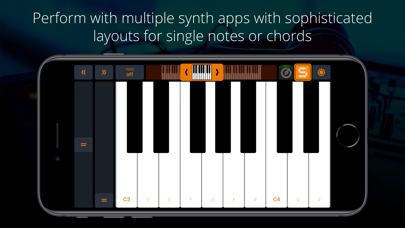
This keyboard for Audiobus 3 allows you to perform music with multiple synth apps at the same time. Use the piano or scale layout to play single notes, and select the chord keyboard for accompaniments. With Audiobus 3, it's super simple to connect the keyboard to your synth apps.

+ Piano layout
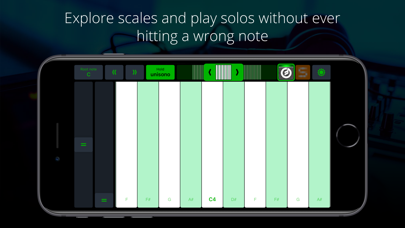
+ Scale layouts (Min/Maj Blue, Ionian, Dorian, ...)
+ Chord layout
+ 2 independent keyboard strips on the iPad, 3 on the iPad Pro
+ Quickly switch sounds
+ Adjust visible key range and
+ Jump to other octaves using up/down buttons
+ Transpose output in half-tone steps
+ Modulation wheel
+ Pitch-Bend wheel
+ "Hold" mode with unisono option
+ Note velocity can be controlled via position or acceleration of the touch, or set to a fixed value
+ Use Split View/Slide Over to display the keyboard next to other apps

NOTE: This app requires Audiobus 3. Insert it into one or more MIDI sender ports to control the synth apps in the MIDI output ports of the respective pipelines.

DETAILS
Midiflow Keyboard is probably the most essential MIDI companion app for Audiobus. It allows you to trigger your synth apps with sophisticated layouts for single notes or chords. With its two keyboards, you can even perform with multiple sounds simultaneously.

HANDY CONTROLS
The streamlined user interface shows the most important controls on the main screen. Quickly change the visible key range in octave steps – you can even keep holding down keys while doing so. Switch on "hold" and keys will stay pressed until you hit them again. Or activate "unisono" and only one note will sound. And, of course, there are pitch-bend and modulation wheels for effects.

PLAY WITH SENSITIVITY
It's not only about which notes you play, but how you play them. By default, you play louder notes by hitting them further down the length of the key. You can also make the app interpret the actual velocity of your taps by using the accelerometer. However, if all you want is a fixed velocity on each tap, that is possible, too.

OPTIMIZE YOUR LAYOUT
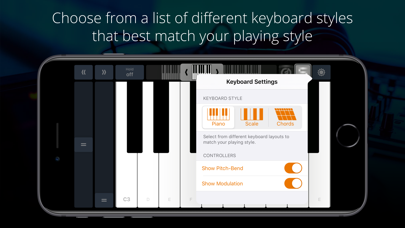
Choose from a list of different keyboard styles that match your playing style best. The regular piano layout is just the beginning. You can select from a list of scale layouts to explore their different sounds and play solos without ever hitting a wrong note. Screen space is valuable – hide the pitch-bend and/or modulation wheel if you don't need them, making more space for keys.

PLAY CHORDS LIKE A PIANIST
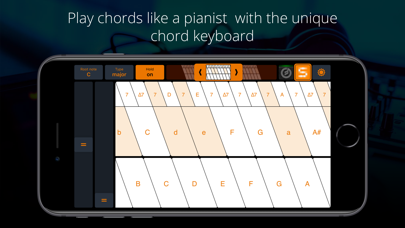
Since it can be quite tricky to play chords on a touch screen, this app comes with a unique chord keyboard. The lower row triggers root notes, while the upper rows trigger chords. This layout makes it very easy to play chord accompaniments with index and middle finger that would require two full hands on a real piano.

SWITCH SOUNDS QUICKLY
The port selector in the upper right corner allows you to specify, for each keyboard, which sound to trigger. You can even select multiple destinations to layer the sounds. In order to reflect the active sound, the color scheme of the keyboard will adjust to match the app's icon.

SPLIT VIEW AND SLIDE OVER
Midiflow Keyboard works great in Split View and Slide Over, the two multitasking modes in iOS. Just swipe from the right screen side and launch the keyboard. That way, you can trigger nodes while making adjustments in an effect app or Audiobus itself. In order to take full advantage of the screen space, the keyboard is rotated 90 degrees. You can either use the right hand to play it while using the left hand in the main app, or simply rotate the device to use both hands for the keys.
Show more Show less

More data about Midiflow Keyboard (Audiobus)

Price $2.99
Rating 5.00 based on 6 ratings
Ranking Not ranked
Version 1.0.7
App download size 4.74 MB
Suitable for Everyone

Alternative downloads for the Midiflow Keyboard (Audiobus) app

Xequence AU | Keys icon Xequence AU | Keys
Alexander Ewering
4.9
$2.99
18 ratings
bismark m16 icon bismark m16
bismark LLC
3.5
$3.99
4 ratings
SWAM Oboe icon SWAM Oboe
Audio Modeling
5.0
$19.99
2 ratings
FabFilter Pro-MB icon FabFilter Pro-MB
FabFilter
4.8
$39.99
21 ratings
SWAM Baritone Sax icon SWAM Baritone Sax
Audio Modeling
5.0
$29.99
2 ratings
VAMono icon VAMono
Ryo Togawa
4.6
$14.99
12 ratings
SWAM Contrabassoon icon SWAM Contrabassoon
Audio Modeling
5.0
$19.99
1 ratings
Multi-Tap Delay AUv3 Plugin icon Multi-Tap Delay AUv3 Plugin
4Pockets.com
0.0
$4.99

More from Johannes Doerr

Midiflow icon Midiflow
Johannes Doerr
4.0
$7.99
39 ratings
iMIDIPatchbay icon iMIDIPatchbay
Johannes Doerr
4.2
$14.99
18 ratings
Midiflow Splitter (Audiobus) icon Midiflow Splitter (Audiobus)
Johannes Doerr
3.4
$2.99
10 ratings
Midiflow Monitor (Audiobus) icon Midiflow Monitor (Audiobus)
Johannes Doerr
4.4
Free
8 ratings
Midiflow Transposer (Audiobus) icon Midiflow Transposer (Audiobus)
Johannes Doerr
4.3
Free
7 ratings
Midiflow Adapter (Audiobus) icon Midiflow Adapter (Audiobus)
Johannes Doerr
4.2
$1.99
5 ratings
Midiflow Randomizer (Audiobus) icon Midiflow Randomizer (Audiobus)
Johannes Doerr
2.6
$1.99
5 ratings
Midiflow Scales (Audiobus) icon Midiflow Scales (Audiobus)
Johannes Doerr
3.8
$1.99
4 ratings

Changelog of Midiflow Keyboard (Audiobus)

No changelog data

Developer information for Johannes Doerr

Johannes Doerr

Address:

Share Midiflow Keyboard (Audiobus)

Comments on Midiflow Keyboard (Audiobus) for iOS

We don't have enough comments to show example comments. Please check back later.

App Store Rankings for Midiflow Keyboard (Audiobus)

This app is not ranked

Technologies used by Midiflow Keyboard (Audiobus)

Popular Overall Top new apps Today's trending apps Apps other people are watching Apps on sale
Xequence AU | Keys icon Xequence AU | Keys
bismark m16 icon bismark m16
SWAM Oboe icon SWAM Oboe
FabFilter Pro-MB icon FabFilter Pro-MB
SWAM Baritone Sax icon SWAM Baritone Sax
VAMono icon VAMono
SWAM Contrabassoon icon SWAM Contrabassoon
Multi-Tap Delay AUv3 Plugin icon Multi-Tap Delay AUv3 Plugin

Back to top
AppBrain Intelligence premium content

Subscribe now to get full and unlimited access to AppBrain Intelligence. You'll have access to:

  • App Intelligence dashboard (performance timeline, competitor comparison, country rankings, insight cards)
  • Detailed ranking data per app
  • Full timeline per developer
  • Device market shares data per country
  • Unlimited keyword tracking
1 Month

$75/mo
(billed every month)

SAVE 0%
Subscribe
3 Months

$65/mo
($195 billed every 3 months)

SAVE 13%
Subscribe
1 Year

$57.50/mo
($690 billed every year)

SAVE 23%
Subscribe
Each subscription will automatically renew 3 days before the expiration date for the same time period. Subscriptions can be cancelled at any time before the renewal.

AppBrain is a directory focused on discovering great apps and games. We give statistics, rankings and search options that Google Play and the App Store don't have. All trademarks are owned by their respective owners. AppBrain doesn't offer APKs or binaries, and always lets users install the official version from Google Play or the App Store.

More apps

  • Top Android apps being viewed
  • View Mahjong: Classic Tiles
  • View All cars mod
  • View Free Up Space Guide

Android Statistics

  • Android statistics
  • Google Play Developer stats
  • Trending Android Apps
  • Top popular Apps
  • Buy the best Android phone

About AppBrain

  • Contact
  • Privacy
  • Documentation
  • DMCA takedowns
  • Articles
  • Blog
  • Android Interstitial Ads: Best practices to optimize your app's earnings
© 2010-2026 - AppBrain