

Midiflow Adapter (Audiobus)
Midiflow Adapter (Audiobus) is made and published by Johannes Doerr. AppBrain is an independent app data site and isn't affiliated with Johannes Doerr. The app name, icon, screenshots and description belong to Johannes Doerr and are shown as published on the App Store.
AppBrain's verdict
Established- Rating on App Store
- 4.20
- 5 ratings
- Last updated
- May 7, 2024
It doesn't have enough ratings yet to judge what users think.
Rankings
App Store top chartsApp Store Rankings for Midiflow Adapter (Audiobus)
Competitors
Similar apps and more from Johannes DoerrAlternatives to Midiflow Adapter (Audiobus)


More from Johannes Doerr







Releases
Updates seen on the App Store- Version
- 1.0.5
- Launched
- April 2017
No changelog data
User feedback
Ratings and reviews on the App StoreComments on Midiflow Adapter (Audiobus) for iOS
We don't have enough comments to show example comments. Please check back later.
Technology
Found in the app by AppBrain- Price
- $1.99
- App size
- 4.59 MB
- Content rating
- Everyone
Technologies used by Midiflow Adapter (Audiobus)
About the app and developer
About Midiflow Adapter (Audiobus)
Midiflow Adapter (Audiobus) is a music app developed by Johannes Doerr.
User Ratings
Midiflow Adapter (Audiobus) is rated 4.20 out of 5 stars. The rating is based on 5 ratings.
App Information
Midiflow Adapter (Audiobus) costs $1.99. The app size is 4.59 MB. The latest version available is 1.0.5. The last update was on May 7, 2024.
Technical Requirements
The app has a content rating of Everyone. The app has been available on the App Store since April 2017.
Developer information for Johannes Doerr
Address:
Frequently asked questions about Midiflow Adapter (Audiobus)
Is Midiflow Adapter (Audiobus) free?
No. Midiflow Adapter (Audiobus) costs $1.99 on the App Store.
Is Midiflow Adapter (Audiobus) still available?
Yes. Midiflow Adapter (Audiobus) is on the App Store, and the last update we saw was on May 7, 2024.
How large is Midiflow Adapter (Audiobus)?
Midiflow Adapter (Audiobus) is 4.59 MB.
Is Midiflow Adapter (Audiobus) suitable for children?
App Store rates the content of Midiflow Adapter (Audiobus) as suitable for everyone.
How do people rate Midiflow Adapter (Audiobus)?
Midiflow Adapter (Audiobus) scores 4.20 out of 5 stars, from 5 ratings on the App Store.
Who made Midiflow Adapter (Audiobus)?
Midiflow Adapter (Audiobus) was developed by Johannes Doerr. It is listed in the music category on the App Store.
What are the best alternatives to Midiflow Adapter (Audiobus)?
People looking at Midiflow Adapter (Audiobus) also look at these music apps: Audiobus Remote, Xequence AU | Pads, MIDI FX PRO, bismark m16, Velocity Filter.
Store listing
By Johannes Doerr, from the App Store
Description by Johannes Doerr Written by the developer, not by AppBrain. Click to read.
+ Connect up to 10 receiving apps (like synthesizers)
+ Connect up to 10 sending apps (like sequencers)
+ Use multiple instances of this app in Audiobus
NOTE: This app requires Audiobus 3. Insert it into one or more MIDI input and output ports. Furthermore, this adapter only works with apps that allow you to select MIDI ports for sending and receiving. It won't work with apps that have no MIDI setup page.
IMPORTANT: Connecting apps via Core MIDI is an advanced topic. If you haven't done it before, please become familiar with it prior to downloading this app.
CONNECT YOUR "LEGACY" APPS TO AUDIOBUS 3
Audiobus 3 has introduced a powerful MIDI routing system that makes interconnecting MIDI apps a lot easier than it was before. However, not all music apps support this new system, yet. Midiflow Adapter makes those apps compatible, by translating between the "old" Core MIDI system and the new Audiobus 3. This, however, only works with apps that let you to select MIDI ports for input and output, or at least the MIDI channel. It is not enough if these apps create their own virtual MIDI port.
SETUP FOR SYNTH APPS (RECEIVERS)
Midiflow Adapter creates 10 permanent virtual MIDI output ports. This means that you can use up to 10 music apps with this adapter. For setting it up, start Midiflow Adapter. Then, start your first synth app that you want to connect with Audiobus via this adapter app. Go to its MIDI settings and activate reception on the MIDI port called "MF Adapter Out 1". It is essential that you deactivate reception on all other ports. Now, go to Audiobus 3 and insert MF Adapter into a MIDI output slot. In the input slot, add any other app, like Midiflow Keyboard. When you switch to Midiflow Adapter, you can select which of your synth apps the MIDI data should go. In this case, it is already set to "Out 1", so you're ready to go.
For your second synth app, do the same steps, but select MIDI port "MF Adapter Out 2", and so on. Then, you can select it in the adapter app.
SETUP FOR SEQUENCER APPS (SENDERS)
The procedure is identical to the one for receiver apps (see above). However, you need to configure the MIDI output settings instead of the input settings. Midiflow Adapter creates 10 permanent virtual MIDI input ports for that purpose. They are called "MF Adapter In 1-10".
WORKING WITH CHANNELS
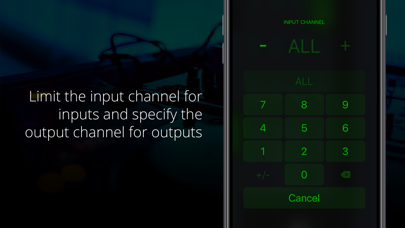
Some Core MIDI apps don't allow you to select the input/output ports, but only the MIDI input/output channel. In that case, they receive on all ports. The only way to selectively trigger them is to assign a unique channel to them. In Midiflow Adapter, you can then select this channel as input/output.
NON-COMPATIBLE APPS
If one of your music apps neither supports selecting the MIDI port nor setting the MIDI channel, you cannot use it with Midiflow Adapter.