

Mindscope 2
Mindscope 2 is made and published by John Goering. AppBrain is an independent app data site and isn't affiliated with John Goering. The app name, icon, screenshots and description belong to John Goering and are shown as published on the App Store.
AppBrain's verdict
- Rating on App Store
- 5.00
- 1 ratings
- Last updated
- October 9, 2026
It doesn't have enough ratings yet to judge what users think.
Rankings
App Store top chartsApp Store Rankings for Mindscope 2
Competitors
Similar apps and more from John GoeringMore from John Goering



Releases
Updates seen on the App Store- Version
- 1.0.3
- Launched
- December 2025
No changelog data
User feedback
Ratings and reviews on the App StoreComments on Mindscope 2 for iOS
We don't have enough comments to show example comments. Please check back later.
Technology
Found in the app by AppBrain- Price
- Free
- App size
- 18.1 MB
- Content rating
- Everyone
Technologies used by Mindscope 2
About the app and developer
About Mindscope 2
Mindscope 2 is a productivity app developed by John Goering.
What is the rating of Mindscope 2?
Mindscope 2 is rated 5.00 out of 5 stars, based on one rating ratings.
Is Mindscope 2 free?
Mindscope 2 is free. The app size is 18.13 MB. The latest version available is 1.0.3. The last update was on October 9, 2026.
What are the requirements for Mindscope 2?
The app has a content rating of Everyone. The app has been available on the App Store since December 2025.
Developer information for John Goering
Address:
Store listing
By John Goering, from the App Store

Description by John Goering Written by the developer, not by AppBrain. Click to read.
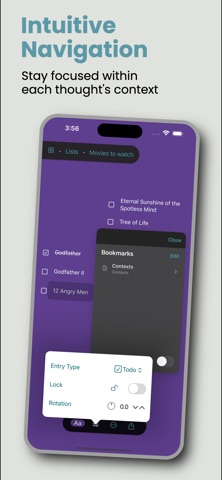
Create entries to capture your thoughts anywhere on a simple and elegant free-form text canvas, drag them around, and tap to zoom into an entry to enter its own space to add sub-entries, for as many levels as you want. Use the "breadcrumb bar", or a quick pinch gesture to jump up a level.
Some highlights:
• Free-form visual boards with smooth, speefy navigation.
• Instant outlining. Drag your entries to reorder, nest, and shape ideas.
• Multiple boards for different projects. Entries saved where you want them.
• Entry types: text, links (including deep links to other apps!), todos, and long-form notes.
• Drag open a selection rectangle for moving and styling multiple entries at once. Long-press for context menus.
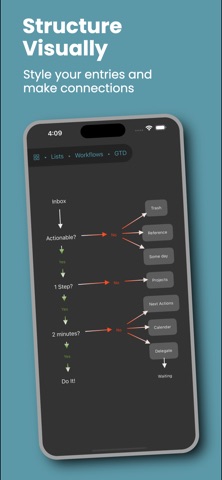
• Draw lines and arrows between entries. Customize arrowheads.
• Smart Undo/Redo of your changes.
• Set bookmarks for quick access to key entries.
• Lock entries you don’t want to move or enter into.
• Rich styling: fonts, colors, backgrounds, rotations. Preserved in exports.
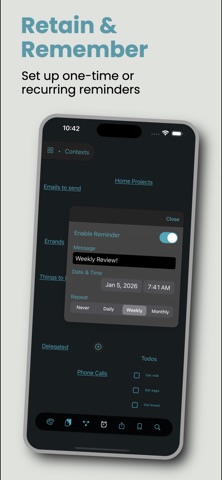
• Reminders on any entry: one-time or repeating. Notifications will then pop up which take you straight to the item.
• Multi-window support on iPad and Mac. Full keyboard shortcuts and native menus.
• iCloud (CloudKit) sync. Work offline and catch up later.
• Intelligent paste with local Apple Intelligence: automatically summarize pasted text into tidy, titled bullet hierarchies.
• Instant global search across all your entries.
• Gorgeous liquid glass UI.
Exporting makes sure you retain complete control of your data:
• Mindscope archive (.mindscope2)
• OPML (supported by most mind-mapping apps)
• Bullet-list text
• PDF (multi-page optional)
• PNG (per board)
• Interactive single-file HTML export that mirrors the real app, complete with navigation, styling, lines, and todos, and works offline in any browser.
Importing works too. Open .mindscope2 files into new top-level boards, or bring in OPML with formatting, positions, metadata, and line connections preserved.
Mindscope 2 is completely free to use with all the way up to 200 entries and 2 boards. All features, all export options, all syncing included. When you get close to the limits, you’ll see gentle upgrade prompts to get the Pro version either as a subscription or a one-time purchase. Mindscope Pro unlocks unlimited boards and entries and there is a 14-day trial as well for the monthly/yearly plans. Early adopters get the low prices locked in.
Apple Watch app included for a synced, streamlined list view on the wrist.
I made Mindscope 2 for my own usage, with my primary focus being speed and focus, for getting thoughts out of my head, organized, and easily accessible later. Try it for free and see if your brain doesn't feel just a bit lighter after using it a bit.
(EULA: http://www.apple.com/legal/itunes/appstore/dev/stdeula)