



AppBrain's verdict
- Last updated
- November 15, 2026
- Size
- 100.3 MB
User feedback
Ratings and reviews on the App StoreComments on MITO EDIT - Auto Video Editor for iOS
We don't have enough comments to show example comments. Please check back later.
Store listing
By JAEBAEK LEE, from the App StoreDescription by JAEBAEK LEE Written by the developer, not by AppBrain. Click to read.
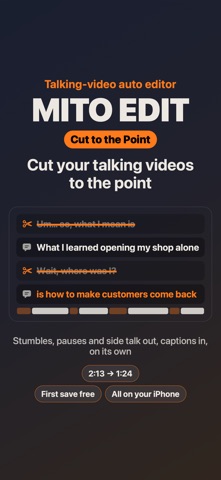
Talk to the camera and you get "um"s, stumbles, sentences started twice and side stories. Pick one talking video and the app takes those out and keeps the point, with captions of what you said.
- Say in one line what it's about and it finds the parts that wander off. Or leave it empty.
- Fit it to 30 s, 1 min, 1.5 min or 2 min, a whole sentence at a time. It never cuts in the middle of a word.
- Before anything is cut you see every line it would take out, and tap to keep any of them.
- Shop promos, lessons, reviews, vlogs: anything you say to the camera.
Hi, I'm a barber with a one-chair shop in Korea. Every day I film haircuts and my evening workouts, and editing always took longer than the filming. So I made the editor I wanted to use.
Auto edit
Pick your clips. MITO EDIT edits them.
- Choose a feel: Short & punchy keeps only the best moments on the beat; Longer, moody holds each shot with a film look.
- Choose a length: auto, 15 s, 30 s, 1 min, or type any number of seconds.
- A day of clips is told in order, morning to evening.
- Add everything you shot: when a scene was filmed several times, it keeps the best take and tells it in story order.
- One long take (styling, a haircut, a workout set) is cut to before → the steps → the finished look.
- Changed outfits on the same spot? It makes a Change: the same move, only the clothes or the place switch.
- Type a song title or paste a YouTube / Apple Music link and the edit cuts to that song's beat (Beat cut), with the biggest moment where the song drops.
Captions, done for you
- Paste a script and each line is matched to the scene that fits: write "wax in your palm" and it lands on the wax shot.
- Talking videos get captions from what's said, and other shots cover a sentence now and then to match it .
- Talking videos lose their dead air: silences and pauses are cut, never the words (a jump cut edit in one tap).
- Pick a caption style: cinema subtitles, film, story captions and more.
- Hair dryer, AC, street noise: it takes the noise away and keeps just your voice, clear.
Easy to touch up
- Change cut lengths, captions, color, transitions and music right away.
- Don't like a shot? Tap "Another moment" to swap it for a different part of the same clip.
- Sound effects, voice-over, video over video, freeze frame and a blurred background behind people are all in.
- Works on iPad and Mac too, with keyboard shortcuts (space to play, ⌘B split, ⌘Z undo).
Everything stays on your iPhone
- Your videos are never uploaded. Customers' faces never leave the phone.
- No sign-up. No ads.
Free and Pro
- Your first project is a free trial of everything: the other versions, 3 more tries, captions from speech. An automatic result saves free once (720p, small mark).
- After that, watch and touch up what the auto edit makes, for free (once per project).
- Videos you edit by hand save free at 720p (with a small corner mark and a short end card).
- The other versions are free to watch too.
- Saving the auto edit, 1080p/4K, saving the other versions, making the auto edit again and captions from speech are Pro.
- The yearly plan starts with a 7-day free trial.
Subscriptions
- The yearly plan's 7-day free trial is once per Apple ID. Cancel at least 24 hours before it ends and you won't be charged.
- MITO EDIT Pro Monthly and Yearly renew automatically unless cancelled at least 24 hours before the end of the period. Payment is charged to your Apple ID.
- Cancel anytime in Settings > Apple ID > Subscriptions.
- Lifetime is a one-time purchase.
- Terms of Use (EULA): https://www.apple.com/legal/internet-services/itunes/dev/stdeula/
- Privacy Policy: https://monoonlabs.com/mito-edit/privacy/
Safety and technology
Found in the app by AppBrain- Price
- Free
- App size
- 100.3 MB
- Content rating
- Everyone
Technologies used by MITO EDIT - Auto Video Editor
Releases
Updates seen on the App Store- Version
- 2026.11.15
- Launched
- October 2026
No changelog data
Alternatives
Similar apps and more from JAEBAEK LEEAlternatives to MITO EDIT - Auto Video Editor


More from JAEBAEK LEE


Rankings
App Store top chartsApp Store Rankings for MITO EDIT - Auto Video Editor
About the app and developer
About MITO EDIT - Auto Video Editor
MITO EDIT - Auto Video Editor is a photo & video app developed by JAEBAEK LEE.
User Ratings
The app has no ratings yet.
App Information
MITO EDIT - Auto Video Editor is freely available from the App Store. The app size is 100.29 MB. The latest version available is 2026.11.15. The last update was on November 15, 2026.
Technical Requirements
The app has a content rating of Everyone. The app has been available on the App Store since October 2026.
MITO EDIT - Auto Video Editor is made and published by JAEBAEK LEE. AppBrain is an independent app data site and isn't affiliated with JAEBAEK LEE. The app name, icon, screenshots and description belong to JAEBAEK LEE and are shown as published on the App Store.
Developer information for JAEBAEK LEE
Address:
Frequently asked questions about MITO EDIT - Auto Video Editor
Is MITO EDIT - Auto Video Editor free?
Yes. MITO EDIT - Auto Video Editor is free on the App Store.
Is MITO EDIT - Auto Video Editor still available?
Yes. MITO EDIT - Auto Video Editor is on the App Store, and the last update we saw was on November 15, 2026.
How large is MITO EDIT - Auto Video Editor?
MITO EDIT - Auto Video Editor is 100.29 MB.
Is MITO EDIT - Auto Video Editor suitable for children?
App Store rates the content of MITO EDIT - Auto Video Editor as suitable for everyone.
Who made MITO EDIT - Auto Video Editor?
MITO EDIT - Auto Video Editor was developed by JAEBAEK LEE. It is listed in the photo & video category on the App Store.
What are the best alternatives to MITO EDIT - Auto Video Editor?
People looking at MITO EDIT - Auto Video Editor also look at these photo & video apps: WEAVE: Music Video Editor, Malcut - Auto Captions, Gloww - AI Photo Enhancer, PhotoFix - Restore Images, Quick Cut Pro - Video Editor.