





AppBrain's verdict
Established- Rating on App Store
- 1.00
- 1 ratings
- Last updated
- February 7, 2026
- Size
- 1.89 MB
It doesn't have enough ratings yet to judge what users think.
User feedback
Ratings and reviews on the App StoreComments on Motion Log Plus for iOS
We don't have enough comments to show example comments. Please check back later.
Store listing
By Heng Jia Liang, from the App StoreDescription by Heng Jia Liang Written by the developer, not by AppBrain. Click to read.
Embark on a journey of motion exploration with Motion Log, a cutting-edge device sensor logging tool designed for iOS devices. Whether you're tracking the subtle nuances of device orientation, analyzing acceleration patterns, or documenting the dynamic forces at play, Motion Log offers unparalleled insight into the motion dynamics of your device. With its intuitive interface and robust feature set, Motion Log empowers users to record, visualize, and analyze motion data with ease. From everyday activities to adventurous endeavors, Motion Log provides a comprehensive toolkit for understanding and harnessing the power of motion. Experience motion logging like never before and unlock a world of possibilities with Motion Log.
Features:
• Capture motion data of your iOS Devices, including:
- Device orientation to North.
- Device Attitude: Pitch, Roll, and Yaw.
- Device Acceleration in X, Y, and Z directions.
- Time and Date of recording start.
• Option to turn off the screen while recording.
• Rename or delete motion log files.
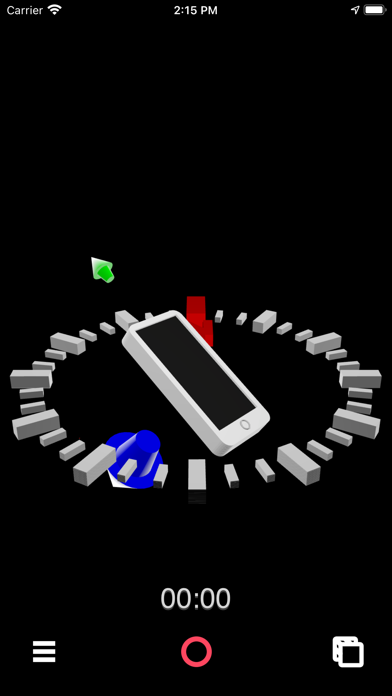
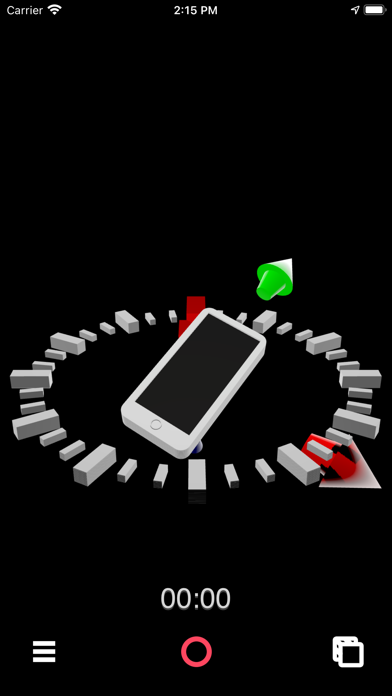
• Preview recorded motion data in 3D.
• View 3D device preview at normal speed, 2X speed, or 0.5X speed.
• Toggle data preview On or Off.
3D Preview:
• Display device orientation in 3D space.
• Represent device acceleration with 3D arrows (X - Red, Y - Green, Z - Blue).
• Arrow size adjusts based on acceleration magnitude.
Motion Log Files:
• Access motion log files in the [Files] app under [Motion Log] Folder.
• Open motion log files using a normal text editor.
• Data array includes compass (0-360 degrees), attitude (Pitch, Roll, and Yaw in radians), and device acceleration (X, Y, Z in G - Gravity).
• Recorded with a 0.05 sec interval.
• Share motion log files via Airdrop, Messages, or Mail.
• Easily load shared motion log files by placing them into [Motion Log] Folder via [Files] app.
Usage:
• Record walking or running motions.
• Capture desk vibrations or other movements.
• Analyze G force while riding roller coasters.
• Assess road conditions or G force while driving.
• Monitor attitude or G force while biking or cycling.
• Explore endless possibilities based on your imagination.
Thank you for your support, and feel free to visit nitrio.com for more iOS device apps.
Safety and technology
Found in the app by AppBrain- Price
- $2.99
- App size
- 1.89 MB
- Content rating
- Everyone
Technologies used by Motion Log Plus
Releases
Updates seen on the App Store- Version
- 1.3
- Launched
- November 2019
No changelog data
Alternatives
Similar apps and more from Heng Jia LiangAlternatives to Motion Log Plus







More from Heng Jia Liang





Rankings
App Store top chartsApp Store Rankings for Motion Log Plus
About the app and developer
About Motion Log Plus
Motion Log Plus is an utilities app developed by Heng Jia Liang.
User Ratings
Motion Log Plus is rated 1.00 out of 5 stars. The rating is based on one rating ratings.
App Information
Motion Log Plus costs $2.99. The app size is 1.89 MB. The latest version available is 1.3. The last update was on February 7, 2026.
Technical Requirements
The app has a content rating of Everyone. The app has been available on the App Store since November 2019.
Motion Log Plus is made and published by Heng Jia Liang. AppBrain is an independent app data site and isn't affiliated with Heng Jia Liang. The app name, icon, screenshots and description belong to Heng Jia Liang and are shown as published on the App Store.
Developer information for Heng Jia Liang
Address: