

MultiTrack Recorder Plugin
MultiTrack Recorder Plugin is made and published by 4Pockets.com. AppBrain is an independent app data site and isn't affiliated with 4Pockets.com. The app name, icon, screenshots and description belong to 4Pockets.com and are shown as published on the App Store.
AppBrain's verdict
Established- Rating on App Store
- 4.09
- 34 ratings
- Last updated
- September 1, 2025
It doesn't have enough ratings yet to judge what users think.
Rankings
App Store top chartsApp Store Rankings for MultiTrack Recorder Plugin
Competitors
Similar apps and more from 4Pockets.comAlternatives to MultiTrack Recorder Plugin







More from 4Pockets.com




Releases
Updates seen on the App Store- Version
- 1.26
- Launched
- October 2019
No changelog data
User feedback
Ratings and reviews on the App StoreComments on MultiTrack Recorder Plugin for iOS
We don't have enough comments to show example comments. Please check back later.
Technology
Found in the app by AppBrain- Price
- $10.99
- App size
- 10.9 MB
- Content rating
- Everyone
Technologies used by MultiTrack Recorder Plugin
About the app and developer
About MultiTrack Recorder Plugin
MultiTrack Recorder Plugin is a music app developed by 4Pockets.com.
What is the rating of MultiTrack Recorder Plugin?
MultiTrack Recorder Plugin is rated 4.09 out of 5 stars, based on 34 ratings.
Is MultiTrack Recorder Plugin free?
MultiTrack Recorder Plugin costs $10.99. The app size is 10.92 MB. The latest version available is 1.26. The last update was on September 1, 2025.
What are the requirements for MultiTrack Recorder Plugin?
The app has a content rating of Everyone. The app has been available on the App Store since October 2019.
Developer information for 4Pockets.com
Address:
Frequently asked questions about MultiTrack Recorder Plugin
Is MultiTrack Recorder Plugin free?
No. MultiTrack Recorder Plugin costs $10.99 on the App Store.
Is MultiTrack Recorder Plugin still available?
Yes. MultiTrack Recorder Plugin is on the App Store, and the last update we saw was on September 1, 2025.
How large is MultiTrack Recorder Plugin?
MultiTrack Recorder Plugin is 10.92 MB.
Is MultiTrack Recorder Plugin suitable for children?
App Store rates the content of MultiTrack Recorder Plugin as suitable for everyone.
How do people rate MultiTrack Recorder Plugin?
MultiTrack Recorder Plugin scores 4.09 out of 5 stars, from 34 ratings on the App Store.
Who made MultiTrack Recorder Plugin?
MultiTrack Recorder Plugin was developed by 4Pockets.com. It is listed in the music category on the App Store.
What are the best alternatives to MultiTrack Recorder Plugin?
People looking at MultiTrack Recorder Plugin also look at these music apps: LoopBud - AUv3 MIDI Recorder, AU3FX:Space, AudioLayer, sEGments by Elliott Garage, Atom | Piano Roll 2.
Store listing
By 4Pockets.com, from the App Store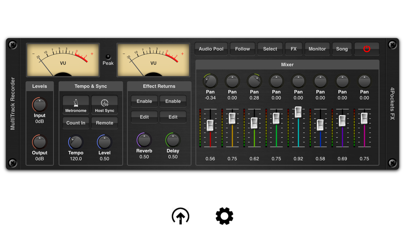
Description by 4Pockets.com Written by the developer, not by AppBrain. Click to read.
MultiTrack can be used for a host of purposes such as a tool for recording and layering audio for export to other DAW's , creating that perfect loop for other third party applications or recording vocal sessions to accompany you in AUM. Its uses are endless.
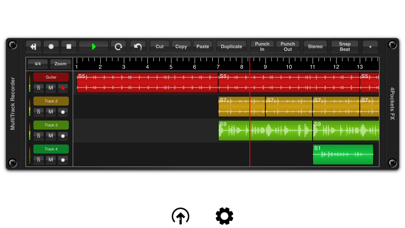
It features the ability to record up to 8 mono or stereo audio tracks per instance, with the ability to run multiple instances under the control of your host DAW. MultiTrack has the ability to run standalone using it's own transport or synced to a host which allows synchronous control of multiple instances.
MultiTrack supports various recording modes including the ability to set punch in and out points for sample accurate recordings. Press the Host Sync in order to the advantage of the hosts transport controls or enable the remote button to enable host recording controls (great for NS2).
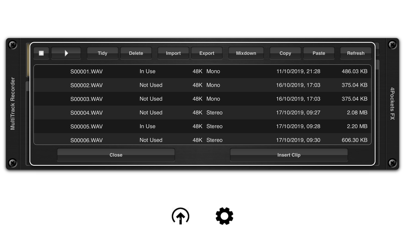
Use the Audio Pool window to quickly and easily import, export and perform mix-downs of audio clips. Quickly and easily move audio files using drag and drop to the time line or between the audio pool and the Files App. Imported audio is automatically converted to the projects sample rate. The audio pool also features the ability to copy and paste audio directly from the iOS pasteboard as well as preview and manage your data.
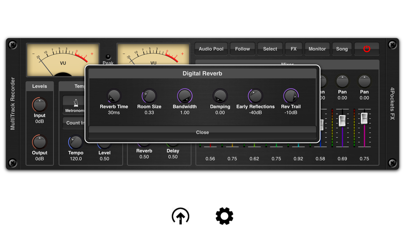
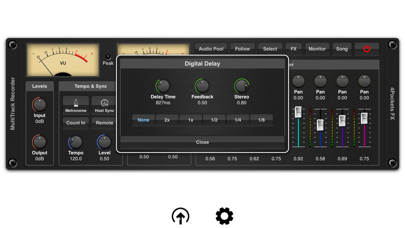
An intergrated 8 channel mixer allows you to control the level, pan and effect send levels. Although AUM allows some great routing options for third party effects, MultiTrack also includes an extremely CPU friendly beat synced delay and reverb which can be used where recording pre-effected instruments is not an option.
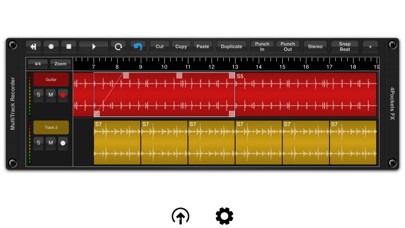
MultiTrack allows per clip volume level as well as being able to control start and end cropping and fade in/out on a clip by clip basis. All these operations are quick and easy to make using the touch screen alone.
Also included is the ability to perform operations such as splitting, normalising, reversing and time stretching of audio clips all with a multi-level undo built right in. A comprehensive set of selection, copying and duplication tools make editing a breeze.
Each track has it's own mute, solo and metering which can also be used to monitoring incoming signal levels. Finally you have the ability to mix down a selected range of your song or create perfectly looped samples for use in other DAW's , samplers and drum machines such as DigiStix.
Features:
○ 8 tracks per instance.
○ Mixer with level, pan and effect settings.
○ Mix mono or stereo clips on a track.
○ Built in CPU friendly delay and reverb.
○ Multi-level undo function.
○ Loop play and record modes (when not synced to host).
○ Mix-down facility.
○ Cut, copy, paste and duplicate clips.
○ Ability to sync to host tempo.
○ Metronome with count-in.
○ Drag and drop support with the Files App.
○ Backup and Restore of individual songs.
○ Automatic conversion of imported audio.
○ Zoom mode for use when cropping clips.