




AppBrain's verdict
- Last updated
- November 7, 2026
- Size
- 4.24 MB
User feedback
Ratings and reviews on the App StoreComments on MyCalendar-Highlight Events for iOS
We don't have enough comments to show example comments. Please check back later.
Store listing
By fumio ueda, from the App StoreDescription by fumio ueda Written by the developer, not by AppBrain. Click to read.
“My Calendar”and “Event List” are screens that can be switched between each other, and both display events on the imminent schedule in an easy-to-understand way and reliably remind them.
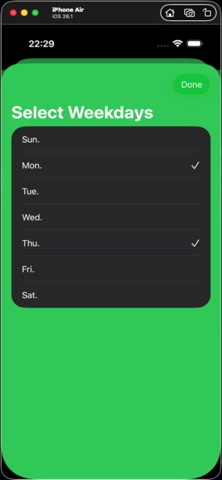
The date type of the event can be selected from 5 types: (1) weekly day of the week (single/multiple selectable), (2) Nth (single/multiple selectable), (3) monthly date (single/multiple selectable), (4) annual date, (5) specific date.
Functions
“MyCalendar” screen: For registered periodic schedules or one-time schedules, urgent schedules are displayed on the timeline. In particular, today and tomorrow are displayed with an emphasis on the font size or border thickness. Here, you can make detailed settings, such as selecting the display period. Also, to transition to the ”Events list”, tap the vent List" button at the bottom of the screen.
“Event list”screen ; Here the registered events are displayed in the order of registration. “All registered events” or “one-time events” can be change filtering rule by setting “toggle” button on top of the screen. And, you can delete events or can transit to the“Add-event” or to “Edit-event” screen. To return to “MyCalendar” , tap the “Return“ button in the upper left corner of “Event List” screen.
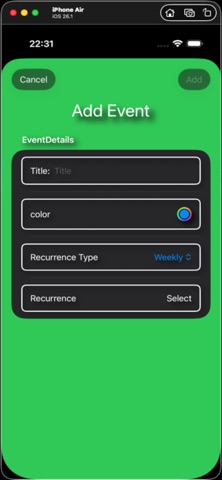
“Add-event” screen ; On the “Add-event” view, which appears when you tap the “Plus” button in the upper right corner of the “Event List” screen, enter/select 4 items of “Title”, “Color”, ”Occurrent day” and “Occurring day”, and confirm the addition with the “Done” button. Additional events can be found at the end of the “Event List”screen.
For titles, use the keyboard that appears when you tap the appropriate area to enter any text. The input ends by tapping the return key and the keyboard is hidden.
On the “Add-event” (or “Edit-event”) screen, simply tap the round button in the color input frame and select any one from the color map that appears.
Type of the event; As mentioned in the feature, the date type of the event can be selected from 5 types: (1) weekly day of the week (single/multiple selectable), (2) specific weekday of the Nth (single/multiple selectable) week of the month, (3) monthly date (single/multiple selectable), (4) annual day, (5) specific date.
For specific date /weekday ; You can simply select the date from the table displayed for each type.
“Edit-event”screen ; This view is displayed when you tap the item you want to edit on the “Event List” screen.
Please make an analogy to the event editing method from the description of adding events.
After finishing editing on this screen, tap the “Done” button. You can check the editing results on the “Event List”screen.
“Delete-event” ; On the “Event list” screen, tap the “Delete” button that appears when you “left swipe” the event column you want to delete, or “left drag” to delete it.
Safety and technology
Found in the app by AppBrain- Price
- Free
- App size
- 4.24 MB
- Content rating
- Medium
Technologies used by MyCalendar-Highlight Events
Releases
Updates seen on the App Store- Version
- 1.5
- Launched
- December 2025
No changelog data
Alternatives
Similar apps and more from fumio uedaAlternatives to MyCalendar-Highlight Events


More from fumio ueda


Rankings
App Store top chartsApp Store Rankings for MyCalendar-Highlight Events
About the app and developer
About MyCalendar-Highlight Events
MyCalendar-Highlight Events is a lifestyle app developed by fumio ueda.
User Ratings
The app has no ratings yet.
App Information
MyCalendar-Highlight Events is freely available from the App Store. The app size is 4.24 MB. The latest version available is 1.5. The last update was on November 7, 2026.
Technical Requirements
The app has a content rating of Medium Maturity. The app has been available on the App Store since December 2025.
MyCalendar-Highlight Events is made and published by fumio ueda. AppBrain is an independent app data site and isn't affiliated with fumio ueda. The app name, icon, screenshots and description belong to fumio ueda and are shown as published on the App Store.
Developer information for fumio ueda
Address: