

MyIPM Vegetables
MyIPM Vegetables is made and published by Charles T. Bargeron. AppBrain is an independent app data site and isn't affiliated with Charles T. Bargeron. The app name, icon, screenshots and description belong to Charles T. Bargeron and are shown as published on the App Store.
AppBrain's verdict
- Last updated
- August 18, 2026
Rankings
App Store top chartsApp Store Rankings for MyIPM Vegetables
Competitors
Similar apps and more from Charles T. Bargeron





Releases
Updates seen on the App Store- Version
- 1.1.2
- Launched
- November 2023
No changelog data
User feedback
Ratings and reviews on the App StoreComments on MyIPM Vegetables for iOS
We don't have enough comments to show example comments. Please check back later.
Technology
Found in the app by AppBrain- Price
- Free
- App size
- 8.09 MB
- Content rating
- Everyone
Technologies used by MyIPM Vegetables
About the app and developer
About MyIPM Vegetables
MyIPM Vegetables is a reference app developed by Charles T. Bargeron.
What is the rating of MyIPM Vegetables?
MyIPM Vegetables has no ratings yet.
Is MyIPM Vegetables free?
MyIPM Vegetables is free. The app size is 8.09 MB. The latest version available is 1.1.2. The last update was on August 18, 2026.
What are the requirements for MyIPM Vegetables?
The app has a content rating of Everyone. The app has been available on the App Store since November 2023.
Developer information for Charles T. Bargeron
Address:
Store listing
By Charles T. Bargeron, from the App Store


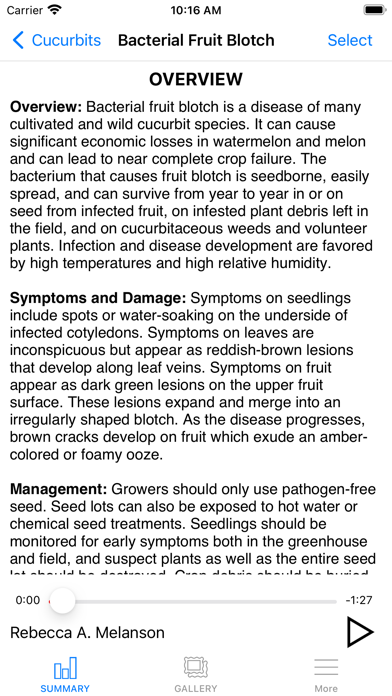


Description by Charles T. Bargeron Written by the developer, not by AppBrain. Click to read.
The home screen lets the user choose the vegetable and discipline (disease or insect) and lets the user update data from the external database. Users can return to this screen at any time to add or delete a selection. In a vegetable and disciple section, users can swipe left and right on images to access the various diseases or insects in the app. Users can choose to learn more about a disease or insect by tapping the image at the top of the screen or by tapping Overview/Gallery/More below the image. Disease- or insect-specific information includes an OVERVIEW about the disease or insect and its management and may include a short, 2- to 3-minute audio on the bottom of the page. The GALLERY features images of disease signs and symptoms or the various insect stages and damage. Users can zoom in on each image for a better view. The MORE section contains additional information about the disease (e.g., causal organism, signs and symptoms, and disease cycle) or insect (e.g., scientific name, descriptions of damage and insects, and life cycles) as well as chemical management information, fungicide or insecticide resistance information, and non-chemical management information (e.g., biological and cultural control management options, host/variety resistance, etc.).
Underneath the feature image of every disease- or insect-specific page, users can choose to view active ingredients and trade names of products labeled for use against the disease or insect in the United States. When tapping active ingredients, users can choose between materials registered for conventional or organic production. Active ingredients are color-coded according to their FRAC (Fungicide Resistance Action Committee) or IRAC (Insecticide Resistance Action Committee) code. The efficacy of an active ingredient against the selected disease or insect, when available, is listed as well as a risk assessment of that chemical as published by FRAC/IRAC. Active ingredients, efficacy, and risk assessments are sortable. When tapping an active ingredient, the labeled trade names containing this active ingredient are displayed. Back on the disease or insect page, tapping trade names for conventional or organic production displays available trade names for the specific disease or insect and provides the active ingredient(s), efficacy rating, PHI (preharvest interval), and REI (reentry interval). Trade names, active ingredients, PHIs, REIs, and efficacy ratings are sortable.
A useful feature of the app is the search feature. This feature is accessible from the search bar on the home screen. Users can use this feature to search for active ingredients and trade names. Results will list the crop for which the product is labeled, the rate per acre, and the efficacy rating. Another useful feature is the select button on the top right of screens within the vegetable disciplines. This button lets the user move seamlessly from one disease to another from whatever page is displayed. Users can use this feature from an active ingredient or trade name page, to quickly view active ingredients and trade names for another disease or insect.