Download Android Apps and Games
AppBrain
  • Apps
  • Apps being viewed right now Trending apps today Most popular apps All-time most downloaded apps Top rated apps
  • Intelligence ▾
    Intelligence overview → Track any Android app or your whole market
    Track & analyze
    Keyword Tracker & OptimizerTrack & improve Play rankings App Performance ReportOne-off PDF for any app StatisticsFree Android & Play market stats
    Promote your app
    Featured Apps App Links
  • Intelligence
  • Pricing
  • Dashboard
  • Sign up
  • Log in
Last updated on: 2026-06-23
App Store Apps > Utilities > NeoCalcs Lite - Calculator
NeoCalcs Lite - Calculator icon

NeoCalcs Lite - Calculator

5.3
YONEKAWA Hideki
0.00
0 reviews
Free

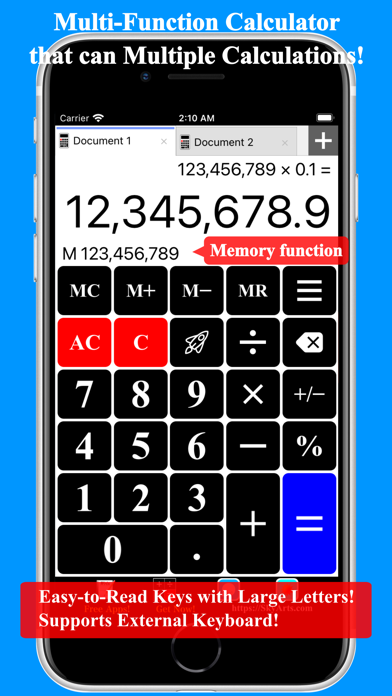
NeoCalcs Lite - Calculator Screenshot 1 of 4
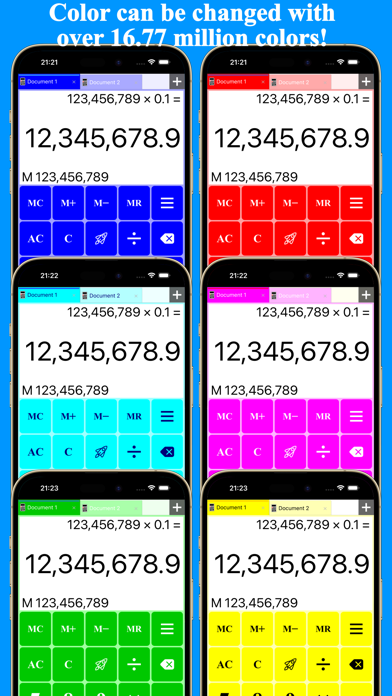
NeoCalcs Lite - Calculator Screenshot 2 of 4
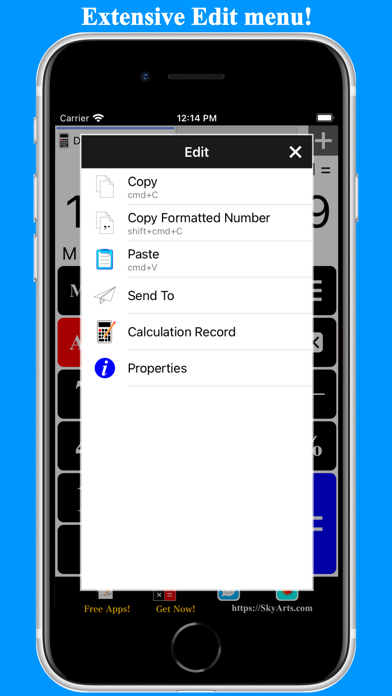
NeoCalcs Lite - Calculator Screenshot 3 of 4
NeoCalcs Lite - Calculator Screenshot 4 of 4
Download from the App Store

About NeoCalcs Lite - Calculator

NeoCalcs Lite - Calculator is an overall app developed by YONEKAWA Hideki.

Download Statistics

User Ratings

The app has no ratings yet.

App Information

NeoCalcs Lite - Calculator is FREE to download. The APK download size is 7.26 MB. The latest version available is 5.3. The last update was on September 16, 2025.

Technical Requirements

The app has a content rating of Everyone. The app has been available on Google Play April 2014.

Description
This is a Multi-Functional Calculator app that can do Multiple-Calculations!
Because it is equipped percent calculation and arithmetic operations is a function of basic calculator, and a memory function, it can also be used as an ordinary calculator.
For multiple calculations can be, can easily compare calculation the shop which is like, or money at the same time.

The ability to change the color keys, key images, can be used by setting the color of choice!
Number of colors that can be specified 16.77 million colors or more theory!

The new sense Launcher key installed, you can call the function quickly and easily!
Work efficiency will go up significantly if you register your function you use frequently!
This new sense Launcher key is comfort to be a habit and get used to!

The main function of this app has to offer is as follows.

+Four arithmetic operations
+Memory function
+Delete keys that can be easily corrected and input mistake
+The percent key to make it easy and consumption tax calculation
+Plus / Minus key
+New launcher that can be called a key feature to quickly and easily
+Auxiliary display function that displays the memory value and progress of calculation
+UI tab can switch between multiple calculations
+Described and notes in the name for each calculator tab (document)
+Save the calculation recorded in the for each calculator (document)
+Copy and Paste the value (Also compatible with the format)
+Format setting value of Display
+Ability to send a value to the external application, such as mailer
+Multifunctional launcher function can call various functions external application quickly
+Can change the color key, such as a key icon
+ With an external keyboard various operations


Where can set the color is as follows.

+Key
+Icon of Key
+Background
+Background of the Display area
+Text of the Display area
+Selected Tab of Tabbar
+Tab of Tabbar
+Tab Text of Tabbar
+Background of Tabbar


-Launcher function-
Launcher function is a function that can be called quickly and another application and various functions of the application.

Launcher feature is made up of the following three.

+Launcher key
+Launcher menu
+User defined

-Launcher key-
Launcher panel opens by pressing the key on the calculator launcher screen.
By and release may be assigned a function in eight directions in the launcher panel, and move the finger in either direction, it can quickly be called the assigned function.
It is a refreshing feeling of operation to the extent that it becomes a habit and get used to!

Various functions of the app, and functions that can be assigned to the launcher key is a user-defined.
For example, you can either move the calculator (document) by moving the left and right, to display the calculation record.
Because it can be called quickly with functions in the bowel of the menu, the efficiency will increase by assigning work well normally.


-Launcher menu
Launcher menu is the sense of creating a new menu on its own.
It is possible to easily call a function that is summarized as a menu of frequently used functions.
You be able to respond to the variety that are selectively used the launcher key.


-User defined
User-defined, is a feature that allows you to define your own URL specification to invoke another application, which is referred to as the URL scheme.
You can also order it as a parameter in the URL, and put the calculation and recording the result of calculation is possible, pass the value at the same time a call to another application.
Note: You can pass a value only if the application that will be called is compatible with the receipt of the value.

For example, you can call the mail application, and describes a calculation record that you gave to the parameters in the body of the newly created e-mail.
Of course, can also be used as a launcher definition to invoke the external application simply.
Show more Show less

More data about NeoCalcs Lite - Calculator

Price Free to download
Rating No ratings
Ranking Not ranked
Version 5.3
App download size 7.26 MB
Suitable for Everyone

Alternative downloads for the NeoCalcs Lite - Calculator app

ChatAI - Smart Search Browser icon ChatAI - Smart Search Browser
Happy Technology Game Studio.
0.0
Free
Higher rated
Art Calc: Colorful Calculator icon Art Calc: Colorful Calculator
Mihoko Araki
4.6
Free
10 ratings
Higher rated
RePNCalc - RPN Calculator Pro icon RePNCalc - RPN Calculator Pro
Michael Redig
5.0
Free
1 ratings
Higher rated
Calculator Sharp icon Calculator Sharp
锦文 游
5.0
Free
5 ratings
Pigeon Calculator icon Pigeon Calculator
Factory inc. (Apps)
0.0
Free
Higher rated
Max Random icon Max Random
Peter Schorn
5.0
Free
1 ratings
Higher rated
Calc Pro - Simple and Useful icon Calc Pro - Simple and Useful
Keita Nonaka
4.8
Free
6 ratings
Higher rated
Calculator COLORS icon Calculator COLORS
newforestar co,.ltd
3.0
Free
1 ratings

More from YONEKAWA Hideki

Color Flash Camera icon Color Flash Camera
YONEKAWA Hideki
1.8
Free
4 ratings
Wrix 2 - Ultra Text Editor icon Wrix 2 - Ultra Text Editor
YONEKAWA Hideki
4.5
Free
2 ratings
Brighter Lite - Colored Light icon Brighter Lite - Colored Light
YONEKAWA Hideki
0.0
Free
SmileTalker icon SmileTalker
YONEKAWA Hideki
0.0
Free

Changelog of NeoCalcs Lite - Calculator

No changelog data

Developer information for YONEKAWA Hideki

YONEKAWA Hideki

Address:

Share NeoCalcs Lite - Calculator

Comments on NeoCalcs Lite - Calculator for iOS

We don't have enough comments to show example comments. Please check back later.

App Store Rankings for NeoCalcs Lite - Calculator

This app is not ranked

Technologies used by NeoCalcs Lite - Calculator

Top new apps Popular Overall Apps on sale Apps other people are watching Today's trending apps
ChatAI - Smart Search Browser icon ChatAI - Smart Search Browser
Art Calc: Colorful Calculator icon Art Calc: Colorful Calculator
RePNCalc - RPN Calculator Pro icon RePNCalc - RPN Calculator Pro
Calculator Sharp icon Calculator Sharp
Pigeon Calculator icon Pigeon Calculator
Max Random icon Max Random
Calc Pro - Simple and Useful icon Calc Pro - Simple and Useful
Calculator COLORS icon Calculator COLORS

Back to top
AppBrain Intelligence premium content

Subscribe now to get full and unlimited access to AppBrain Intelligence. You'll have access to:

  • App Intelligence dashboard (performance timeline, competitor comparison, country rankings, insight cards)
  • Detailed ranking data per app
  • Full timeline per developer
  • Device market shares data per country
1 Month

$75/mo
(billed every month)

SAVE 0%
Subscribe
3 Months

$65/mo
($195 billed every 3 months)

SAVE 13%
Subscribe
1 Year

$57.50/mo
($690 billed every year)

SAVE 23%
Subscribe
Each subscription will automatically renew 3 days before the expiration date for the same time period. Subscriptions can be cancelled at any time before the renewal.

AppBrain is a directory focused on discovering great apps and games. We give statistics, rankings and search options that Google Play and the App Store don't have. All trademarks are owned by their respective owners. AppBrain doesn't offer APKs or binaries, and always lets users install the official version from Google Play or the App Store.

More apps

  • Top Android apps being viewed
  • Snacky Dash: Food Maze Puzzle
  • MyPublicInbox
  • RotaCloud Terminal

Android Statistics

  • Android statistics
  • Google Play Developer stats
  • Trending Android Apps
  • Top popular Apps
  • Buy the best Android phone

About AppBrain

  • Contact
  • Privacy
  • Documentation
  • DMCA takedowns
  • Articles
  • Blog
  • Free App-Ads.Txt Validation
© 2010-2026 - AppBrain