

Note Names: Sheet Music Scan
Note Names: Sheet Music Scan is made and published by TETSUYA SAKAI. AppBrain is an independent app data site and isn't affiliated with TETSUYA SAKAI. The app name, icon, screenshots and description belong to TETSUYA SAKAI and are shown as published on the App Store.
AppBrain's verdict
- Last updated
- October 9, 2026
Rankings
App Store top chartsApp Store Rankings for Note Names: Sheet Music Scan
Competitors
Similar apps and more from TETSUYA SAKAIAlternatives to Note Names: Sheet Music Scan


More from TETSUYA SAKAI


Releases
Updates seen on the App Store- Version
- 1.9.0
- Launched
- August 2026
No changelog data
User feedback
Ratings and reviews on the App StoreComments on Note Names: Sheet Music Scan for iOS
We don't have enough comments to show example comments. Please check back later.
Technology
Found in the app by AppBrain- Price
- Free
- App size
- 31.9 MB
- Content rating
- Everyone
Technologies used by Note Names: Sheet Music Scan
About the app and developer
About Note Names: Sheet Music Scan
Note Names: Sheet Music Scan is a music app developed by TETSUYA SAKAI.
User Ratings
The app has no ratings yet.
App Information
Note Names: Sheet Music Scan is freely available from the App Store. The app size is 31.86 MB. The latest version available is 1.9.0. The last update was on October 9, 2026.
Technical Requirements
The app has a content rating of Everyone. The app has been available on the App Store since August 2026.
Developer information for TETSUYA SAKAI
Address:
Store listing
By TETSUYA SAKAI, from the App Store




Description by TETSUYA SAKAI Written by the developer, not by AppBrain. Click to read.
But at the beginning, most of the practice hour goes somewhere else — working out which note is which, counting up from middle C, losing your place, starting the bar again.
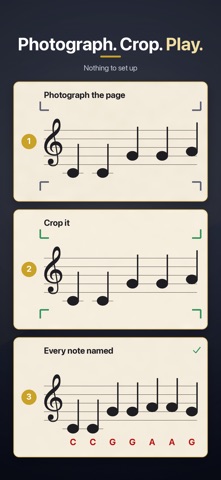
This app hands that hour back. Photograph a page of your own sheet music, and every note comes back with its name printed right above it — C D E F G, or Do Re Mi if that's how you learned. Print it, put it on the stand, and play.
And the reading? It comes with the playing. It always has.
WHY PEOPLE USE IT
• You're learning piano as an adult, and you know the piece faster than you can read it
• You sit with your kid at practice and can't read the music yourself
• You picked your instrument back up after twenty years
• You joined a choir or a community band and want to keep up at rehearsal
IT WORKS ON YOUR MUSIC
Not a retyped version of the song — your actual page, with the names added. The layout, the fingerings, your teacher's pencil marks: all still there.
THREE STEPS
1. Photograph the page — just fit the whole page in the frame
2. Crop it (a finger in the shot? erase it)
3. Done. Every note named, ready to print or share as a PDF
HEAR THE PAGE, TOO
Once the names are on, tap play. It follows the note lengths and rests it read, so you can get a feel for how the piece goes.
Drag the red line to start from anywhere on the page, or loop a single staff until the hard bar sits right.
NAMES FOR YOUR INSTRUMENT
Transposing instruments are supported — in B-flat, in E-flat, in F and more. Read the names as they sit on your part, or as they sound in concert pitch. Switch any time in Settings.
PICK YOUR SPELLING
C D E F G (letter names) · Do Re Mi (solfège) · ドレミ (Japanese katakana). Change it any time in Settings.
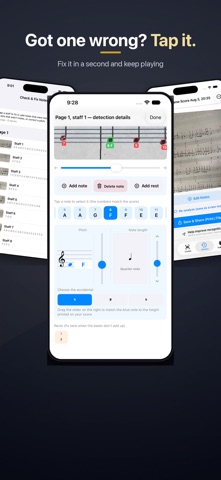
WHEN IT GETS ONE WRONG, YOU FIX IT
Tap the note and pick the right name. Add a note it missed. Delete a mark that wasn't a note. Add a whole staff it didn't find. It takes seconds — and it beats penciling in every note by hand.
YOUR MUSIC NEVER LEAVES YOUR PHONE
Everything runs on your device. No account, no upload, no server. It works in airplane mode.
PAY ONCE. NO SUBSCRIPTION.
Try it free: 5 scans, one photo each, with the first 2 staves named — enough to see how it does on your own music before you spend anything.
Full Version, one payment: unlimited scans, any number of pages, every staff named.
A NOTE ON ACCURACY
This is built for printed sheet music. Handwritten scores aren't supported, and faint printing, heavy shadows or a curled page will cost you accuracy. Anything it gets wrong you can fix in the app in a few taps.