

Note is made and published by nonzerosumness. AppBrain is an independent app data site and isn't affiliated with nonzerosumness. The app name, icon, screenshots and description belong to nonzerosumness and are shown as published on the App Store.
AppBrain's verdict
- Rating on App Store
- 5.00
- 6 ratings
- Last updated
- September 24, 2026
It doesn't have enough ratings yet to judge what users think.
Rankings
App Store top chartsApp Store Rankings for Note
Competitors
Similar apps and more from nonzerosumnessAlternatives to Note



More from nonzerosumness

Releases
Updates seen on the App Store- Version
- 3.3.2
- Launched
- February 2023
No changelog data
User feedback
Ratings and reviews on the App StoreComments on Note for iOS
We don't have enough comments to show example comments. Please check back later.
Technology
Found in the app by AppBrain- Price
- $4.99
- App size
- 4.52 MB
- Content rating
- Everyone
Technologies used by Note
About the app and developer
About Note
Note is a productivity app developed by nonzerosumness.
What is the rating of Note?
Note is rated 5.00 out of 5 stars, based on 6 ratings.
Is Note free?
Note costs $4.99. The app size is 4.52 MB. The latest version available is 3.3.2. The last update was on September 24, 2026.
What are the requirements for Note?
The app has a content rating of Everyone. The app has been available on the App Store since February 2023.
Developer information for nonzerosumness
Address:
Store listing
By nonzerosumness, from the App Store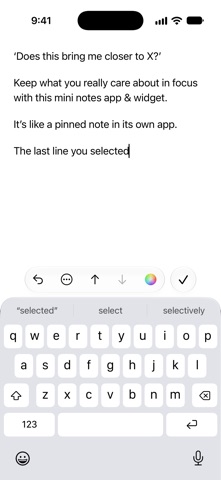

Description by nonzerosumness Written by the developer, not by AppBrain. Click to read.
It’s like a pinned note in its own app.
The app feels like just 1 note, but you can create up to 8 infinite pages.
It features beautiful typefaces.
There is extra spacing between lines.
You can mark lines with color, italics, or both.
Pages can also be given custom names.
Each page is saved as a plain text file, either in iCloud Drive or only on your iPhone or iPad.
Text and links can be added to a page in the app from within other apps using the Share button.
You can add a sticky note widget to your Home Screen and Lock Screen that shows the last line you selected in the app or the line you pinned in the Home Screen widget.
A control lets you open the app directly from Control Center or your Lock Screen. You can also assign this control to your iPhone’s Action button.
An Apple Watch app and widget show the last line you selected in the app on your paired iPhone or the line you pinned in the app on your watch.
App Privacy:
There is no sign-in and no data is collected.
Your files are encrypted on your device using your passcode when it’s locked or turned off.
If iCloud Backup is turned on for the app in the Settings app > [Your Name] > iCloud > Storage > Backups > [Your Device], your app data is uploaded to iCloud.
If you want your files in iCloud Drive to be end-to-end encrypted, please turn on Advanced Data Protection in Settings > [Your Name] > iCloud > Advanced Data Protection.
If you have Share Analytics turned on in Settings > Privacy & Security > Analytics & Improvements, we receive app analytics from Apple. This does not contain your app data or personally identify you.
Other Features:
To add a new line, pull down when you are at the top of a page.
Easily move lines up ↑ or down ↓.
Quickly undo or redo changes above the keyboard.
Tap the ⋯ button above the keyboard for more actions, such as adding the date or inserting a line break.
Link or move lines to another page using the Quick Actions menu.
List markers (like ‘•’) and spaces you type at the start of a line automatically get added to a new line below it.
A URL scheme allows you to go directly to a page or to a specific line on a page.
Support for Apple’s Writing Tools on compatible devices.
Supports multiple windows on iPad.
Fully accessible with VoiceOver.
Gestures:
Swipe left or right on a page while editing to move the insertion point from word to word.
To move the insertion point, touch and hold the Space bar on the onscreen keyboard with one finger, then slide your finger around the keyboard.
Swipe left with three fingers to undo or right to redo.
Tap on a page with three fingers to show a menu with undo, cut, copy, paste, and redo.
The use of this app is subject to your agreement to:
Apple’s Standard End User License Agreement: https://www.apple.com/legal/internet-services/itunes/dev/stdeula/
Apple’s Privacy Policy: https://www.apple.com/legal/privacy/
If you use iCloud with the app, iCloud’s Terms of Service: https://www.apple.com/legal/internet-services/icloud/