

ODDCAMERA is made and published by CHENG YANG KUO. AppBrain is an independent app data site and isn't affiliated with CHENG YANG KUO. The app name, icon, screenshots and description belong to CHENG YANG KUO and are shown as published on the App Store.
AppBrain's verdict
- Last updated
- August 1, 2026
- Size
- 19.6 MB
User feedback
Ratings and reviews on the App StoreComments on ODDCAMERA for iOS
We don't have enough comments to show example comments. Please check back later.
Store listing
By CHENG YANG KUO, from the App Store




Description by CHENG YANG KUO Written by the developer, not by AppBrain. Click to read.
Eleven camera modes
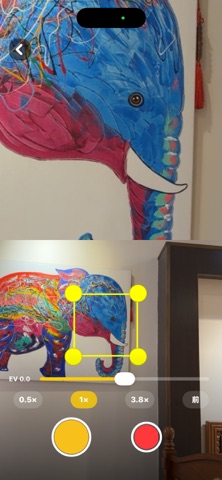
1. Loupe Camera Drag a resizable yellow frame to magnify any part of the scene while keeping the full composition. Split top/bottom in portrait, left/right in landscape — photos and video both save as a dual-view composite.
2. Multi-Bubble Loupe Up to six circular magnifier bubbles on screen at once, each freely movable with its own zoom level.
3. Color Isolation Camera Keep one hue range in full color and turn everything else black & white. Adjustable hue range, saturation, and brightness, with 1080p/4K recording.
4. Dual Filter Camera Two different looks on one frame — left/right or top/bottom — with a draggable split line. One shot, two moods.
5. Split Camera Shoot 2–8 panels in sequence and composite them into a single split collage. Great for travel shots and action sequences.
6. Map Camera Your live view and a map in the same frame, overlaid with coordinates, altitude, street, and timestamp — so you always know where a shot was taken.
7. Slit Scan A fixed slit scans line by line, stretching moving people, cars, and clouds into abstract time-slice images.
8. Distortion Camera A live sine-wave / ripple distortion engine with adjustable strength, ripple density, horizontal or vertical axis, and edge handling — plus an animated "flowing water" mode. Supports 1080p/4K recording.
9. Dive Camera (new) Bring back the reds that water takes away. Pick a depth profile — 2, 5, 10, or 20 meters — and switch between blue-water and green-water correction. The filter is baked straight into your photos and video, so there's no color grading afterward. Supports 1080p/4K recording.
10. Aura Camera (new) Dreamy aura-photo glow. Choose 1–4 colors from an eight-color palette to blend, or let random mode decide, and dial the glow from subtle to strong. Baked into photos and video. Supports 1080p/4K recording.
11. QR Camera (new) Your shot on top, your QR code below. The top half shoots live photos or video (with lens/zoom switching and the front camera), or imports a photo or video from your library that you can pinch to zoom and drag to reframe. The bottom half generates a QR code from any URL you enter, with a line of custom text above and below it — and full color control over the background, text, and QR itself. Drag the divider to set the split, and export imported video as a fully composited clip in one tap. Perfect for signing your work, digital business cards, event promos, and shop signage.
Look LUTs
A set of original film-style LUTs is built in and applies live across most camera modes, so photos and video match. You can also import your own .cube 3D LUTs.
Processed on device, private by design
Every effect is computed live on your device. Your shots are saved to your own photo library — nothing is uploaded or shared.
Try before you buy
Every camera is free to try. Upgrading to Pro is a one-time purchase (not a subscription): unlimited use of every camera, advanced adjustments, no watermarks, no ads, and restore purchases anytime.
Safety and technology
Found in the app by AppBrain- Price
- Free
- App size
- 19.6 MB
- Content rating
- Everyone
Technologies used by ODDCAMERA
Releases
Updates seen on the App Store- Version
- 1.3
- Launched
- June 2026
No changelog data
Alternatives
Similar apps and more from CHENG YANG KUOAlternatives to ODDCAMERA


More from CHENG YANG KUO


Rankings
App Store top chartsApp Store Rankings for ODDCAMERA
About the app and developer
About ODDCAMERA
ODDCAMERA is a photo & video app developed by CHENG YANG KUO.
User Ratings
The app has no ratings yet.
App Information
ODDCAMERA is freely available from the App Store. The app size is 19.63 MB. The latest version available is 1.3. The last update was on August 1, 2026.
Technical Requirements
The app has a content rating of Everyone. The app has been available on the App Store since June 2026.
Developer information for CHENG YANG KUO
Address:
Frequently asked questions about ODDCAMERA
Is ODDCAMERA free?
Yes. ODDCAMERA is free on the App Store.
Is ODDCAMERA still available?
Yes. ODDCAMERA is on the App Store, and the last update we saw was on August 1, 2026.
How large is ODDCAMERA?
ODDCAMERA is 19.63 MB.
Is ODDCAMERA suitable for children?
App Store rates the content of ODDCAMERA as suitable for everyone.
Who made ODDCAMERA?
ODDCAMERA was developed by CHENG YANG KUO. It is listed in the photo & video category on the App Store.
What are the best alternatives to ODDCAMERA?
People looking at ODDCAMERA also look at these photo & video apps: NoAI Photo Cam, Cubedit: LUT Color Grading, Tail Cam: Motion Trail Effect, BatchCraft - Edit, Bulk Export, APO - cinema photo.