

OffScroll: Block Apps & To-Dos
OffScroll: Block Apps & To-Dos is made and published by Paul Konrad Blumberg. AppBrain is an independent app data site and isn't affiliated with Paul Konrad Blumberg. The app name, icon, screenshots and description belong to Paul Konrad Blumberg and are shown as published on the App Store.
AppBrain's verdict
- Last updated
- October 7, 2026
Rankings
App Store top chartsApp Store Rankings for OffScroll: Block Apps & To-Dos
Competitors
Similar apps and more from Paul Konrad BlumbergAlternatives to OffScroll: Block Apps & To-Dos


Releases
Updates seen on the App Store- Version
- 1.3.0
- Launched
- August 2026
No changelog data
User feedback
Ratings and reviews on the App StoreComments on OffScroll: Block Apps & To-Dos for iOS
We don't have enough comments to show example comments. Please check back later.
Technology
Found in the app by AppBrain- Price
- Free
- App size
- 6.81 MB
- Content rating
- Everyone
Technologies used by OffScroll: Block Apps & To-Dos
About the app and developer
About OffScroll: Block Apps & To-Dos
OffScroll: Block Apps & To-Dos is a productivity app developed by Paul Konrad Blumberg.
User Ratings
The app has no ratings yet.
App Information
OffScroll: Block Apps & To-Dos is freely available from the App Store. The app size is 6.81 MB. The latest version available is 1.3.0. The last update was on October 7, 2026.
Technical Requirements
The app has a content rating of Everyone. The app has been available on the App Store since August 2026.
Developer information for Paul Konrad Blumberg
Address:
Frequently asked questions about OffScroll: Block Apps & To-Dos
Is OffScroll: Block Apps & To-Dos free?
Yes. OffScroll: Block Apps & To-Dos is free on the App Store.
Is OffScroll: Block Apps & To-Dos still available?
Yes. OffScroll: Block Apps & To-Dos is on the App Store, and the last update we saw was on October 7, 2026.
How large is OffScroll: Block Apps & To-Dos?
OffScroll: Block Apps & To-Dos is 6.81 MB.
Is OffScroll: Block Apps & To-Dos suitable for children?
App Store rates the content of OffScroll: Block Apps & To-Dos as suitable for everyone.
Who made OffScroll: Block Apps & To-Dos?
OffScroll: Block Apps & To-Dos was developed by Paul Konrad Blumberg. It is listed in the productivity category on the App Store.
What are the best alternatives to OffScroll: Block Apps & To-Dos?
People looking at OffScroll: Block Apps & To-Dos also look at these productivity apps: Offscroll: Screen Time Control, Longitude°: Time Zone Calendar, TimeVault: Screentime & Habits, Push Ups App Blocker: RepLock, Quit: Screen Time Blocker.
Store listing
By Paul Konrad Blumberg, from the App Store


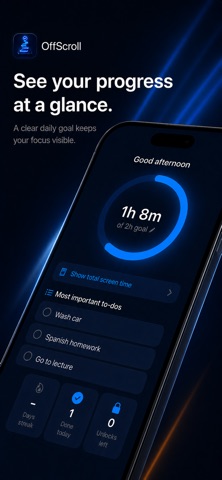


Description by Paul Konrad Blumberg Written by the developer, not by AppBrain. Click to read.
OffScroll doesn't just take the feed away. It puts what you actually meant to do in its place.
HOW IT WORKS
1. Set your limits
Pick single apps or whole categories and give them a daily limit. OffScroll builds on Apple Screen Time, so it really blocks — it doesn't just remind you.
2. Write down what's waiting
A plain list, no folders and no labels. Whatever is at the top is what matters most.
3. At your limit, you see that list
When the time is used up, the block screen shows your three most important tasks. One tap takes you straight there.
4. You can unlock — but you have to explain yourself
You can always get back into your apps. You just have to write down why. When the time runs out, OffScroll asks whether it was worth it.
WHAT SETS OFFSCROLL APART
The block screen isn't a dead end
Other apps say "time's up" and that's that. OffScroll puts your open list in the same spot. You don't just lose something — you get something back.
Unlocking costs you a sentence
No password, no forced waiting period, no wall to fight against. Just one question: why now? That's the difference between a decision and a reflex — and it's why you can look back and see where your time actually went.
Priority is simply the order
No categories, no priority levels, no stars, no points. What's at the top matters. Drag to reorder, that's it.
No leaderboards, no trophies
The app reports, it doesn't cheer. You see your numbers — not your rank next to strangers.
No account, no sign-up
Download it, open it, go. There is nothing to register and no email address to hand over.
EVERYTHING IT DOES
Limits and blocking
· Daily limits for single apps or whole categories
· Real blocking through Apple Screen Time, not just a notice
· Block websites at all times — in Safari
· Cap your daily unlocks: 1 to 10
· Choose how long an unlock lasts: 5, 10, 15 or 30 minutes
· A follow-up question after every unlock, asking whether it was worth it
To-dos
· A list where the order is the priority — drag to reorder
· The top three appear on the block screen
· Completed items are struck through; one-off tasks disappear at the next day change, daily ones come back unchecked
· Swipe to pin
Overview
· A ring with your real screen time and your daily goal
· Weekly overview with per-day bars and a goal line
· "Time saved" — measured against your screen time before OffScroll
· A streak for every day you kept your limits
· Unlocks taken and tasks completed per day
Also
· Evening recap, Sunday weekly recap — both can be turned off
· Two colour worlds: Dark Blue or Black & Orange
· For iPhone and iPad
PRIVATE, BECAUSE NOTHING LEAVES YOUR DEVICE
OffScroll has no account, no sign-in, no server. Your limits, your to-dos and your usage data live on your iPhone only. Apple Screen Time doesn't even hand the app the names of the apps you block — we couldn't read them if we wanted to.
SUBSCRIPTION
Use OffScroll for free with one limit for an app, a category or a website, and up to 5 open to-dos. Pro unlocks unlimited limits (including whole groups of apps), daily to-dos, unlimited to-dos and the 7-day overview. Pro is available as a monthly or yearly subscription and starts with an immediate charge. Cancel any time in your App Store account settings.
Privacy Policy: https://offscrollsupport-ship-it.github.io/offscroll-privacy/
Terms of Use: https://www.apple.com/legal/internet-services/itunes/dev/stdeula/