AppBrain
AppBrain
  • Apps
  • Apps being viewed right now Trending apps today Most popular apps All-time most installed apps Top rated apps iPhone and iPad apps
  • Intelligence ▾
    Intelligence overview → Track any Android app or your whole market
    Track & analyze
    Keyword Tracker & OptimizerTrack & improve Play rankings App Performance ReportOne-off PDF for any app StatisticsFree Android & Play market stats
    Promote your app
    Featured Apps App Links
  • Intelligence
  • Pricing
  • Dashboard
  • Sign up
  • Log in
App Store Apps > Productivity > Quit: Screen Time Blocker
Quit: Screen Time Blocker icon

Quit: Screen Time Blocker

by Markus Rau · Productivity · Free
On the App Store since June 2026 · Data updated 2026-10-21

Quit: Screen Time Blocker is made and published by Markus Rau. AppBrain is an independent app data site and isn't affiliated with Markus Rau. The app name, icon, screenshots and description belong to Markus Rau and are shown as published on the App Store.

AppBrain's verdict

Last updated
September 23, 2026
Size
71.0 MB
Official page on the App Store

User feedback

Ratings and reviews on the App Store

Comments on Quit: Screen Time Blocker for iOS

We don't have enough comments to show example comments. Please check back later.

Store listing

By Markus Rau, from the App Store
Quit: Screen Time Blocker Screenshot 1 of 5
Quit: Screen Time Blocker Screenshot 2 of 5
Quit: Screen Time Blocker Screenshot 3 of 5
Quit: Screen Time Blocker Screenshot 4 of 5
Quit: Screen Time Blocker Screenshot 5 of 5
Screenshots by Markus Rau, from the the App Store listing
Description by Markus Rau Written by the developer, not by AppBrain. Click to read.
Quit helps you stop doomscrolling and take back your screen time — with an AI plan that lowers your daily limit week by week, instead of blocking you when it's already too late.

Most of us spend four hours a day on our phones. Very little of it is time we chose. Quit shows you the real number, then gives you a plan to bring it down.


HOW QUIT WORKS

Quit reads your actual usage through Apple Screen Time and builds a personalised plan around it. Your daily limit doesn't stay fixed — it drops a little each week, so you're always moving toward your goal without hitting a wall you can't clear.

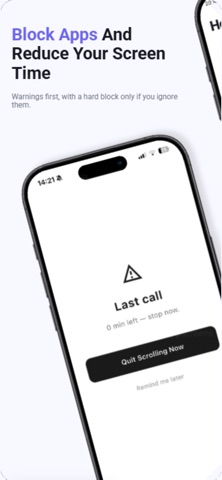
And before you reach that limit, Quit warns you. At 50%, 70% and 90% you get a checkpoint with a real choice: stop now, or keep going. Most people stop at a warning. The hard block is the last resort, not the first.


FEATURES

• Real screen time tracking: Your actual usage via Apple Screen Time — no manual logging, no estimates.
• AI focus plans: A plan built on your real baseline, not a generic limit that's the same for everyone.
• Weekly reduction: Your target drops gradually, so progress never depends on one perfect day.
• Early warnings: Three checkpoints before the block, each with a genuine choice.
• App blocking: Choose exactly which apps get limited. Everything else stays open.
• Group challenges: Create a group, start a weekly challenge, follow a live leaderboard.
• AI coach: Ask about your habits, your progress, your plan — 5 questions a day.
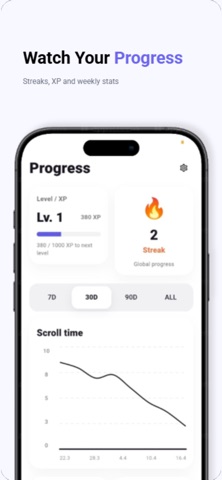
• Streaks, XP and stats: See how far you've come and how many hours you've saved.


WHAT YOU GET BACK

Hours. The first thing most people notice isn't the number going down — it's the evenings that suddenly have room in them again. Time for a book, a run, a conversation that isn't interrupted.

Quit shows you exactly how much time you've reclaimed, every day.


WHAT MAKES QUIT DIFFERENT

Other screen time apps give you a wall. You hit your limit, you're locked out, and the rest of the day feels written off — so you disable the block and start over tomorrow.

Quit gives you a number that moves. A limit that lowers itself, warnings before the block, and friends who can see whether you stuck to it.

If you've deleted Instagram three times and reinstalled it three times, the problem was never your willpower. It was the tool.


TRY IT FREE

Premium includes AI plans, the AI coach, group challenges and your full history.
3 days free — cancel anytime in Settings.

Available in 10 languages.

Terms of Use: https://henry2010rau-coder.github.io/quit-terms/
Privacy Policy: https://henry2010rau-coder.github.io/quit-privacy/
Official page on the App Store

Safety and technology

Found in the app by AppBrain
Price
Free
App size
71.0 MB
Content rating
Everyone

Technologies used by Quit: Screen Time Blocker

Releases

Updates seen on the App Store
Version
1.5
Launched
June 2026

No changelog data

Alternatives

Similar apps and more from Markus Rau

Alternatives to Quit: Screen Time Blocker

DontSnooze: Goals & Friends icon DontSnooze: Goals & Friends
Johann Buscail
0.0
Free
Axion - Daily Planner Todo icon Axion - Daily Planner Todo
Leny Moncy
0.0
Free
Spiral: Screen Time App icon Spiral: Screen Time App
Harry O'Brien
3.5
Free
2 ratings
OffScroll: Block Apps & To-Dos icon OffScroll: Block Apps & To-Dos
Paul Konrad Blumberg
0.0
Free
ScrollTax: Earn Screen Time icon ScrollTax: Earn Screen Time
Marasy Phi
4.8
Free
4 ratings
Push Up Time: App Blocker icon Push Up Time: App Blocker
ISMAIL FATIH BIRAK
4.8
Free
16 ratings
GoalBar icon GoalBar
Strivian LLC
5.0
Free
4 ratings
EVOLVE AI: Self Improvement icon EVOLVE AI: Self Improvement
Richard Oestreich
1.0
Free
1 ratings

Rankings

App Store top charts

App Store Rankings for Quit: Screen Time Blocker

This app is not ranked

About the app and developer

About Quit: Screen Time Blocker

Quit: Screen Time Blocker is a productivity app developed by Markus Rau.

What is the rating of Quit: Screen Time Blocker?

Quit: Screen Time Blocker has no ratings yet.

Is Quit: Screen Time Blocker free?

Quit: Screen Time Blocker is free. The app size is 70.99 MB. The latest version available is 1.5. The last update was on September 23, 2026.

What are the requirements for Quit: Screen Time Blocker?

The app has a content rating of Everyone. The app has been available on the App Store since June 2026.

Developer information for Markus Rau

Markus Rau

Address:

Share Quit: Screen Time Blocker

Price drops on Google Play Apps other people are watching Top new apps Today's trending apps Popular Productivity Apps
DontSnooze: Goals & Friends icon DontSnooze: Goals & Friends
Axion - Daily Planner Todo icon Axion - Daily Planner Todo
Spiral: Screen Time App icon Spiral: Screen Time App
OffScroll: Block Apps & To-Dos icon OffScroll: Block Apps & To-Dos
ScrollTax: Earn Screen Time icon ScrollTax: Earn Screen Time
Push Up Time: App Blocker icon Push Up Time: App Blocker
GoalBar icon GoalBar
EVOLVE AI: Self Improvement icon EVOLVE AI: Self Improvement
Overview Alternatives Reviews Rankings Technology
AppBrain Intelligence premium content

Subscribe now to get full and unlimited access to AppBrain Intelligence. You'll have access to:

  • App Intelligence dashboard (performance timeline, competitor comparison, country rankings, insight cards)
  • Detailed ranking data per app
  • Full timeline per developer
  • Device market shares data per country
  • Unlimited keyword tracking
1 Month

$75/mo
(billed every month)

SAVE 0%
Subscribe
3 Months

$65/mo
($195 billed every 3 months)

SAVE 13%
Subscribe
1 Year

$57.50/mo
($690 billed every year)

SAVE 23%
Subscribe
Each subscription will automatically renew 3 days before the expiration date for the same time period. Subscriptions can be cancelled at any time before the renewal.

AppBrain is an app data site, we track rankings, ratings, installs for all apps and games on Google Play and the App Store. AppBrain doesn't host app files or APKs, all install links go directly to the official store. All trademarks are owned by their respective owners.

More apps

  • Top Android apps being viewed
  • View Anagram Sprint: Word Game
  • MyTriCountyTX
  • Frogs Kitchen Android App

App statistics

  • Android statistics
  • Google Play Developer stats
  • Trending Android Apps
  • Trending iOS apps
  • Top popular Apps
  • Buy the best Android phone
  • Buy & sell app businesses

About AppBrain

  • Contact
  • Privacy
  • Documentation
  • DMCA takedowns
  • Blog
  • Android Interstitial Ads: Best practices to optimize your app's earnings
© 2010-2026 - AppBrain