

OffShift – Shift Work Sleep
OffShift – Shift Work Sleep is made and published by JONATHAN ALEXANDER WRIGHT. AppBrain is an independent app data site and isn't affiliated with JONATHAN ALEXANDER WRIGHT. The app name, icon, screenshots and description belong to JONATHAN ALEXANDER WRIGHT and are shown as published on the App Store.
AppBrain's verdict
- Last updated
- April 20, 2026
Rankings
App Store top chartsApp Store Rankings for OffShift – Shift Work Sleep
Competitors
Similar apps and more from JONATHAN ALEXANDER WRIGHTAlternatives to OffShift – Shift Work Sleep


More from JONATHAN ALEXANDER WRIGHT

Releases
Updates seen on the App Store- Version
- 1.6
- Launched
- December 2025
No changelog data
User feedback
Ratings and reviews on the App StoreComments on OffShift – Shift Work Sleep for iOS
We don't have enough comments to show example comments. Please check back later.
Technology
Found in the app by AppBrain- Price
- Free
- App size
- 3.05 MB
- Content rating
- Everyone
Technologies used by OffShift – Shift Work Sleep
About the app and developer
About OffShift – Shift Work Sleep
OffShift – Shift Work Sleep is a health & fitness app developed by JONATHAN ALEXANDER WRIGHT.
User Ratings
The app has no ratings yet.
App Information
OffShift – Shift Work Sleep is freely available from the App Store. The app size is 3.05 MB. The latest version available is 1.6. The last update was on April 20, 2026.
Technical Requirements
The app has a content rating of Everyone. The app has been available on the App Store since December 2025.
Developer information for JONATHAN ALEXANDER WRIGHT
Address:
Store listing
By JONATHAN ALEXANDER WRIGHT, from the App Store


Description by JONATHAN ALEXANDER WRIGHT Written by the developer, not by AppBrain. Click to read.
Whether you're a paramedic, nurse, firefighter, physician, or trades worker — OffShift helps you sleep smarter, recover faster, and stay ahead of fatigue.
WHAT'S NEW IN 1.6
- App lock — protect your health data with Face ID or Touch ID
- Shift editing — edit time, type, and notes on any shift
- Pre-shift fatigue warning — get a heads-up when you're running low before a shift
- Auto-archive — past shifts stay hidden but your trend data stays intact
TRACK YOUR SLEEP
- Log sleep manually or sync from Apple Health
- Automatically merges fragmented sleep into meaningful sessions
- See total sleep, nightly averages, and sleep debt at a glance
- Rate sleep quality and track streaks to build better habits
UNDERSTAND YOUR SCHEDULE
- View upcoming shifts clearly
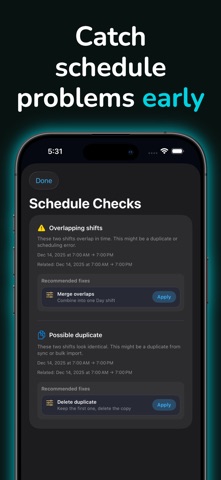
- Get alerts for overlapping shifts, short turnarounds, and unusually long days
- Apply rotation templates to build weeks of shifts in seconds
- Import shifts from your iOS calendar automatically
- Share a PDF schedule with your partner or family
- Edit any shift directly from the detail view
STAY AHEAD OF FATIGUE
- Recovery score based on your recent sleep and sleep debt
- 3-day fatigue forecast based on upcoming shifts and sleep history
- Pre-shift fatigue warning when your score is too high going into a shift
- Personalized sleep plans built around your shift type
- Caffeine cutoff, nap windows, and bedtime reminders timed to your schedule
- Haptic wake-up alarm with snooze, timed to your sleep plan
APPLE WATCH
- Shift progress and countdown on your wrist
- Sleep summary and recovery score
- 7-day sleep trend chart
- Complication support for quick glances
WIDGETS
- Next shift at a glance
- Shift countdown and progress bar
- Sleep summary
- Fatigue score widget
OFFSHIFT PRO
- Apple Health sleep sync
- 30 and 90-day sleep trends
- Advanced widgets including fatigue score
- Apple Watch app
- Live Activity on Dynamic Island and lock screen
- Custom rotation templates
- Shift pattern detection
- Calendar import
- Haptic alarm
- Fatigue forecast
- Pre-sleep routine reminders
- Available monthly, yearly, or as a one-time lifetime purchase
PRIVATE BY DESIGN
- App lock with Face ID, Touch ID, or passcode
- Your data stays on your device and iCloud account
- No accounts, no ads, no tracking
"Just sleep at night" isn't an option for everyone. OffShift gets that.