

Orch A320 Guide is made and published by Wonmo Seong. AppBrain is an independent app data site and isn't affiliated with Wonmo Seong. The app name, icon, screenshots and description belong to Wonmo Seong and are shown as published on the App Store.
AppBrain's verdict
- Rating on App Store
- 4.00
- 1 ratings
- Last updated
- April 30, 2026
It doesn't have enough ratings yet to judge what users think.
Rankings
App Store top chartsApp Store Rankings for Orch A320 Guide
Competitors
Similar apps and more from Wonmo SeongAlternatives to Orch A320 Guide


More from Wonmo Seong





Releases
Updates seen on the App Store- Version
- 1.2
- Launched
- April 2026
No changelog data
User feedback
Ratings and reviews on the App StoreComments on Orch A320 Guide for iOS
We don't have enough comments to show example comments. Please check back later.
Technology
Found in the app by AppBrain- Price
- Free
- App size
- 52.8 MB
- Content rating
- Everyone
Technologies used by Orch A320 Guide
About the app and developer
About Orch A320 Guide
Orch A320 Guide is an education app developed by Wonmo Seong.
User Ratings
Orch A320 Guide is rated 4.00 out of 5 stars. The rating is based on one rating ratings.
App Information
Orch A320 Guide is freely available from the App Store. The app size is 52.77 MB. The latest version available is 1.2. The last update was on April 30, 2026.
Technical Requirements
The app has a content rating of Everyone. The app has been available on the App Store since April 2026.
Developer information for Wonmo Seong
Address:
Frequently asked questions about Orch A320 Guide
Is Orch A320 Guide free?
Yes. Orch A320 Guide is free on the App Store.
Is Orch A320 Guide still available?
Yes. Orch A320 Guide is on the App Store, and the last update we saw was on April 30, 2026.
How large is Orch A320 Guide?
Orch A320 Guide is 52.77 MB.
Is Orch A320 Guide suitable for children?
App Store rates the content of Orch A320 Guide as suitable for everyone.
How do people rate Orch A320 Guide?
Orch A320 Guide has one rating of 4.00 stars on the App Store.
Who made Orch A320 Guide?
Orch A320 Guide was developed by Wonmo Seong. It is listed in the education category on the App Store.
What are the best alternatives to Orch A320 Guide?
People looking at Orch A320 Guide also look at these education apps: Airbus A320 Systems, A320 Systems Study & Exam, A320 FMS Trainer - SimViz Labs, iAIRBUS A320 Type Rating Prep, 320 Guide.
Store listing
By Wonmo Seong, from the App Store
Description by Wonmo Seong Written by the developer, not by AppBrain. Click to read.
for type rating, a sim enthusiast, or a line pilot brushing up on procedures — everything you need is here, offline
and always ready.
INTERACTIVE 3D COCKPIT
Explore a detailed A320 cockpit in full 3D. Pan, zoom, and walk through the flight deck with 35+ labeled instrument
targets. Tap any instrument to learn what it does. From the FCU to the overhead panel, every switch and display is
identified and explained.
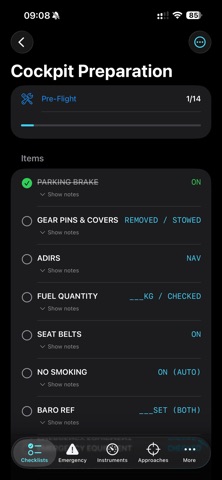
14 NORMAL CHECKLISTS
Complete flow-through checklists for every phase of flight:
• Cockpit Preparation & Before Start
• After Start & Before Taxi
• Before Takeoff & After Takeoff
• Climb, Cruise & Descent Preparation
• Approach, Landing & After Landing
• Parking & Securing the Aircraft
Interactive check-off with progress tracking. Complete All or Reset with one tap.
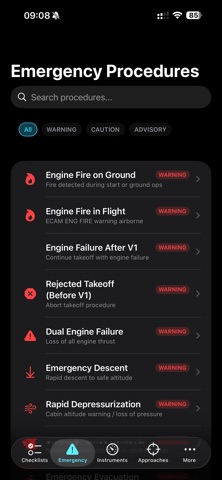
17 EMERGENCY PROCEDURES
Memory items highlighted in red. Step-by-step actions with severity classification:
• Engine Fire (Ground & Flight)
• Engine Failure After V1 / Rejected Takeoff
• Dual Engine Failure & Emergency Descent
• Rapid Depressurization & Smoke Removal
• Emergency Evacuation & Ditching
• Unreliable Airspeed & TCAS RA
• Windshear Escape, Fuel Leak, Hydraulic Failure
• Electrical Emergency & Loss of Braking
10 INSTRUMENT GUIDES
Detailed breakdowns of every cockpit instrument:
• PFD — airspeed tape, attitude, altitude, FMA modes
• ND — all display modes, overlays, range selection
• ECAM — engine parameters, system pages, warning levels
• FCU — speed, heading, altitude, V/S knobs explained
• MCDU — every page, color coding, data entry
• Overhead Panel, Pedestal, Glareshield, AP/FD, Radio
8 APPROACH PROCEDURES
Step-by-step with FMGC setup and minimums:
• ILS CAT I / II / III with autoland guidance
• VOR, VOR/DME, NDB approaches
• RNAV (GPS) with LNAV/VNAV/LPV
• Visual, Circling, LOC Only
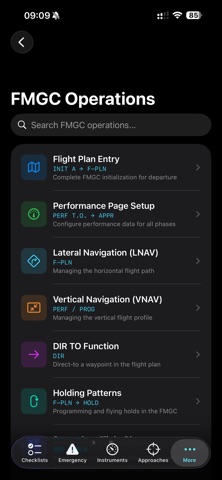
FMGC OPERATIONS
MCDU key-by-key instructions for:
• Flight Plan Entry & Performance Setup
• Lateral & Vertical Navigation (LNAV/VNAV)
• DIR TO, Holding Patterns, Secondary Flight Plan
• Step Climb, Cost Index, Wind Entry
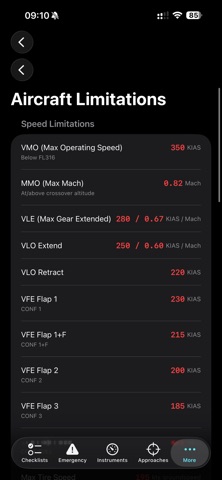
POH REFERENCE
• Speed Limitations (VMO, VFE, VLE, VLO)
• Weight Limitations (MTOW, MLW, MZFW)
• Engine Limits, Altitude Limits, Environmental Limits
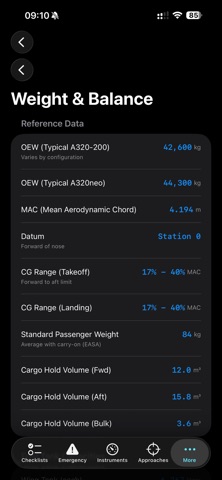
• Weight & Balance data, Fuel Capacities
• Takeoff, Cruise & Landing Performance
• Systems: Engines, Hydraulics, Electrical, Flight Controls, Pressurization, Fuel
DESIGNED FOR PILOTS
• Dark mode optimized for cockpit use
• Works 100% offline — no internet required
• Satisfying haptic feedback on checklist completion
• Zero data collection — complete privacy
DISCLAIMER: This app is a training and reference tool. It is not a substitute for official airline SOPs, the Airbus
FCOM/QRH, or proper type-rating training.