

PanoSlicer is made and published by Dr. Tae. AppBrain is an independent app data site and isn't affiliated with Dr. Tae. The app name, icon, screenshots and description belong to Dr. Tae and are shown as published on the App Store.
AppBrain's verdict
Established- Rating on App Store
- 1.00
- 1 ratings
- Last updated
- September 14, 2025
It doesn't have enough ratings yet to judge what users think.
Rankings
App Store top chartsApp Store Rankings for PanoSlicer
Competitors
Similar apps and more from Dr. TaeAlternatives to PanoSlicer






More from Dr. Tae



Releases
Updates seen on the App Store- Version
- 2.1
- Launched
- March 2017
No changelog data
User feedback
Ratings and reviews on the App StoreComments on PanoSlicer for iOS
We don't have enough comments to show example comments. Please check back later.
Technology
Found in the app by AppBrain- Price
- Free
- App size
- 9.95 MB
- Content rating
- Everyone
Technologies used by PanoSlicer
About the app and developer
About PanoSlicer
PanoSlicer is a photo & video app developed by Dr. Tae.
User Ratings
PanoSlicer is rated 1.00 out of 5 stars. The rating is based on one rating ratings.
App Information
PanoSlicer is freely available from the App Store. The app size is 9.95 MB. The latest version available is 2.1. The last update was on September 14, 2025.
Technical Requirements
The app has a content rating of Everyone. The app has been available on the App Store since March 2017.
Developer information for Dr. Tae
Address:
Store listing
By Dr. Tae, from the App Store

Description by Dr. Tae Written by the developer, not by AppBrain. Click to read.
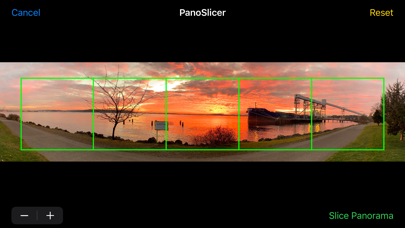
PanoSlicer helps you take advantage of Instagram's multi-image posts by slicing your panoramas into square pieces that can be uploaded at the same time into a seamless panorama that can swiped through on Instagram.
1) PanoSlicer displays thumbnails of all the panoramas* in your photo library. Simply tap the panorama you want to upload to Instagram, and customize the slicing by choosing the number of slices you want (up to Instagram's limit of 10) and which part of the panorama to slice by scrolling and zooming. After tapping on the "Slice Panorama" button, PanoSlicer slices your panorama into squares (keeping the original intact, of course), saves those slices to your photo library, and then automatically opens the Instagram uploader for you.
2) Use Instagram's "select multiple" option to upload your sliced panorama. PanoSlicer saves the slices to your photo library so that it's easy to select them in the correct order in Instagram's uploader.
3) Finish your upload and enjoy sharing your full panorama on Instagram!
PanoSlicer is free to try before you buy and initially adds a watermark to the images it creates. If you decide that PanoSlicer suits your needs, you can make an in-app purchase to unlock PanoSlicer so that it slices your panoramas without adding the watermark.
*Panoramas are defined as images with a height of more than 800 pixels and an aspect ratio (width/height) of at least 2.75. If you want to slice images that aren't recognized as panoramas, tap the "All Photos" button to browse your entire photo library.