

Parental Control App KidsLink
Parental Control App KidsLink is made and published by Yqjc Technology Co., Ltd. AppBrain is an independent app data site and isn't affiliated with Yqjc Technology Co., Ltd. The app name, icon, screenshots and description belong to Yqjc Technology Co., Ltd. and are shown as published on the App Store.
AppBrain's verdict
- Rating on App Store
- 4.20
- 5 ratings
- Last updated
- September 25, 2026
- Size
- 140.1 MB
It doesn't have enough ratings yet to judge what users think.
User feedback
Ratings and reviews on the App StoreComments on Parental Control App KidsLink for iOS
We don't have enough comments to show example comments. Please check back later.
Store listing
By Yqjc Technology Co., Ltd., from the App Store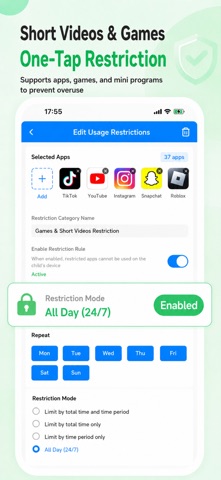



Description by Yqjc Technology Co., Ltd. Written by the developer, not by AppBrain. Click to read.
KidsLink is a powerful parental control app designed to help parents manage screen time, reduce phone addiction, and build healthier digital habits for children.
With advanced parental controls, study mode, app restrictions, real-time screen viewing, and family safety features, KidsLink helps parents create a safer and more focused digital environment.
Key Features:
* Parental Control & Screen Time Management
* App Limits & Game Restrictions
* Study Mode & Focus Mode
* Real-Time Screen View
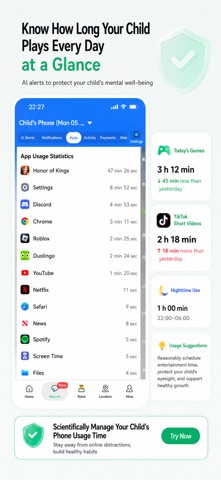
* AI Alerts & Usage Reports
* Family Safety & Location Tracking
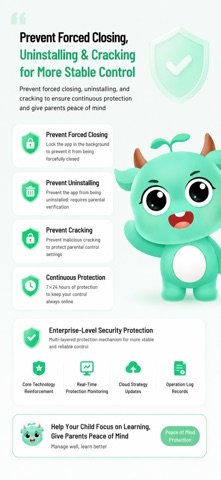
* Anti-Uninstall & Anti-Tamper Protection
Help your child stay focused, safe, and healthy online.
Screen Time & App Management
Create healthy device habits with powerful parental controls.
Features include:
* Daily screen time limits
* App usage schedules
* Bedtime auto-lock
* Game and short video restrictions
* Focus mode for studying
* Reduce late-night device usage
Help children reduce distractions and develop healthier screen habits.
Study Mode
Turn your child’s device into a focused learning environment instantly.
Only parent-approved educational apps can be used during Study Mode.
Entertainment apps, games, and short videos can be restricted automatically to improve focus and productivity.
Help children stay focused while studying.
Real-Time Screen View & Activity Monitoring
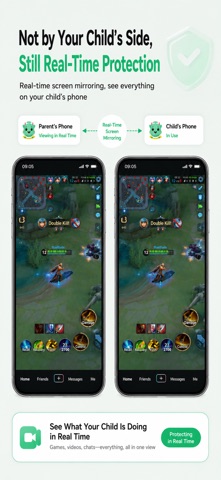
View your child’s device screen in real time and stay informed about device activity.
Features include:
* Real-time screen viewing
* Learning playback
* App activity insights
* Notification activity sync
* Device usage reports
Help parents better understand digital habits and guide responsible device usage.
AI Alerts & Usage Reports
Track your child’s digital activity with detailed reports and smart alerts.
Monitor:
* Game usage time
* Short video usage
* Nighttime device usage
* App activity records
AI-powered alerts help identify:
* Excessive screen time
* Unhealthy digital habits
* Late-night phone usage
* Potential addiction risks
Support healthier digital wellbeing for children.
Family Safety & Location Tracking
Stay connected and informed throughout the day.
Features include:
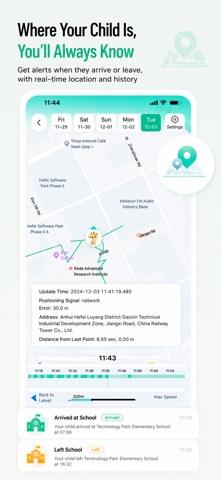
* Real-time family location
* Arrival & departure alerts
* Location history
* Family safety notifications
Know where your child is and receive important safety updates anytime.
Emergency Safety Protection
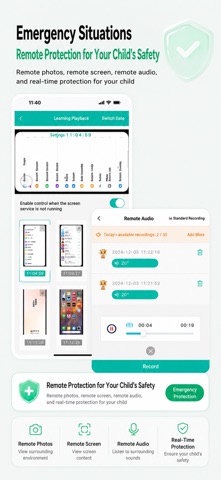
In emergency situations, parents can use:
* Remote screenshots
* Remote photo capture
* Remote audio recording
These features are designed to help parents confirm their child’s surrounding environment and safety status when needed.
Advanced Anti-Tamper Protection
Enterprise-level parental control technology designed for family device management.
Features include:
* Anti-uninstall protection
* Anti-disable protection
* Anti-tamper protection
* Prevent force closing
Ensure parental controls remain active and effective.
One of the main reasons parents choose KidsLink:
It truly works.
Healthy Digital Habits
Encourage healthier device usage with:
* Eye protection reminders
* Dark environment reminders
* Walking while using phone reminders
* Healthy screen time guidance
Help children build healthier digital habits and balanced lifestyles.
Safe Web Browsing
Smart filtering helps block unsafe and inappropriate websites, creating a safer online environment for children.
Professional Customer Support
Our support team is available whenever you need assistance.
KidsLink - Smarter Parental Control for healthier digital habits and family safety.
---POLICIES & TERMS OF USE---
Privacy Policy: https://ossfiles.kidslink.info/mp-configs/SXB/htmls/privacy.html
Terms of Use: https://ossfiles.kidslink.info/mp-configs/SXB/htmls/user.html
Website: https://www.kidslink.info/
Contact US: support@kidslink.info
Safety and technology
Found in the app by AppBrain- Price
- Free
- App size
- 140.1 MB
- Content rating
- Everyone
Technologies used by Parental Control App KidsLink
Releases
Updates seen on the App Store- Version
- 3.42
- Launched
- November 2023
No changelog data
Alternatives
Similar apps and more from Yqjc Technology Co., Ltd.Alternatives to Parental Control App KidsLink


More from Yqjc Technology Co., Ltd.


Also available on Google Play

Rankings
App Store top chartsApp Store Rankings for Parental Control App KidsLink
About the app and developer
About Parental Control App KidsLink
Parental Control App KidsLink is an utilities app developed by Yqjc Technology Co., Ltd.
What is the rating of Parental Control App KidsLink?
Parental Control App KidsLink is rated 4.20 out of 5 stars, based on 5 ratings.
Is Parental Control App KidsLink free?
Parental Control App KidsLink is free. The app size is 140.08 MB. The latest version available is 3.42. The last update was on September 25, 2026.
What are the requirements for Parental Control App KidsLink?
The app has a content rating of Everyone. The app has been available on the App Store since November 2023.
Developer information for Yqjc Technology Co., Ltd.
Address: