

Parental Control KidsLink Kids
Parental Control KidsLink Kids is made and published by Yqjc Technology Co., Ltd. AppBrain is an independent app data site and isn't affiliated with Yqjc Technology Co., Ltd. The app name, icon, screenshots and description belong to Yqjc Technology Co., Ltd. and are shown as published on the App Store.
AppBrain's verdict
- Rating on App Store
- 5.00
- 1 ratings
- Last updated
- August 6, 2026
- Size
- 43.2 MB
It doesn't have enough ratings yet to judge what users think.
User feedback
Ratings and reviews on the App StoreComments on Parental Control KidsLink Kids for iOS
We don't have enough comments to show example comments. Please check back later.
Store listing
By Yqjc Technology Co., Ltd., from the App Store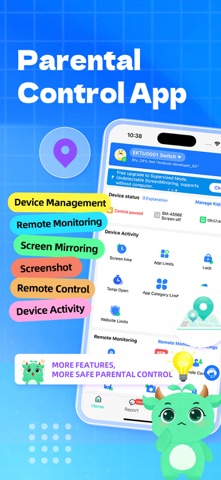


Description by Yqjc Technology Co., Ltd. Written by the developer, not by AppBrain. Click to read.
Why Choose Parental Control App:
◆ Real-Time Monitoring & Remote Control – View the device screen in real time and understand which apps are being used and how often. You can also remotely manage the device to guide responsible usage.
◆ App Notification Sync – Sync notifications from social media platforms such as Facebook, Instagram, and Messenger to better understand device activity and help reduce potential risks.
◆ Screen Time Management – Set screen time schedules to ensure the device is used at appropriate times.
◆ Website & App Blocker – Filter inappropriate websites and restrict certain apps (such as adult content, dating apps, or games) to guide healthier usage.
◆ GPS Location Tracker – View the device’s real-time location and daily route history on the map to enhance safety awareness.
◆ Screenshot Capture – Capture the device screen remotely to help understand usage behavior.
◆ One-Way Recording & Video – Record audio and camera video from the device when necessary for safety-related scenarios.
◆ Mode Switching – Switch between Normal Mode and Study Mode. In Study Mode, only parent-approved apps can be viewed or used, reducing distractions and improving study focus.
Start Protecting Your Device
1.Download the app on your phone.
2.Download the corresponding companion app on the target device.
3.Link the device by scanning a QR code or entering a pairing code to complete setup.
Parental Control App offers a 3-day free trial with full features. A subscription is required after the trial period. No ads included.
A parent account can connect up to 3 devices and invite additional parents for shared monitoring.
---POLICIES & TERMS OF USE---
Privacy Policy: https://ossfiles.kidslink.info/mp-configs/SXB/htmls/privacy.html
Terms of Use: https://ossfiles.kidslink.info/mp-configs/SXB/htmls/user.html
Website: https://www.kidslink.info/
Contact US: support@kidslink.info
The app asks for the following permissions:
1.Display over other apps - to block applications when time limit rules occur
2.Accessibility services - to Restrict modifications to system settings and app permissions, and automatically grant certain permissions.
3.VpnService - to Restrict access to designated unhealthy websites.
4.Usage access - to collect statistics about the application uptime.
5.Autostart - for constant operation of the application tracker on the device.
6.Device admin apps - to protect against unauthorized deletion.
Safety and technology
Found in the app by AppBrain- Price
- Free
- App size
- 43.2 MB
- Content rating
- Everyone
Technologies used by Parental Control KidsLink Kids
Releases
Updates seen on the App Store- Version
- 1.24
- Launched
- January 2025
No changelog data
Alternatives
Similar apps and more from Yqjc Technology Co., Ltd.Alternatives to Parental Control KidsLink Kids




More from Yqjc Technology Co., Ltd.


Also available on Google Play

Rankings
App Store top chartsApp Store Rankings for Parental Control KidsLink Kids
About the app and developer
About Parental Control KidsLink Kids
Parental Control KidsLink Kids is an utilities app developed by Yqjc Technology Co., Ltd.
What is the rating of Parental Control KidsLink Kids?
Parental Control KidsLink Kids is rated 5.00 out of 5 stars, based on one rating ratings.
Is Parental Control KidsLink Kids free?
Parental Control KidsLink Kids is free. The app size is 43.23 MB. The latest version available is 1.24. The last update was on August 6, 2026.
What are the requirements for Parental Control KidsLink Kids?
The app has a content rating of Everyone. The app has been available on the App Store since January 2025.
Developer information for Yqjc Technology Co., Ltd.
Address:
Frequently asked questions about Parental Control KidsLink Kids
Is Parental Control KidsLink Kids free?
Yes. Parental Control KidsLink Kids is free on the App Store.
Is Parental Control KidsLink Kids still available?
Yes. Parental Control KidsLink Kids is on the App Store, and the last update we saw was on August 6, 2026.
How large is Parental Control KidsLink Kids?
Parental Control KidsLink Kids is 43.23 MB.
Is Parental Control KidsLink Kids suitable for children?
App Store rates the content of Parental Control KidsLink Kids as suitable for everyone.
How do people rate Parental Control KidsLink Kids?
Parental Control KidsLink Kids has one rating of 5.00 stars on the App Store.
Who made Parental Control KidsLink Kids?
Parental Control KidsLink Kids was developed by Yqjc Technology Co., Ltd. It is listed in the utilities category on the App Store.
What are the best alternatives to Parental Control KidsLink Kids?
People looking at Parental Control KidsLink Kids also look at these utilities apps: FlashGet Kidsafe, 向日葵客户端, Kids Mode & Child Lock :Suzy, AirMirror - Remote Support, Alli360 by Kids360.