






AppBrain's verdict
- Last updated
- June 24, 2026
- Size
- 37.0 MB
User feedback
Ratings and reviews on the App StoreComments on PDF Editor: Scan, Merge, Sign for iOS
We don't have enough comments to show example comments. Please check back later.
Store listing
By SCIENEXT INDIA PRIVATE LIMITED, from the App StoreDescription by SCIENEXT INDIA PRIVATE LIMITED Written by the developer, not by AppBrain. Click to read.
Whether you're a student, professional, business owner, or everyday user, this app provides essential PDF tools to help you work more efficiently.
Main Features:
1. PDF Viewer
Open and read PDF documents with multiple viewing options designed for a comfortable reading experience.
2. Scan Documents to PDF
Scan documents, receipts, notes, IDs, and other paper documents using your device camera and save them as PDF files.
3. Add Text to PDF
Insert text into PDF documents for editing, corrections, notes, and additional information.
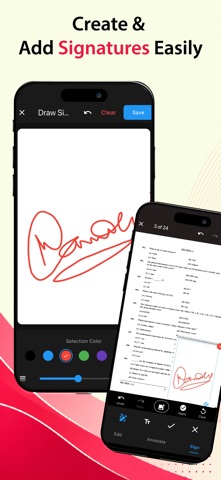
4. Sign PDF Documents
Create and add signatures to PDF files for forms, agreements, contracts, and other documents.
5. PDF Converter
Convert PDF files into images and create PDF files from images quickly and easily.
6. Annotate PDF Files
Highlight text, draw, add notes, and mark important information directly on your PDF documents.
7. Merge PDF Files
Combine multiple PDF documents into a single PDF file for easier sharing and management.
8. Compress PDF Documents
Reduce PDF file size to save storage space and make file sharing more convenient.
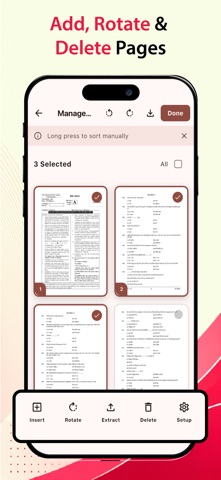
9. PDF File Manager
Organise, rename, sort, and manage your PDF documents in one place.
10. Print PDF Files
Print PDF documents directly from your device whenever needed.
11. Multiple Language Support
Choose your preferred language from the settings for a personalised experience.
12. Custom Themes
Customize the app with multiple color themes, including Light Mode and Dark Mode.
Premium Features
Upgrade to Premium and unlock advanced PDF tools:
1. Preferred Compression Size
Choose your preferred PDF compression size. In some cases, the maximum possible compression may be applied to achieve the best file size reduction.
2. Split PDF into Separate Pages
Extract each page from a PDF document and save them as an individual PDF files for easier organization and sharing.
3. Mange pages
Manage Page size and colors
4. Lock PDF Files
Add password protection to your PDF documents to help keep sensitive information secure.
5. Unlock PDF Files
Remove password protection from PDF documents that you are authorised to access and manage.
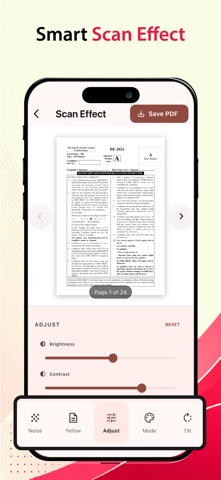
6. Scan Effects for Documents
Apply document enhancement effects to give scanned PDFs and documents a cleaner and more professional appearance.
Premium Plans:
Premium features are available through auto-renewable subscriptions:
• Weekly Plan
• Monthly Plan
• Yearly Plan
Subscription pricing may vary by region and will be displayed before purchase. Payment will be charged to your Apple ID account upon confirmation of purchase. Subscriptions automatically renew unless cancelled at least 24 hours before the end of the current billing period. You can manage and cancel subscriptions at any time through your App Store account settings.
Regular Updates: Stay at the forefront with regular feature additions and enhancements.
View our Terms of Service at: Terms of Service : https://www.apple.com/legal/internet-services/itunes/dev/stdeula/](https://www.apple.com/legal/internet-services/itunes/dev/stdeula/
Check out our Privacy Policy: Privacy Policy : https://scienext.in/pdfPrivacyPolicy.html
Download PDF Editor & Viewer today and simplify the way you scan, edit, sign, convert, compress, and manage your PDF documents.
Safety and technology
Found in the app by AppBrain- Price
- Free
- App size
- 37.0 MB
- Content rating
- Everyone
Technologies used by PDF Editor: Scan, Merge, Sign
Releases
Updates seen on the App Store- Version
- 1.0
- Launched
- June 2026
No changelog data
Alternatives
Similar apps and more from SCIENEXT INDIA PRIVATE LIMITEDAlternatives to PDF Editor: Scan, Merge, Sign


More from SCIENEXT INDIA PRIVATE LIMITED


Rankings
App Store top chartsApp Store Rankings for PDF Editor: Scan, Merge, Sign
About the app and developer
About PDF Editor: Scan, Merge, Sign
PDF Editor: Scan, Merge, Sign is a productivity app developed by SCIENEXT INDIA PRIVATE LIMITED.
What is the rating of PDF Editor: Scan, Merge, Sign?
PDF Editor: Scan, Merge, Sign has no ratings yet.
Is PDF Editor: Scan, Merge, Sign free?
PDF Editor: Scan, Merge, Sign is free. The app size is 36.97 MB. The latest version available is 1.0. The last update was on June 24, 2026.
What are the requirements for PDF Editor: Scan, Merge, Sign?
The app has a content rating of Everyone. The app has been available on the App Store since June 2026.
PDF Editor: Scan, Merge, Sign is made and published by SCIENEXT INDIA PRIVATE LIMITED. AppBrain is an independent app data site and isn't affiliated with SCIENEXT INDIA PRIVATE LIMITED. The app name, icon, screenshots and description belong to SCIENEXT INDIA PRIVATE LIMITED and are shown as published on the App Store.
Developer information for SCIENEXT INDIA PRIVATE LIMITED
SCIENEXT INDIA PRIVATE LIMITED
Address:
Frequently asked questions about PDF Editor: Scan, Merge, Sign
Is PDF Editor: Scan, Merge, Sign free?
Yes. PDF Editor: Scan, Merge, Sign is free on the App Store.
Is PDF Editor: Scan, Merge, Sign still available?
Yes. PDF Editor: Scan, Merge, Sign is on the App Store, and the last update we saw was on June 24, 2026.
How large is PDF Editor: Scan, Merge, Sign?
PDF Editor: Scan, Merge, Sign is 36.97 MB.
Is PDF Editor: Scan, Merge, Sign suitable for children?
App Store rates the content of PDF Editor: Scan, Merge, Sign as suitable for everyone.
Who made PDF Editor: Scan, Merge, Sign?
PDF Editor: Scan, Merge, Sign was developed by SCIENEXT INDIA PRIVATE LIMITED. It is listed in the productivity category on the App Store.
What are the best alternatives to PDF Editor: Scan, Merge, Sign?
People looking at PDF Editor: Scan, Merge, Sign also look at these productivity apps: Combine PDF - Merge PDF, PDF Scanner & Editor: Privio, Merge PDF - Combine PDF Files, CVwizard: Online CV maker, CleanMe - Phone Cleaner Kit.