

PDF Scanner & Editor: Lemon
PDF Scanner & Editor: Lemon is made and published by Fuzhou Buwan Technology Co., Ltd. AppBrain is an independent app data site and isn't affiliated with Fuzhou Buwan Technology Co., Ltd. The app name, icon, screenshots and description belong to Fuzhou Buwan Technology Co., Ltd. and are shown as published on the App Store.
AppBrain's verdict
- Last updated
- October 12, 2026
Rankings
App Store top chartsApp Store Rankings for PDF Scanner & Editor: Lemon
Competitors
Similar apps and more from Fuzhou Buwan Technology Co., Ltd.Alternatives to PDF Scanner & Editor: Lemon




Releases
Updates seen on the App Store- Version
- 1.0.5
- Launched
- August 2026
No changelog data
User feedback
Ratings and reviews on the App StoreComments on PDF Scanner & Editor: Lemon for iOS
We don't have enough comments to show example comments. Please check back later.
Technology
Found in the app by AppBrain- Price
- Free
- App size
- 6.61 MB
- Content rating
- Everyone
Technologies used by PDF Scanner & Editor: Lemon
About the app and developer
About PDF Scanner & Editor: Lemon
PDF Scanner & Editor: Lemon is a productivity app developed by Fuzhou Buwan Technology Co., Ltd.
User Ratings
The app has no ratings yet.
App Information
PDF Scanner & Editor: Lemon is freely available from the App Store. The app size is 6.61 MB. The latest version available is 1.0.5. The last update was on October 12, 2026.
Technical Requirements
The app has a content rating of Everyone. The app has been available on the App Store since August 2026.
Developer information for Fuzhou Buwan Technology Co., Ltd.
Fuzhou Buwan Technology Co., Ltd.
Address:
Store listing
By Fuzhou Buwan Technology Co., Ltd., from the App Store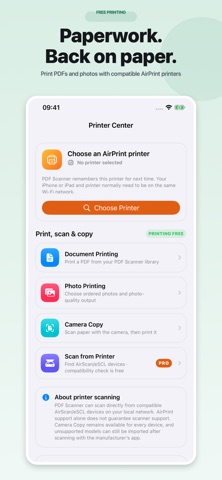


Description by Fuzhou Buwan Technology Co., Ltd. Written by the developer, not by AppBrain. Click to read.
FREE EVERYDAY TOOLS
- Camera scanning on supported iPhone/iPad, with PDF, JPG or PNG export
- ID Copy: front and back card images on one A4 or US Letter PDF page
- Photos to PDF in your chosen order
- Merge PDFs without a subscription or usage counter
- Screen-optimized PDF compression without a subscription or usage counter
- Import, read, rename, favorite, share and print PDFs
- Optional fictional sample PDF to try the app
PRO WHEN YOU NEED MORE
- On-device OCR: extract, search, copy and share recognized text
- Highlight, annotate and place handwritten signature stamps
- Reorder, rotate, extract or remove pages
- PDF passwords and document permissions
- Compatible AirScan/eSCL network scanning
- Supported PDF watermark tools and authorized photo/video region masking
PRIVACY AND STORAGE
Files are processed on your device. There is no developer-operated document upload server or app account. Optional iCloud Drive uses your Apple account; otherwise documents stay locally.
IMPORTANT LIMITS
Compression results depend on the source; a PDF may shrink little or become larger. The original stays unchanged. Compression is not a guaranteed target-size or lossless conversion. OCR extracts text; it does not add a searchable text layer to exported PDFs. Signatures are visible annotations, not certified digital signatures. Watermark tools do not recover content hidden underneath flattened watermarks. Only edit content you own or have permission to modify.
Camera capture is an iPhone/iPad feature, not a Mac feature. Mac printing uses Apple’s system dialog. Network scanning requires compatible AirScan/eSCL hardware; AirPrint alone does not guarantee scanner compatibility. ID Copy fits cropped images proportionally into standard card-sized slots; use 100% print scale for card-sized output. It does not verify identity.
PRO PURCHASES
Monthly, quarterly and yearly auto-renewable subscriptions, or a one-time lifetime purchase, unlock the same remaining Pro tools. Localized prices and terms are shown before purchase. Restore purchases in Settings or on the paywall. Merge and compression remain free whether or not you subscribe.
Privacy Policy: https://h5.skyingidea.com/legal/
Terms of Use: https://h5.skyingidea.com/legal/terms.html
Support: https://h5.skyingidea.com/legal/support.html