

PDF To Word – Doc Converter
PDF To Word – Doc Converter is made and published by Jaydip Patoliya. AppBrain is an independent app data site and isn't affiliated with Jaydip Patoliya. The app name, icon, screenshots and description belong to Jaydip Patoliya and are shown as published on the App Store.
AppBrain's verdict
- Last updated
- January 14, 2026
- Size
- 37.1 MB
User feedback
Ratings and reviews on the App StoreComments on PDF To Word – Doc Converter for iOS
We don't have enough comments to show example comments. Please check back later.
Store listing
By Jaydip Patoliya, from the App Store


Description by Jaydip Patoliya Written by the developer, not by AppBrain. Click to read.
Easily convert PDFs to Word and manage all your documents in one app!
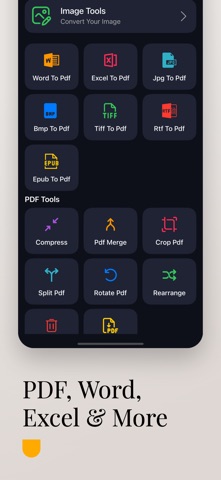
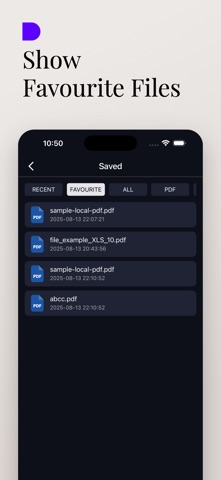
Whether you’re a student, professional, or freelancer, PDF To Word – Doc Converter makes working with PDFs fast, easy, and secure. Convert, compress, merge, split, and edit files — all from one simple app.
Key Features:
• PDF to Word Converter:
Instantly convert PDF files to editable Word documents (DOC/DOCX).
• Convert PDFs with Ease
Convert PDF to Word, Excel, PowerPoint, RTF, EPUB, JPG, PNG — and vice versa.
• Office & Image to PDF
Create high-quality PDFs from Word, Excel, JPG, PNG, and more in just one tap.
• Smart PDF Compressor
Shrink PDF and image file sizes without quality loss — perfect for sharing or storage.
• Merge & Split PDFs
Easily combine multiple PDF files or split one into several documents.
• Built-in Image Tools
Crop, resize, rotate, and convert images directly inside the app.
• Offline & Secure Processing
Convert and compress your files privately, with optional offline tools for maximum security.
• No Watermarks
Get professional results every time.
Who Should Use This App?
• Students
• Professionals
• Freelancers
• Office teams
• Anyone working with digital documents
Why Choose PDF To Word – Doc Converter?
• Fast & accurate results
• Simple, clean interface
• Secure offline mode
• Regular updates & improvements
• No watermarks on output files
PDF To Word – Doc Converter offers an auto-renewing weekly, monthly and one time purchase subscription. Payment will be charged to your iTunes Account on confirmation of purchase. Your subscription will automatically renew unless auto-renew is turned off at least 24 hours prior to the end of the current period. You may manage your subscriptions and turn off auto-renewal in your iTunes Account Settings after purchase. Any unused portion of free trail period, if offered, will be forfeited when you purchase a subscription, where applicable.
PDF converter, PDF compressor, merge PDF, split PDF, PDF editor, DOC converter.
Privacy Policy: https://sites.google.com/view/developer-planet/privacy-policy
Terms of use: https://sites.google.com/view/developer-planet/terms-of-use
Download PDF To Word – Doc Converter now and take control of your documents — all in one app.
Safety and technology
Found in the app by AppBrain- Price
- Free
- App size
- 37.1 MB
- Content rating
- Everyone
Technologies used by PDF To Word – Doc Converter
Releases
Updates seen on the App Store- Version
- 1.1.3
- Launched
- August 2025
No changelog data
Alternatives
Similar apps and more from Jaydip PatoliyaAlternatives to PDF To Word – Doc Converter



More from Jaydip Patoliya


Rankings
App Store top chartsApp Store Rankings for PDF To Word – Doc Converter
About the app and developer
About PDF To Word – Doc Converter
PDF To Word – Doc Converter is a productivity app developed by Jaydip Patoliya.
User Ratings
The app has no ratings yet.
App Information
PDF To Word – Doc Converter is freely available from the App Store. The app size is 37.11 MB. The latest version available is 1.1.3. The last update was on January 14, 2026.
Technical Requirements
The app has a content rating of Everyone. The app has been available on the App Store since August 2025.
Developer information for Jaydip Patoliya
Address: