

Duplicate Photo Finder: Swipe
Duplicate Photo Finder: Swipe is made and published by LEAN ASIA CO., LTD. AppBrain is an independent app data site and isn't affiliated with LEAN ASIA CO., LTD. The app name, icon, screenshots and description belong to LEAN ASIA CO., LTD and are shown as published on the App Store.
AppBrain's verdict
- Last updated
- October 7, 2026
Rankings
App Store top chartsApp Store Rankings for Duplicate Photo Finder: Swipe
Competitors
Similar apps and more from LEAN ASIA CO., LTDAlternatives to Duplicate Photo Finder: Swipe



More from LEAN ASIA CO., LTD


Releases
Updates seen on the App Store- Version
- 1.0.7
- Launched
- September 2025
No changelog data
User feedback
Ratings and reviews on the App StoreComments on Duplicate Photo Finder: Swipe for iOS
We don't have enough comments to show example comments. Please check back later.
Technology
Found in the app by AppBrain- Price
- Free
- App size
- 21.6 MB
- Content rating
- Everyone
Technologies used by Duplicate Photo Finder: Swipe
About the app and developer
About Duplicate Photo Finder: Swipe
Duplicate Photo Finder: Swipe is a photo & video app developed by LEAN ASIA CO., LTD.
User Ratings
The app has no ratings yet.
App Information
Duplicate Photo Finder: Swipe is freely available from the App Store. The app size is 21.57 MB. The latest version available is 1.0.7. The last update was on October 7, 2026.
Technical Requirements
The app has a content rating of Everyone. The app has been available on the App Store since September 2025.
Developer information for LEAN ASIA CO., LTD
Address:
Store listing
By LEAN ASIA CO., LTD, from the App Store



Description by LEAN ASIA CO., LTD Written by the developer, not by AppBrain. Click to read.
Storage almost full, but half your camera roll is the same photo taken nine times? PhotoCleaner finds the copies — exact duplicates, look-alike shots, screenshots, blurry frames and oversized videos — so you can swipe them away and get your gigabytes back.
Everything runs on your iPhone. PhotoCleaner compares photos with Apple's on-device Vision framework, groups the clutter, marks the sharpest, highest-resolution shot in every group as the keeper, and then waits for you. It never deletes anything by itself: every removal is your decision, confirmed through the system Photos dialog and recoverable from Recently Deleted for 30 days.
WHAT YOU GET
• Open the app and see how many gigabytes you can take back — counted honestly, always excluding the keeper in every group
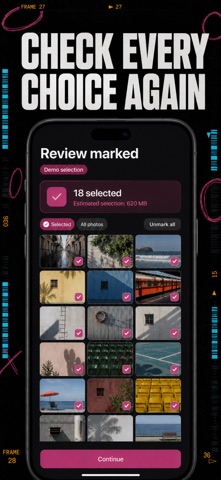
• Exact copies and near-identical bursts grouped side by side, with the best shot already marked so you keep the right one
• A swipe deck for fast keep-or-delete decisions — clearing 300 photos takes one coffee, not one afternoon
• Screenshots and blurry frames sorted into their own piles, so years of expired boarding passes and shaky shots vanish in a single session
• Your largest videos ranked by size — usually the quickest gigabytes you will ever reclaim
• A match-sensitivity slider, from strict "near-identical only" to loose "catch every look-alike"
PERFECT FOR
• Anyone whose iPhone flashes "Storage Almost Full" exactly when a video needs recording
• Burst shooters with fourteen takes of every group photo and no time to compare them
• Screenshot hoarders whose camera roll is half receipts, memes and boarding passes
• Anyone who wants a lean, tidy library before backing up or moving to a new iPhone
WHY NOT JUST USE THE PHOTOS APP?
Apple's built-in Duplicates album only merges exact copies. It won't surface the nine slightly different takes of the same sunset, the blurry frames, the screenshot pile or the forgotten 4K videos — and it gives you no fast way to triage them. PhotoCleaner finds all of it and turns the cleanup into a swipe.
PRIVATE BY DEFAULT
The scan happens entirely on your device. Your photos are never uploaded, no account is required, and the analysis even works with network access switched off. What's in your library stays in your library.
PREMIUM (PURCHASE REQUIRED)
PhotoCleaner Pro unlocks unlimited photo and video removal across every category — duplicates, similar shots, screenshots, blurry photos and large videos. Choose the plan that fits:
• Weekly subscription
• Yearly subscription
• Lifetime — pay once, use forever
Subscriptions renew automatically unless canceled at least 24 hours before the current period ends. Manage or cancel anytime in your Apple ID settings.
Download PhotoCleaner and run your first scan today — it takes about a minute, and the space it finds is already yours.
Terms of Use: https://leanstudio.asia/terms-of-use
Privacy Policy: https://leanstudio.asia/privacy-policy
Support: support@leanstudio.asia